Stop Loss to trigger new trade

Viewing 15 posts - 1 through 15 (of 16 total)
  • Author
    Posts
  • #182518 quote
    joeyp101
    Participant
    New

    Hello,

    Forgive me, still very much learning. If a trade closes because of a stop loss, I want to open a new trade in the opposite direction immediately.

    1sec timeframe, I have my script set to 1 trade per trading window, unless that trade went to stop loss, then 1 more trade is allowed in the opposite direction.

    What am I doing wrong?


    //check profit
    if strategyprofit<>strategyprofit[1] then
    if close < tradeprice AND count =1 then
    SELL 1.5 PERPOINT AT MARKET
    count = count + 1
    SET STOP   LOSS   6
    
    elsif close>tradeprice AND count=1 then
    BUY 1.5 PERPOINT AT MARKET
    count = count + 1
    SET STOP   LOSS   6
    endif
    endif

    Many thanks

    #182519 quote
    PeterSt
    Participant
    Master

    Hi Joeyp,

    You can’t do that within the same bar (hence same call of your code) with a formal  Set Stop Loss command.
    If you keep track of the StopLoss yourself (If Price < StopLossFigure) and Sell (when Long), you can buy in the same bar when further down the line you have a Buy command again.

    You can keep the formal Set Stop Loss command (at the very end of your code) for safety, if it is only a little further (deeper) from what you coded “manually” per what I told above.

    If you need a more literal example, just let me know.
    Peter

    #182521 quote
    PeterSt
    Participant
    Master

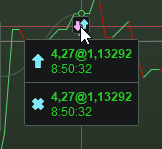
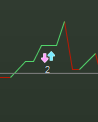
    You will know that you managed by not being able to zoom in such that two separate orders appear. See attachment 1 and 2. There’s always the little “2”, telling you that it happening within the same bar (hence second in your case).
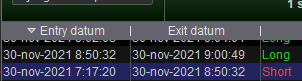
    Of course you can also observe it in the closed positions list (attachment 3).

    Notice that it is also possible – when e.g. 10 Long – to sell (or Exit Short) 20. This may save some on minimum Brokerage fees per quantity threshold. If you pay per spread, this does not matter (that I know).

    image_2021-11-30_120648.png image_2021-11-30_120648.png image_2021-11-30_120732.png image_2021-11-30_120732.png image_2021-11-30_120918.png image_2021-11-30_120918.png
    #182525 quote
    PeterSt
    Participant
    Master

    you can buy in the same bar when further down the line you have a Buy command again.

    Apologies – in your case this should read :

    you can invert in the same bar when further down the line you have an Sell

    Notice that it is also possible – when e.g. 10 Long – to sell (or Exit Short) 20.

    That too was wrong (should be Sell Short). But I assume you got the gist anyway.
    Short command again (when you were Long).

    #182526 quote
    PeterSt
    Participant
    Master

    Wow, I couldn’t make that more messy (now a quote was injected in the middle of a sentence. 🙁 )

    Here the first sentence as how it should be (I hope) :


    Apologies – in your case this should read :
    you can invert in the same bar when further down the line you have an Sell Short command again (when you were Long).

    #182527 quote
    joeyp101
    Participant
    New

    Thanks Peter!

    Next bar execution is fine, would you mind giving me a literal example? Still learning.

    Many thanks for your speedy reply!

    #182530 quote
    PeterSt
    Participant
    Master

    Next bar execution is fine

    In that case it is simply solved by

    If Not OnMarket then
      // Do your Buy or ShortSell thing
    Endif

    with the notice that this is slightly more complicated because now you need to keep track of your last position (Short vs Long). Only when you know that, you can “invert”, right ?
    So I think it will be more easy for you to do it in the same bar (because you know in your sequential code (which is executed from top to bottom) when you did higher-up.

    I am not so sure whether I should pre-cook that code, because quite some more is involved than just “do it”. I will give you a snippet (implied to execute in the same bar), though, so you can see what’s involved the least (as how I see it) :

    if SellBuy  then   // 11-02-2018,PS. Sell / Buy again right away ?
    
      // Apply the regular means to determine the direction.
      // Note that this could change later hence is *not* really
      // redundant from this similar determination elsewhere.
    
      if DroppingShortTerm and not JustSoldShort then   // 27-05-2018,PS, JustSoldShort. 28-05-2018,PS, ShortTerm version (Test !).
    
        // 08-02-2018,PS, But we also want a CLEAR rise.
        // This works, but does not work out for the better (too short in
        // the market).
    
        // 09-05-2018,PS, There's a kind of major bug in this SellBuy code now, because
        // it does not take into account the Trend (which is new since a few days).
        // Also, the sheer reason the system just has sold could be buggy (or unclear)
        // in itself and THAT implies that while we were e.g. dropping and just sold,
        // changing the direction could be blatantly wrong. [...]
    
        If TrendNet = -1 Then  // 09-05-2018,PS, This If. Trend is Dropping indeed ?
    
          if [my condition to enter the market in the opposite direction] then
            SELLSHORT BuySellAmountForReal SHARES AT MARKET
            JustSoldShort = 1    // 27-05-2018,PS.
            JustSoldLong = 0     // 27-05-2018,PS, Reset.
          endif
    
        endif
      endif
    endif // SelBuy ?

    If you want to do this cross bars (thus exit in the one second and enter in the next second) then focus on either

    • the StrategyProfit PRT constant
    • define variables with Once so you can track a last occurred value (e.g. Once LastTradeDirection)

    Regarding the latter, a variable declared with Once, will appear to have its last assigned value in the previous bar (-call) in the new bar. In my example JustSoldShort and JustSoldLong would be suitable for that. But/and, you would need to reset them at the end of the code, if no trade happened, because else it would not be an “invert” really. … which IMO it already is not if you apply this cross bars.

    Hope this helps …
    Peter

    #182534 quote
    JS
    Participant
    Senior
    //check profit
    if strategyprofit<>strategyprofit[1] then
    if close < tradeprice AND count =1 then
    SELLSHORT 1.5 PERPOINT AT MARKET
    count = count + 1
    SET STOP   LOSS   6
     
    elsif close>tradeprice AND count=1 then
    BUY 1.5 PERPOINT AT MARKET
    count = count + 1
    SET STOP   LOSS   6
    endif
    endif

    Use SellShort for short positions (not Sell).

    Buy versus Sell

    SellShort versus ExitShort

    #182540 quote
    joeyp101
    Participant
    New

    Absolute schoolboy error. Thanks JS.

    And thank you Peter, I’ll have a look at that.

    #182557 quote
    joeyp101
    Participant
    New

    Been trying the following, it works, except if a trade was open and closed in the same bar. Any ideas? Do I need to count +1 bar before executing a new trade?


    If StrategyProfit < StrategyProfit[1] AND Not OnMarket then
    If LongOnMarket[1] AND count=1 then
    Sellshort 1.5 PERPOINT AT MARKET
    count = count + 1
    Elsif count=1 then
    BUY 1.5 PERPOINT AT MARKET
    count = count + 1
    Endif
    Endif
    #182558 quote
    JS
    Participant
    Senior
    If Not OnMarket and LongOnMarket[1] then
    Sellshort 1.5 PERPOINT AT MARKET
    Else
    BUY 1.5 PERPOINT AT MARKET
    Endif
    

    It is not necessary to count.

    Keep the program order straight:

    You can start with “DefParam CumulateOrders = false”

    1. Conditions for going Long / Short
    2. StopLosses
    3. and then your “turnaround” strategy.
    #182600 quote
    joeyp101
    Participant
    New

    Hi JS,

    I’m counting because I only want 2 trades max per trading window, if trade 1 is a loss, trade 2 is triggered, if trade 1 is profit, no trade 2.

    I’ve got my code setup as you say, with:

    “DefParam CumulateOrders = false”

    1. Conditions for going Long / Short
    2. StopLosses
    3. and then  “turnaround” strategy.

    However, my turnaround strategy as above works, EXCEPT when trade 1 has opened and closed in the same bar (1sec timeframe) which I need to fix.

    Sorry I wasn’t clearer, any help much appreciated.

    #182604 quote
    PeterSt
    Participant
    Master

    EXCEPT when trade 1 has opened and closed in the same bar (1sec timeframe)

    Hi Joeyp, … are you sure those trades actually happened within that second ?
    As you wil have seen, I am doing 1 second TF and I can’t imagine it to happen, except for when I do things really wrong, and it also needs to be two subsequent orders in the same direction. Hence :
    A buy followed by a sell in the same bar (second) would cancel out, and the program will not put through an order, net. Regarding this, notice that the orders will only be given at the end of the bar you’re in (at least that has always been my thinking), which is why all ends up with a net result. Thus :

    The text I quoted, could be about you abusively putting a buy and a sell in the same bar (thus within the same call of your code). This is different from an opened and closed trade as such.

    Also notice this part :

    // Let's say Count is 1.
    // Let's also say LongOnMarket[1] = 0 (false).
    // Lat's also assume that ShortOnMarket[0] (!) is True.
    
    If LongOnMarket[1] AND count=1 then   // This will be false.
      Sellshort 1.5 PERPOINT AT MARKET
      count = count + 1
      Elsif count=1 then                  // This will be True.
      BUY 1.5 PERPOINT AT MARKET
      count = count + 1
    Endif
    
    // Result : You bought 1.5 pp against a Short position of (undoubtedly) 1.5pp. Net this leaves zero position.
    // But it wouldn't close and open in the same bar - just saying.

    OK ?

    #182605 quote
    joeyp101
    Participant
    New

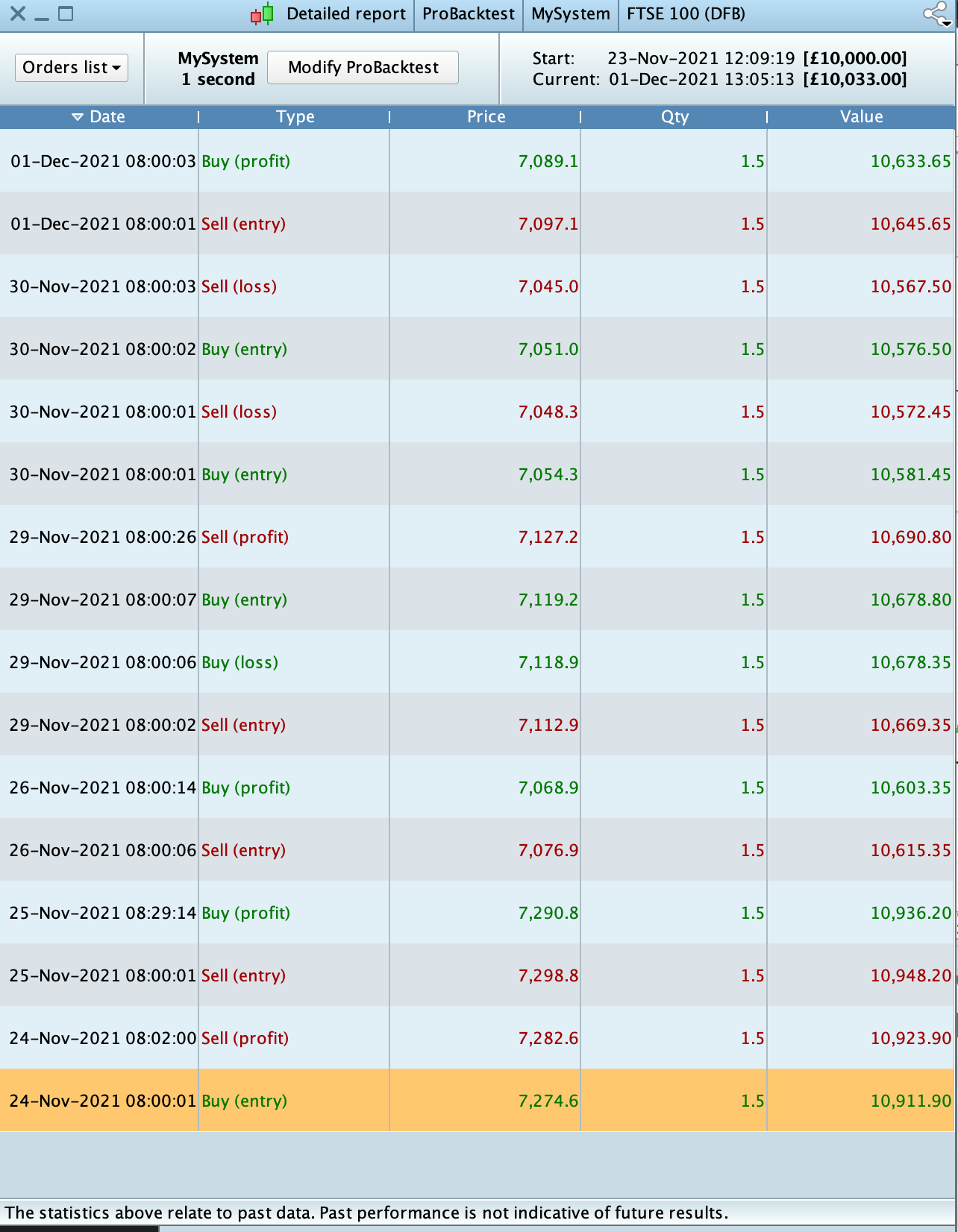
    Note trades 30th Nov. Seems to open and close at 08:00:01 and then the second trade is incorrect, it should be sell order.


    [attachment file=”182606″]

    Screenshot-2021-12-01-at-13.05.16.png Screenshot-2021-12-01-at-13.05.16.png
    #182630 quote
    PeterSt
    Participant
    Master

    I am sorry, but I can’t reason how this would emerge.
    Of course with a real invert this would happen in the same second. This also would happen with a semi-invert (Sell Short 1 when being Long 1) which ends up at net 0.

    • With a real invert I would not be able to spread this over two bars;
    • With Buying 1 in the one bar (call) and inverting  that with 2 in the next bar, I would not be able to do that in the same second.

    I’m afraid it is still your code with an odd “structure” ten things happening you don’t expect and also can’t follow (map to what really happened). Thus see my previous post where I try to point out easily possible anomalies, just because of not-so-decent coding.
    Meanwhile I can guarantee you that all can work as you intend, as I do it all the time myself (in Live).

    Don’t hesitate to post more (questions) !

Viewing 15 posts - 1 through 15 (of 16 total)
  • You must be logged in to reply to this topic.

Stop Loss to trigger new trade


ProOrder: Automated Strategies & Backtesting

New Reply
Author
author-avatar
joeyp101 @joeyp101 Participant
Summary

This topic contains 15 replies,
has 3 voices, and was last updated by JS

4 years, 2 months ago.

Topic Details
Forum: ProOrder: Automated Strategies & Backtesting
Language: English
Started: 11/30/2021
Status: Active
Attachments: 4 files
Logo Logo
Loading...