Morning all.
Please see attached / below code.
After backtesting for what seems like ages (Over a year), i went live testing on a small account a few months ago, however – The stoploss does not show on either the ProRealTime charts or on my brokers web-charts.
The stop never gets hit and the losses are mounting up –
Could anyone tell me whats wrong with the code please?
Also – Have a play with it and let me know if you are getting the same issue?
Thanks
defparam cumulateorders=false
defparam preloadbars=200000
n=1.5
m=1
FEMA=ExponentialAverage[40](close)
LEMA=ExponentialAverage[200](close)
MEMA=ExponentialAverage[300](close)
SEMA=ExponentialAverage[950](close)
atr=Averagetruerange[14](close)
//AcceptableTradingHours
//This trades monday through friday between Midnight am and 5pm
TimeandDay=(dayofweek>1 and dayofweek<6)and(time>=000500 and time<=170000)
//FirstOrder
if TimeandDay then
if not longonmarket and FEMA crosses over SEMA then
buy n shares at close limit
endif
if not shortonmarket and FEMA crosses under SEMA then
sellshort n shares at close limit
endif
endif
//FirstOrderExit
if longonmarket and FEMA crosses under MEMA then
sell n shares at market
endif
if shortonmarket and FEMA crosses over MEMA then
exitshort n shares at market
endif
//SecondOrder
if TimeandDay then
if not longonmarket and not shortonmarket and FEMA>SEMA and FEMA crosses over LEMA then
buy m shares at market
endif
if not longonmarket and not shortonmarket and FEMA<SEMA and FEMA crosses under LEMA then
sellshort m shares at market
endif
//Stoploss
SET STOP pLOSS 40
SET STOP pTRAILING 0
SET TARGET pPROFIT 65
ENDIF
Hi lisamtitch,
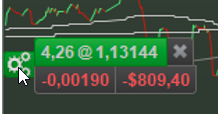
Are you sure that the wheel above the mouse pointer is still there ?
If not, the automatic trading stopped, the StopLoss and TakeProfit orders have been thrown out, and your code is as a loose running train now. But in that case you can deal with it as a manual trade (put Limits, kill the position).
If this is indeed your case … it is a Setting which allows for the position to stay after something goes odd with the autotrading. Flip that setting, and the position will be killed right away as well.
Peter
Thanks Peter,
The code has been working fine on backtest, set from 01/01/2021 and have been running it on my demo for the whole year, making small adjustments to the stop and so on as i go.
Since moving it over to live account (Small) the stop does show on the charts, either on PRT or my brokers web charts – See attached file if i can add one.
Not sure about the setting you mean – The code is the code, and if you mean inside PRT then i havent chanegd anything else and my other automated strategies are working…
Thanks again for any help..
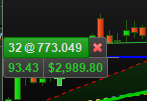
Question remains – is that wheel still visible. Because if it is, it is not related to my mentioned settings. Compare with a normal position (not Auto-) below. No wheel present there.
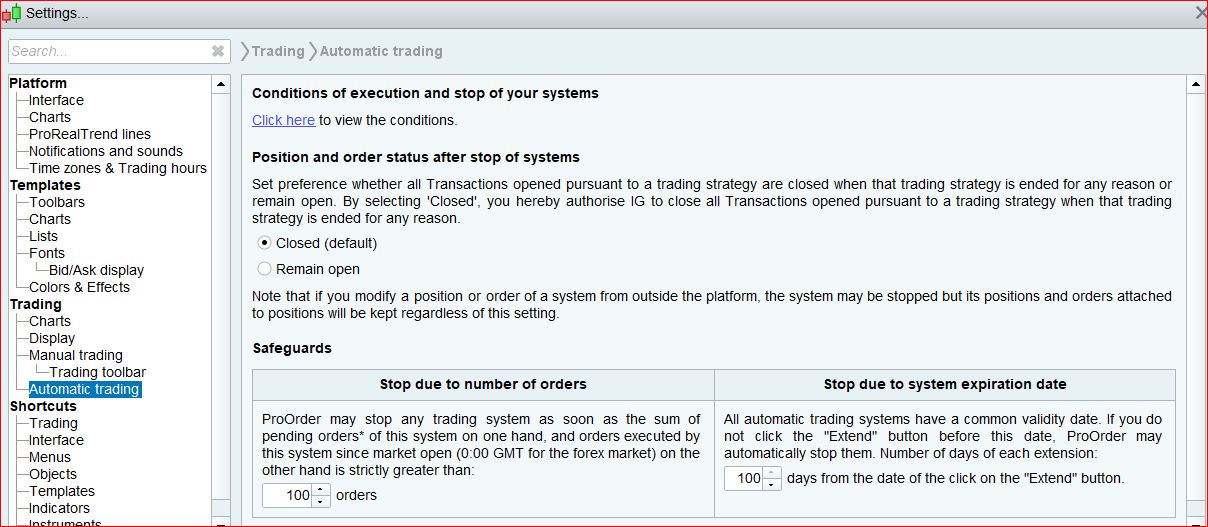
go Settings>Trading>Automatic Trading and you’ll find options for ‘Position and order status after stop of systems’
if ‘Remain open’ is selected then it’s poss that your system stopped but the position stayed open, so the stop instructions won’t apply.
Thanks nonetheless,
Yeah screenshot shows not changed and is still default – Close.
Just to confirm, i have changed a few of the strategy parameters before i popped it on this thread, if you were to back test it, it would show a major loss.
The real EMA’s and times have a demo account return showing amazing results, the fact that when on the live account the stop never shows and does not get hit is annoying me, in fact after so much time looking at the code and running around 30 more tests on different markets, i am down to 3 possible reasons why its not working, but getting to the actual bottom of why is out of my reach.
Its not even hard code, its childs play code. Simple is the best way ahead – Especially over time.
The code runs great on the demo account PRT and web charts, but as soon as its on a live account the stop doesn’t show…
could be a problem with
SET STOP pTRAILING 0
I never use that sort of trail so I’m not familiar with it but a 0 value looks wrong to me ???
Maybe try replacing it with this (includes breakeven)
//points trailing stop function
trailingstart = tst //trailing will start @trailinstart points profit
trailingstep = st //trailing step to move the "stoploss"

//reset the stoploss value
IF NOT ONMARKET THEN
newSL=0
ENDIF

//manage long positions
IF LONGONMARKET THEN
//first move (breakeven)
IF newSL=0 AND close-tradeprice(1)>=trailingstart*pipsize THEN
newSL = tradeprice(1)+trailingstep*pipsize
ENDIF
//next moves
IF newSL>0 AND close-newSL>=trailingstep*pipsize THEN
newSL = newSL+trailingstep*pipsize
ENDIF
ENDIF

//manage short positions
IF SHORTONMARKET THEN
//first move (breakeven)
IF newSL=0 AND tradeprice(1)-close>=trailingstart*pipsize THEN
newSL = tradeprice(1)-trailingstep*pipsize
ENDIF
//next moves
IF newSL>0 AND newSL-close>=trailingstep*pipsize THEN
newSL = newSL-trailingstep*pipsize
ENDIF
ENDIF

//stop order to exit the positions
IF newSL>0 THEN
SELL AT newSL STOP
EXITSHORT AT newSL STOP
ENDIF
Thanks nonetheless,
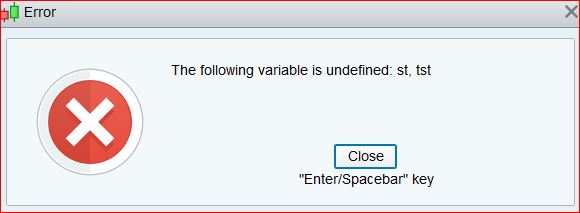
See attached – not letting me backtest or add to code –
tst and st are variables, you have to replace them with some value
try 25 and 1 as a test or (better) run the optimizer
Hey again,
Yeah did that, and had to remove a few other bits for it to work –
Had to remove all the STOPLOSS info, then it worked. However, there is no stop if it opens and the trade and goes against it. Full account loss in less than a year. Makes a fortune (Unbelievable) profits at 1tst/1st, but drawdown is a cow.
The code looks great and thanks for helping, but i still need the stoploss to be in place as soon as the trade opens.
Have since sent the code to a freelance chap (Quite a lot of cash) and ill see what he says, but it looks like it works on my partners account…… Seems a little suspect to me.
Thanks again, any more info would be great.
Mitch
Try it like this. I removed ATR (not used) and changed Dayofweek >0 (>1 won’t trade on monday)
Run SL, TP, SLS, TPS through the optimizer, you might find better results with different values for long and short.
defparam cumulateorders=false
defparam preloadbars=10000
n=1.5
m=1
FEMA=ExponentialAverage[40](close)
LEMA=ExponentialAverage[200](close)
MEMA=ExponentialAverage[300](close)
SEMA=ExponentialAverage[950](close)

//AcceptableTradingHours
//This trades monday through friday between Midnight am and 5pm
TimeandDay=(dayofweek>0 and dayofweek<6)and(time>=000500 and time<=170000)

//FirstOrder
if TimeandDay then
if not longonmarket and FEMA crosses over SEMA then
buy n shares at close limit
SET STOP pLOSS sl
SET TARGET pPROFIT tp
endif
if not shortonmarket and FEMA crosses under SEMA then
sellshort n shares at close limit
SET STOP pLOSS sls
SET TARGET pPROFIT tps
endif

endif

//FirstOrderExit

if longonmarket and FEMA crosses under MEMA then
sell at market

endif
if shortonmarket and FEMA crosses over MEMA then
exitshort at market
endif

//SecondOrder
if TimeandDay then
if not longonmarket and not shortonmarket and FEMA>SEMA and FEMA crosses over LEMA then
buy m shares at market
SET STOP pLOSS sl
SET TARGET pPROFIT tp
endif
if not longonmarket and not shortonmarket and FEMA<SEMA and FEMA crosses under LEMA then
sellshort m shares at market
SET STOP pLOSS sls
SET TARGET pPROFIT tps
endif
ENDIF

//points trailing stop function
trailingstart = tst //trailing will start @trailinstart points profit
trailingstep = st //trailing step to move the "stoploss"

//reset the stoploss value
IF NOT ONMARKET THEN
newSL=0
ENDIF

//manage long positions
IF LONGONMARKET THEN
//first move (breakeven)
IF newSL=0 AND close-tradeprice(1)>=trailingstart*pipsize THEN
newSL = tradeprice(1)+trailingstep*pipsize
ENDIF
//next moves
IF newSL>0 AND close-newSL>=trailingstep*pipsize THEN
newSL = newSL+trailingstep*pipsize
ENDIF
ENDIF

//manage short positions
IF SHORTONMARKET THEN
//first move (breakeven)
IF newSL=0 AND tradeprice(1)-close>=trailingstart*pipsize THEN
newSL = tradeprice(1)-trailingstep*pipsize
ENDIF
//next moves
IF newSL>0 AND newSL-close>=trailingstep*pipsize THEN
newSL = newSL-trailingstep*pipsize
ENDIF
ENDIF

//stop order to exit the positions
IF newSL>0 THEN
SELL AT newSL STOP
EXITSHORT AT newSL STOP
ENDIF
You can’t have tst = 1 (if that’s what you meant) due to minimum stop distance.
Hey again nonetheless.
Yeah i know dude, but after a little jiggery tests, there is no fixed SL. If the price goes immediately against the trade when it opens, there is no stop..
My fixed 40point SL worked so well in backtesting on demo.
I shall wait and see what the expensive “Coder” thinks.
Thanks again.
In your code (first post), remove the pTRAILING line and move the last ENDIF to just after the previous ENDIF (before//Stoploss).
If you need a trailing stop add a code snippet as already suggested.
Max PreLoadBars are 10000, any higher value is ignored.