Stop loss below the lowest of the last 5 candles

Viewing 14 posts - 1 through 14 (of 14 total)
  • Author
    Posts
  • #191533 quote
    Oliviertrader2020
    Participant
    Average

    Hello,

    How do you place your stop loss below the lowest of the last 5 candles (at the time of entry)?

    I tried with :

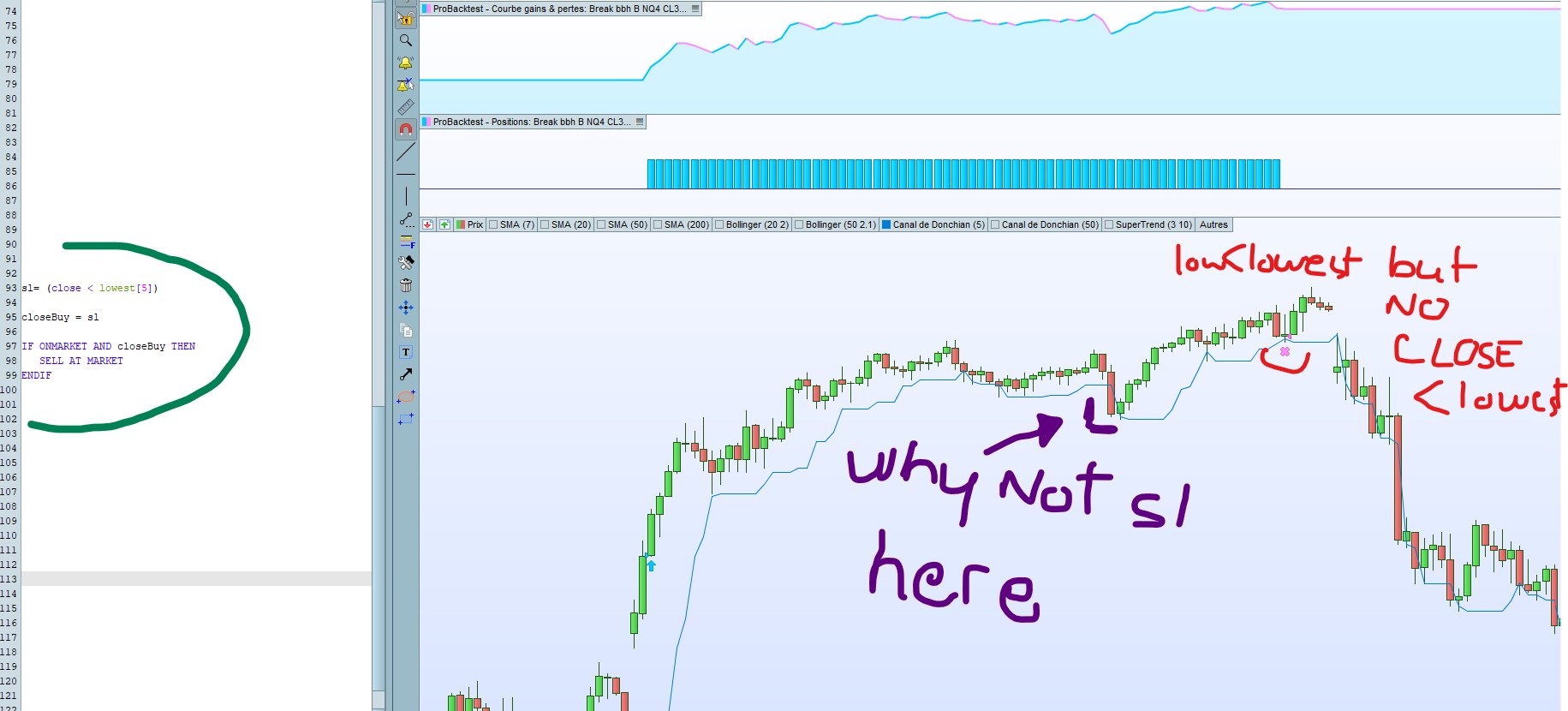
    sl= (close < lowest[5])

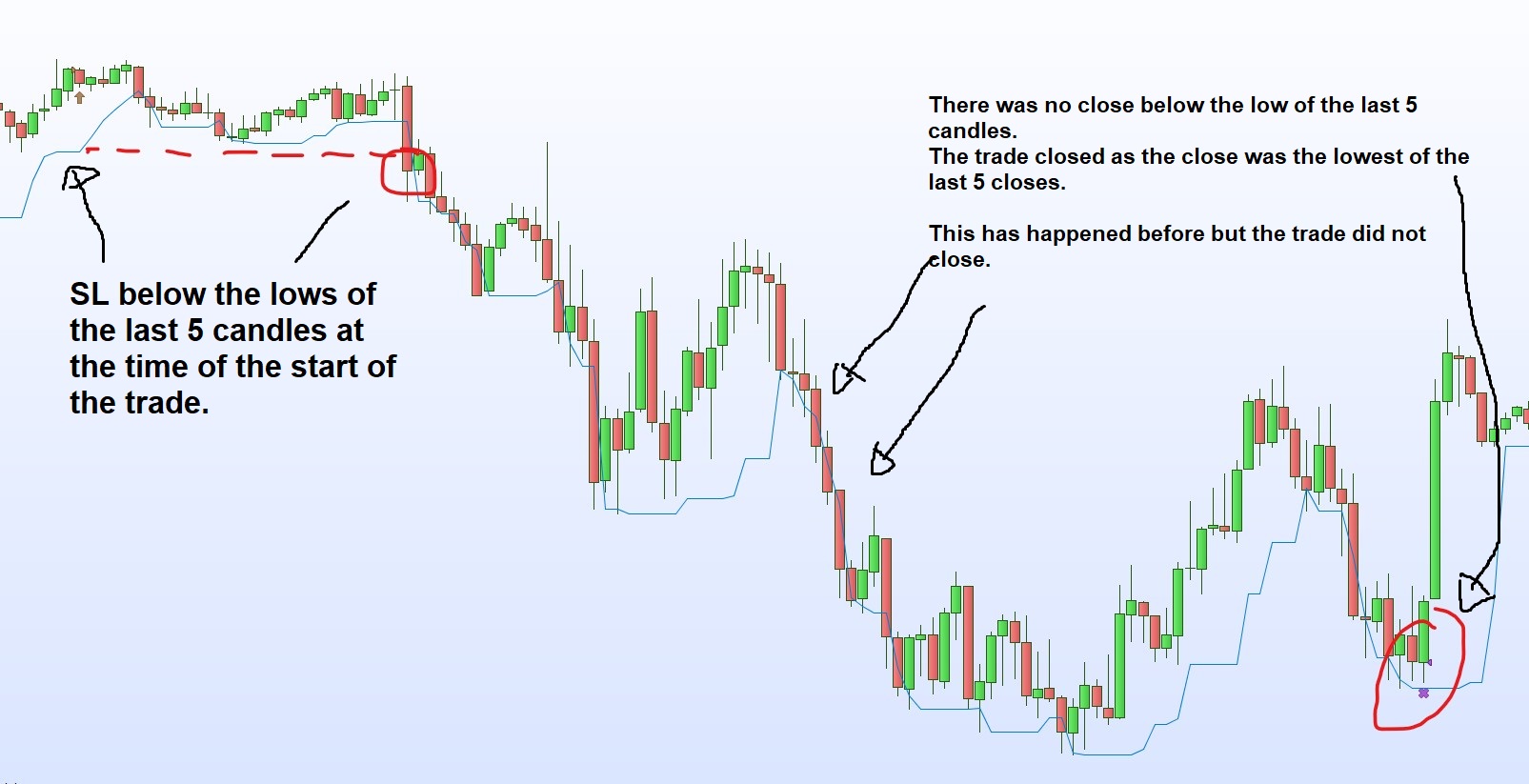
    but this piece of code gives random stops because many times the price closed below the last 5 lows without the trade being closed (as you can see in the screenshot)

    And most importantly, I don’t want to have a trailing stop, I want to use a fixed stop loss, which is below the last 5 lows AT THE TIME OF BUY.
    How do I code this type of stop ?
    Thank you for your help 🙂

    lowest.jpg lowest.jpg
    #191537 quote
    nonetheless
    Participant
    Master

    deleted

    (sorry, I misread your post, my reply would not have been relevant)

    #191541 quote
    GraHal
    Participant
    Master
    If CondBuy Then
    Buy at Market
    Sell at Lowest[5]Low Stop
    Endif
    
    OR
    
    If CondBuy Then
    Buy at Market
    If Close crosses under Lowest[5]Low Then
    Sell at Market
    Endif
    Endif
    

    Try above

    #191561 quote
    JS
    Participant
    Senior
    If Not LongOnMarket and CondBuy then
    Buy 1 contract at Market
    SL = Close - Lowest[5](Low)
    EndIf
    
    SET STOP LOSS SL
    

    Hi OlivierTrader2020,

    If you want a fixed StopLoss try this:

    #191563 quote
    Oliviertrader2020
    Participant
    Average

    Thank you for your answer.
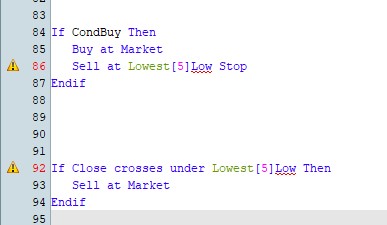
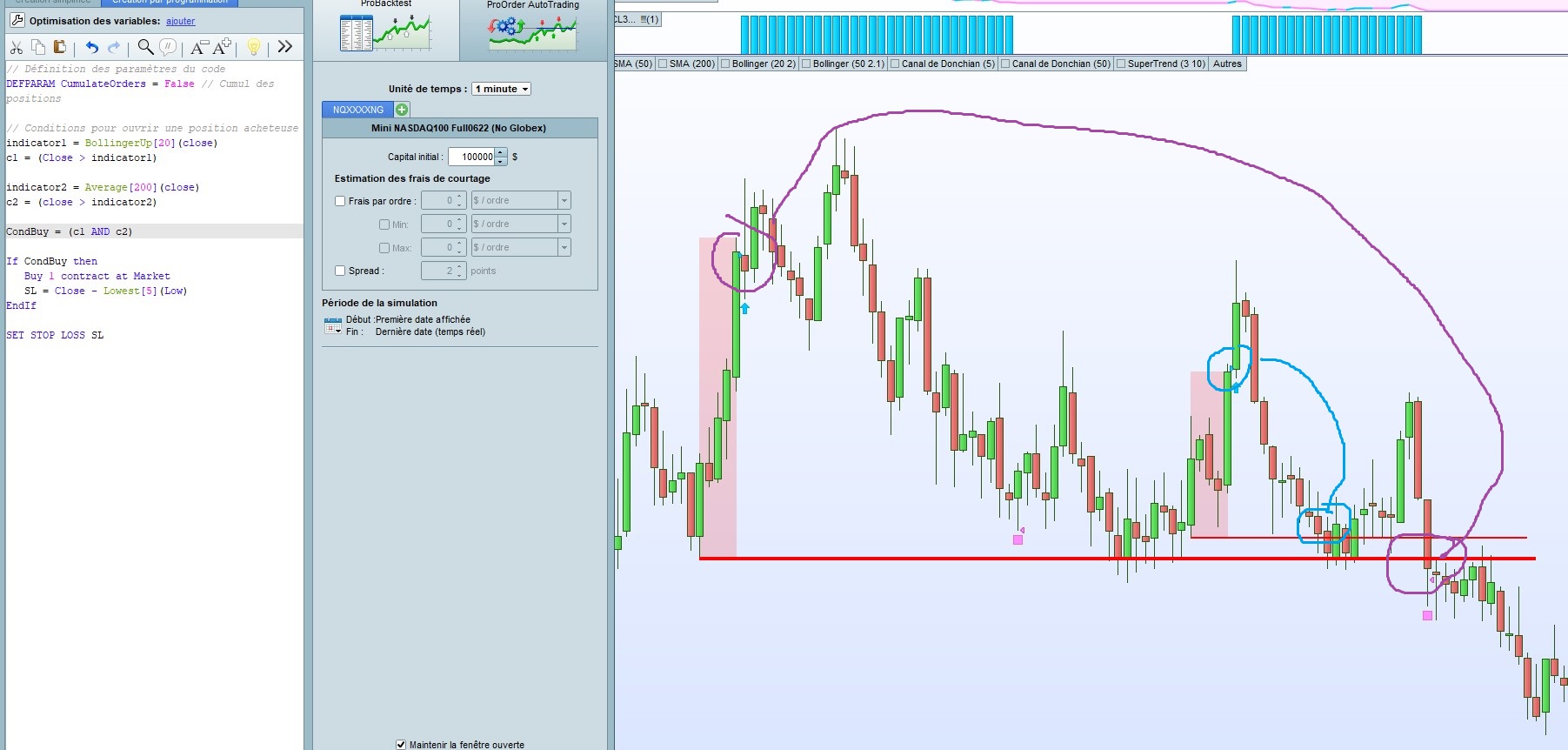
    As you can see in the 1st screenshot, it seems that we can’t use the code lines with the final “LOW”.

    As you can see in the 2nd screenshot, when we remove the low, it does not close the trade at the last 5 lows at the time of entry.

    no-low2.jpg no-low2.jpg noslfixe.jpg noslfixe.jpg
    #191566 quote
    GraHal
    Participant
    Master

    we can’t use the code lines with the final “LOW”.

    JS got it right below! 🙂

    Also … did JS fixed SL work?

    #191567 quote
    JS
    Participant
    Senior

    The right code is: Lowest[5](Low) and not Lowest[5]Low

    The SL above is a fixed SL under your entry price.

    #191568 quote
    Oliviertrader2020
    Participant
    Average

    Hi JS,

    Thank you for your answer.
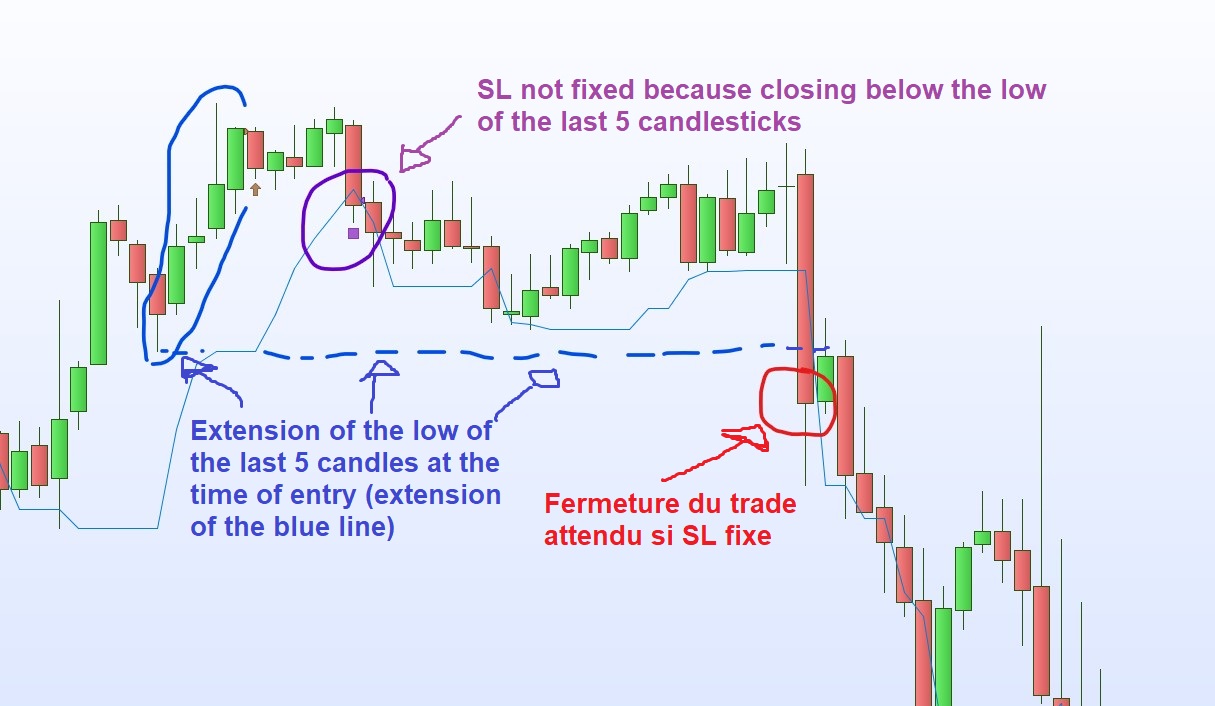
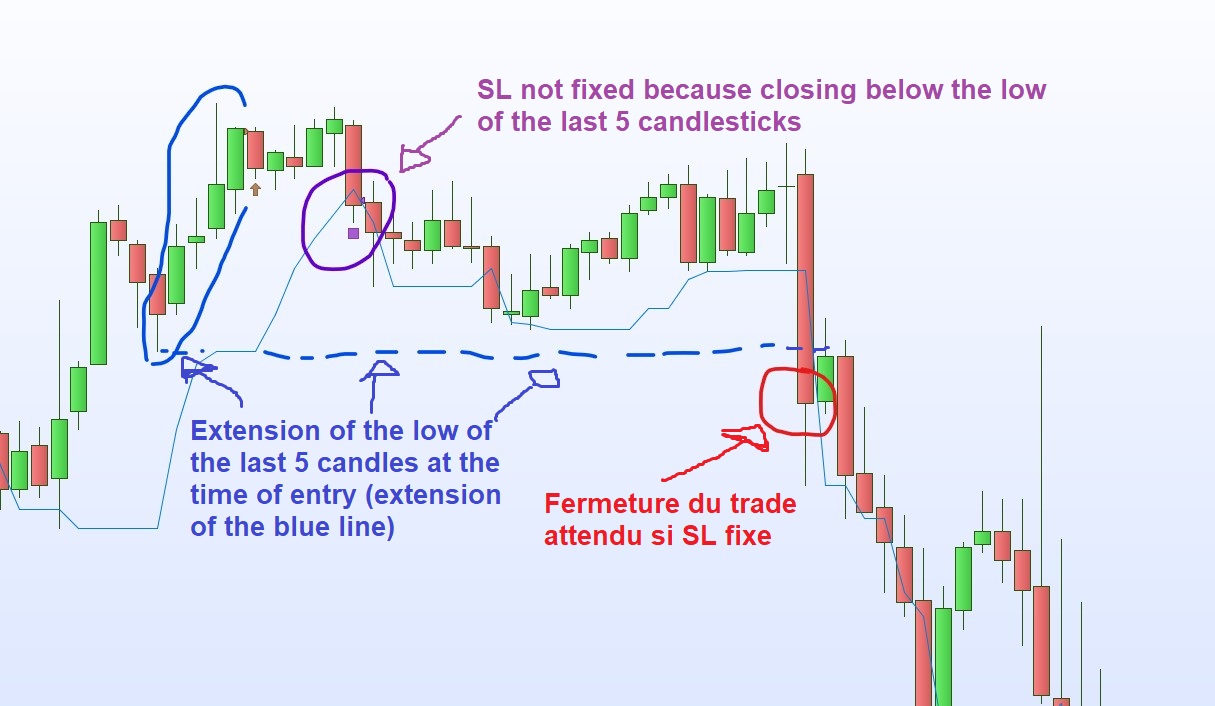
    As you can see in the screenshot, it looks like close the trade at if the close is below the current 5 candlestick low.

    However as you can see in the screenshot, it does not close the trade at the level of the last 5 lows at the time of entry (extension of the blue line) :

    nofixed.jpg nofixed.jpg nofixed-1.jpg nofixed-1.jpg
    #191571 quote
    Oliviertrader2020
    Participant
    Average

    Indeed, the brackets allow to use (Low).
    However, this does not generate a fixed sl but a tracking sl.
    I think we are close to the solution 🙂

    GraHal thanked this post
    #191574 quote
    JS
    Participant
    Senior

    Hoi Olivier,

    The idea of a fixed StopLoss is:

    For example:

    You buy at 100

    Your fixed StopLoss is 10

    Then only when the Close crosses under 90 (100 – 10) your position will be closed.

    What you are showing in your screenshots is a trailing stop and not a fixed StopLoss.

    #191575 quote
    JS
    Participant
    Senior
    Hi Olivier, Line 1 of the code “If Not LongOnMarket …” prevent the code from recalculation the SL when on market so the StopLoss will be fixed (not changing).
    #191580 quote
    Oliviertrader2020
    Participant
    Average
    In the different screenshots I have shown you the results of the different codes received which generate trailing stops and not fixed stops. Sorry if it was not clear and you are right to point it out, you should not take into account the bottom of the Donchian Channel of 5 periods over the entire duration of the trade. Its display shows the extension of the level at which it is located when the trade is triggered. You will find in the last screenshot what is expected as a fixed stop with the dotted extension of the blue line. These dotted lines correspond to the low of the last 5 candles at the time the trade is triggered.
    #191581 quote
    Oliviertrader2020
    Participant
    Average
    Hi JS, Unfortunately, even if you remove “If Not LongOnMarket …”, the code still generates errors. For example in the screenshot below: the 1st trade should close at the same level as the 2nd trade. The 2nd trade should close earlier
    nofixed-2.jpg nofixed-2.jpg
    #191587 quote
    JS
    Participant
    Senior
    Hi Olivier, Don’t remove “If Not LongOnMarket…” from the code, otherwise your SL will be recalculated with every new bar… In the bar, where your Buy condition is true, the SL will be calculated according to “Close – Lowest[5](Low)”, then your SL is a fixed number. In the next bar, your buy order is executed on the Open of that bar. Your order price (TradePrice) is the Open of that bar. Your actual SL is now: TradePrice – SL Hope it is clear…(not easy to explain)  😉
Viewing 14 posts - 1 through 14 (of 14 total)

  • You must be logged in to reply to this topic.

Stop loss below the lowest of the last 5 candles


ProOrder: Automated Strategies & Backtesting

New Reply
Summary

This topic contains 13 replies,
has 4 voices, and was last updated by JS

3 years, 10 months ago.

Topic Details
Forum: ProOrder: Automated Strategies & Backtesting
Language: English
Started: 04/10/2022
Status: Active
Attachments: 6 files
Logo Logo
Loading...