Hello all,
I am just starting to create simple customized indicators in ProBuilder, mainly with the purpose of combining several indicators in one chart.
Right at my first attempt I got stuck. When I select the stochastic indicator from the library, I can choose between different calculation methods (simple, exponential, weighted…). The functions in ProBuilder Stochastic[N,K](price) or Stochasticd[N,K,D](price) do not offer any parameter for this.
How can I calculate the stochastic indicator by exponential or weighted method? By default it is calculated in the standard way.
Thanks for your input!
JSParticipant
Senior
Hi
@Sebastian
The indicators in the library are all custom-made indicators and can be a variation of the standard indicators in PRT…
If you want to use the stochastics with a certain average, you will have to use the indicator from the library…
You can import from the library into the standard indicators of PRT…
(Download the .itf file of the relevant indicator from the library and import it into the (standard) indicators of PRT…)
@
Sebastian
Do not double post. Ask your question only once and only in one forum. All double posts will be deleted anyway so posting the same question multiple times will just be wasting your own time and will not get you an answer any quicker. Double posting just creates confusion in the forums.
Thanks 🙂
@robertogozzi
Sorry Roberto. I apologize and will consider for the future.
@JS
Thanks for replying!
I might not have pointed my problem out properly.
The standard stochastic indicator in PRT offers different calculation methods which the code from the ProBuilder library doesn’t. I would like to see the “exonential feature” for my customized indicator as well.
I found another thread inside this forum where a user seemed to have solved that exact problem but unfortunately I do not understand his solution:
https://www.prorealcode.com/topic/indicator-for-stochastic-exponential-method/#post-79281
You can change the moving average type in the code with:
ma = average[period,type]
where period is the period of calculation and type, the moving average type, you can modify with:
0 = SMA 1 = EMA 2 = WMA 3 = Wilder 4 = Triangular 5 = End point 6 = Time series 7 = Hull (PRT v11 only) 8 = ZeroLag (PRT v11 only)
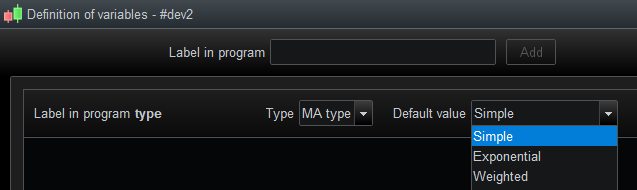
You can also, add a MAtype as the variable definition, in the indicator settings, to let the user change it more user friendly.
JSParticipant
Senior
Hi Sebastian,
Here is the calculation of the Stochastics…
As Nicolas pointed out, the second parameter of the Average[3,0] is the setting for your average…
//Stochastic
hi = highest[14](high)
lo = lowest[14](low)
oscillator = (close - lo) / (hi - lo) * 100
ProcentK = average[3,0](oscillator) // 0=SMA, 1=EMA, 2=WMA
ProcentD = average[5,0](ProcentK) // 0=SMA, 1=EMA, 2=WMA
RETURN ProcentK AS "%K MA", ProcentD AS "%D MA"
Thanks for your support! I managed to create what i needed now.