Stochastic signals indicator with arrows

Viewing 10 posts - 1 through 10 (of 10 total)

  • Author
    Posts
  • #254801 quote
    UKCityGent
    Participant
    New

    id like an indicator to show %K and %D to dip below 20 and when it goes over 20 to draw an arrow as per the code below

    Not sure why its not working out ?

    MA1 = Close > average[50]
    
    K = stochastic[14,1]
    D = average[3](K)
    C1 =  K => 20 AND K[1] =< 19 AND D => 20 AND D[1] =< 19
    
    IF C1 AND MA1 THEN
       DRAWARROWUP(barindex, low - (high-low)*0.5) COLOURED(104,142,35)
    ENDIF
    #254802 quote
    jacquesgermain
    Participant
    Senior

    hello add “return” at the end of indicator

    robertogozzi, Iván González and Nicolas thanked this post
    #254803 quote
    JS
    Participant
    Senior

    Hi,

    Try this one…

    MA1 = Close < average[50]
    
    K = stochastic[14,1]
    D = average[3](K)
    
    C1 = D crosses over 20
    
    IF C1 AND MA1 THEN
    DRAWARROWUP(barindex, low - (high-low)*0.5) COLOURED(104,142,35)
    ENDIF
    
    Return
    robertogozzi and Iván González thanked this post
    Scherm­afbeelding-2025-12-28-om-18.45.27.png Scherm­afbeelding-2025-12-28-om-18.45.27.png
    #254818 quote
    jacquesgermain
    Participant
    Senior

    hello this one is exactly your code

    MA1 = Close < average[50]
     
    K = stochastic[14,1]
    D = average[3](K)
     
    C1 = D crosses over 20 and K crosses over 20
     
    IF C1 AND MA1 THEN
    DRAWARROWUP(barindex, low - (high-low)*0.5) COLOURED(104,142,35)
    ENDIF
     
    Return
    #254824 quote
    JS
    Participant
    Senior

    D is the average of K, so when “D crosses over 20, K has already crossed above 20…

    When you combine them, you miss signals…

    UKCityGent thanked this post
    #254826 quote
    LaMaille
    Participant
    Junior

    D is the average of K, so when “D crosses over 20, K has already crossed above 20…

    When you combine them, you miss signals…

    Sometimes, D crosses over 20 while k crosses again under 20… So : C1 = D crosses over 20 and K > 20 would less exclusive than both crosses at the same time, yet more safer than the mean crossing over while K going back under (which means downside not finished yet)

    #254827 quote
    JS
    Participant
    Senior

    There is no point in applying smoothing (D) and then also use the raw oscillator (K)…

    #254834 quote
    UKCityGent
    Participant
    New

    Hi Jacques
    Perfectly thanks -it was what i was trying to do

    #254859 quote
    LucasBest
    Participant
    Average

    There is no point in applying smoothing (D) and then also use the raw oscillator (K)…

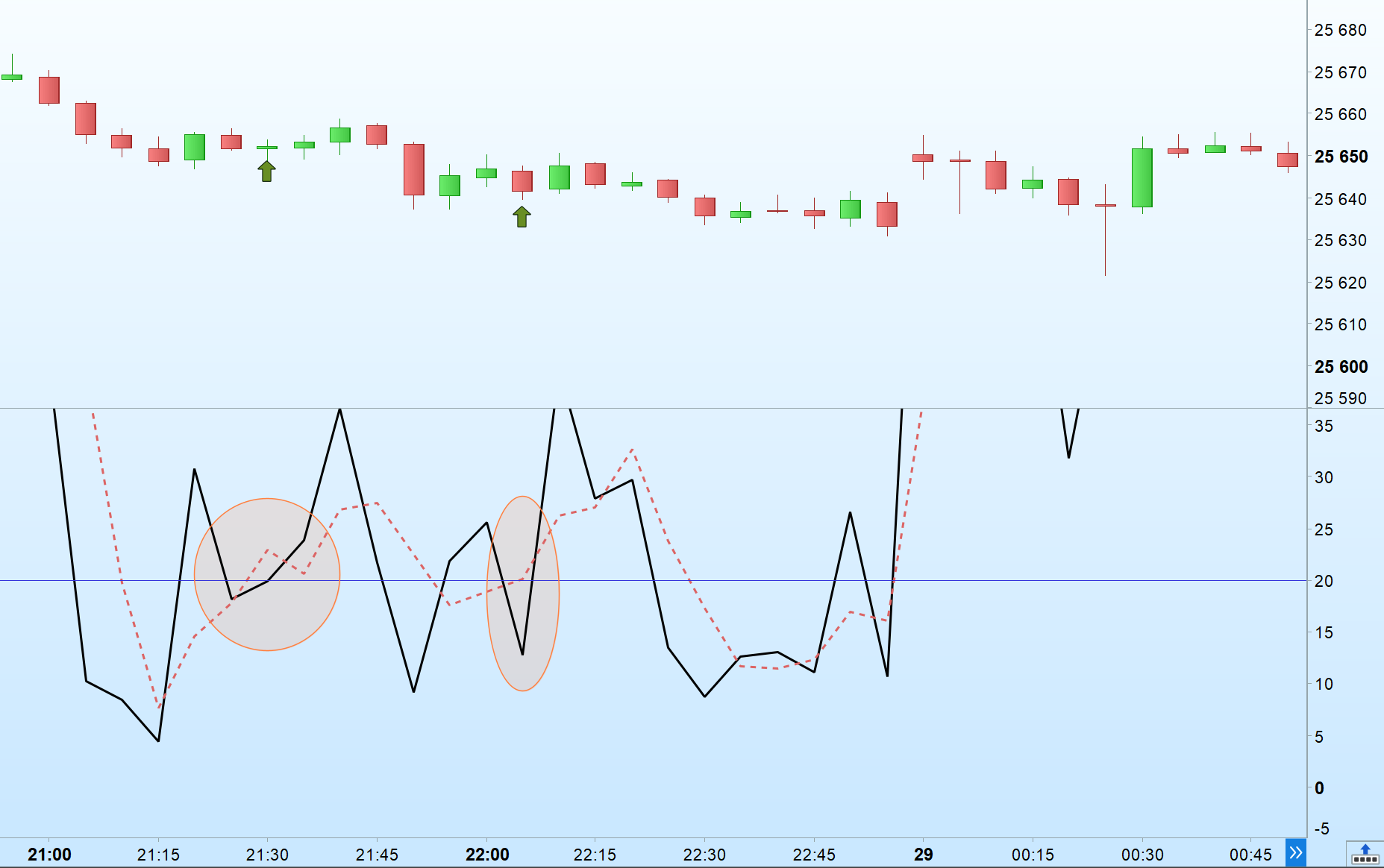
    The mean (smmothing) is slower to react… While it crosses over, K can reverse and this can mean that the pulse is not so clear/good.
    => checking that k still above 20 while D crosses over is a way to check if the pulse still holding while the mean reacts.

    It happened last friday on Nasdaq 5 min timeframe

    Capture-decran-2025-12-29-231214.png Capture-decran-2025-12-29-231214.png
    #254861 quote
    JS
    Participant
    Senior

    Nicolas made the interesting “CandlestickStochastic” a while ago…

    //PRC_CandlesticksStochastic | indicator
    //25.10.2016
    //Nicolas @ http://www.prorealcode.com
    //Sharing ProRealTime knowledge
    
    period = 26
    ////////////////////////////////////////////////////////////////////
    //lastest highhest high and lowest low over "period"
    hh = highest[period](high)
    ll = lowest[period](low)
    scale = hh-ll
    dynO = ((Open-ll)/scale)*100
    dynH = ((High-ll)/scale)*100
    dynL = ((Low-ll)/scale)*100
    dynC = ((Close-ll)/scale)*100
    //candle color
    if Open>Close then
    r = 0
    g = 102
    else
    r = 102
    g = 0
    endif
    //draw candlesticks
    DRAWCANDLE(dynO,dynH,dynL,dynC) coloured(g,r,0) bordercolor (g,r,0)
    
    return 0 as " 0 " ,23.6 as "23.6 % level",38.2 as " 38.2 ", 50 as "50% level", 61.8 as " 61.8 " ,78.6 as "78.6% level", 100 as " 100 "
    Iván González thanked this post
    Scherm­afbeelding-2025-12-30-om-00.37.24.png Scherm­afbeelding-2025-12-30-om-00.37.24.png
Viewing 10 posts - 1 through 10 (of 10 total)
  • You must be logged in to reply to this topic.

Stochastic signals indicator with arrows


ProBuilder: Indicators & Custom Tools

New Reply
Author
author-avatar
UKCityGent @ukcitygent Participant
Summary

This topic contains 9 replies,
has 5 voices, and was last updated by JS

2 months ago.

Topic Details
Forum: ProBuilder: Indicators & Custom Tools
Language: English
Started: 12/28/2025
Status: Active
Attachments: 3 files
Logo Logo
Loading...