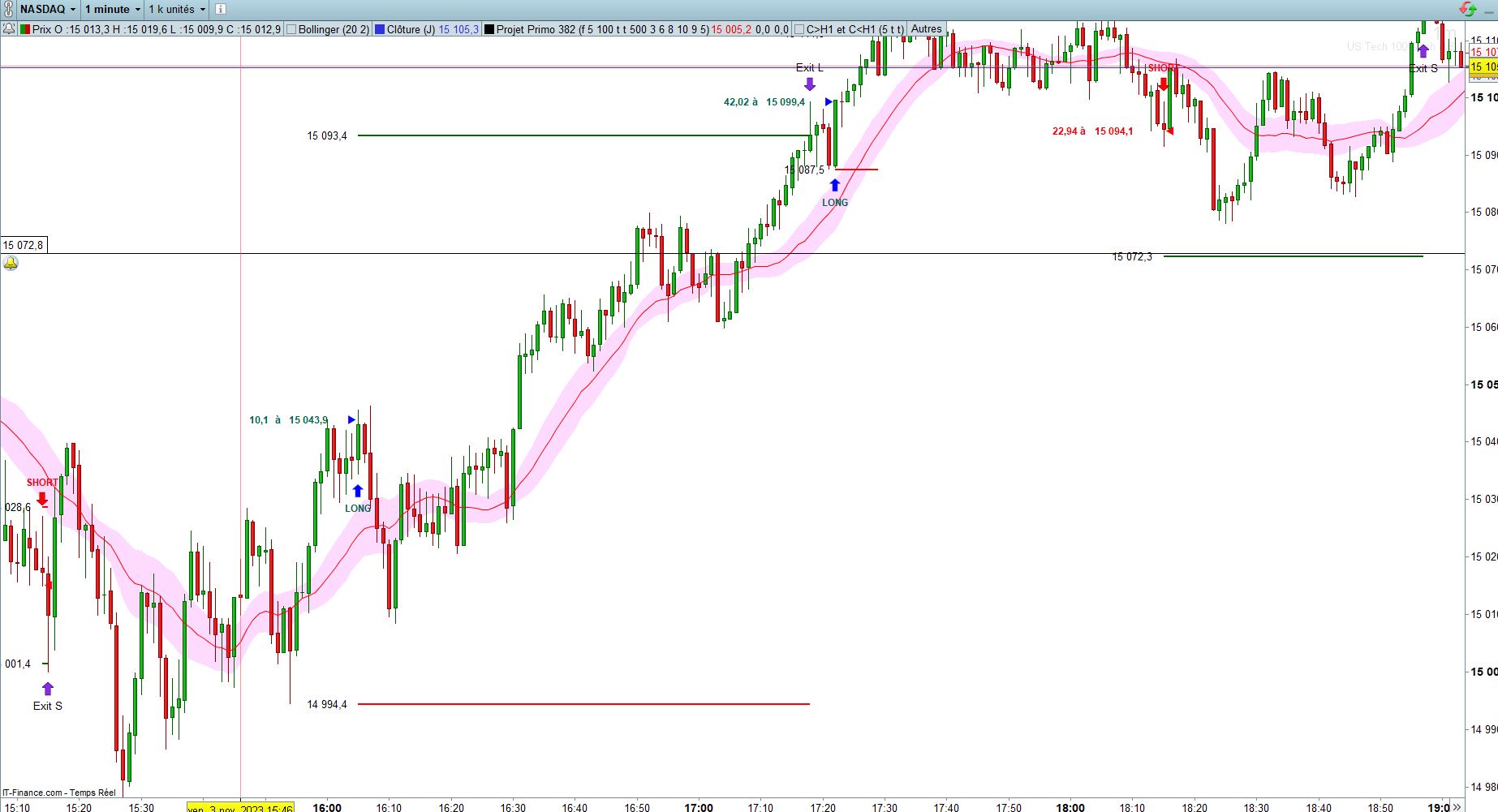
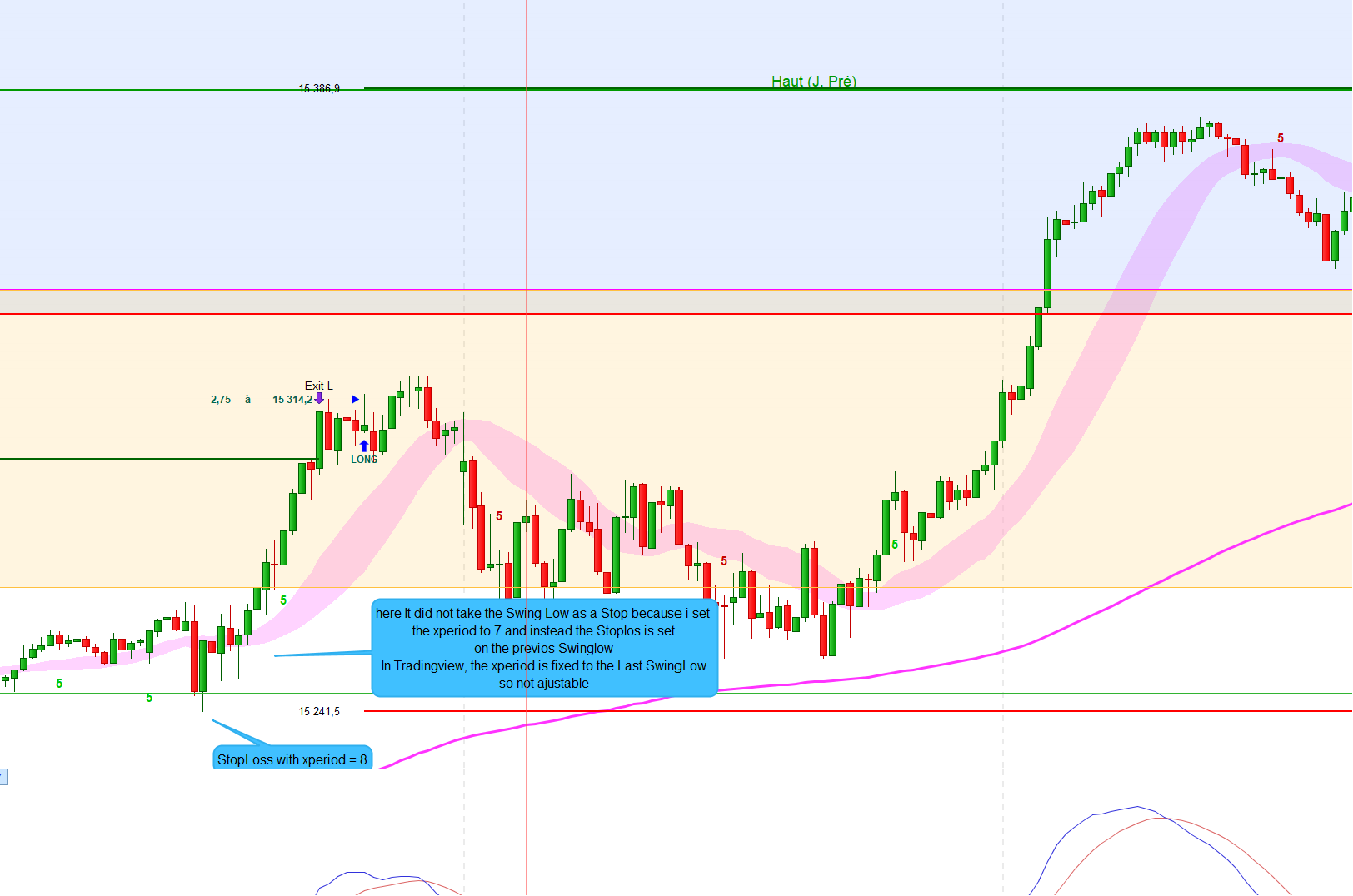
Hi everyone, after a lot of work i finaly converted the Steven Primo bollinger Bands indicator from Tradingview to a prorealcode indicator and added some features.
i just want to convert this indicator in an autmated Strategy, if you can help, here is the code and i upload the indicator itf
DEFPARAM CalculateOnLastBars = 5000
// Atributs :
OffsetArrow   = ArrowDistance * pipsize
OffsetText = TextDistance * pipsize
OffsetFifth = FifthDistance * pipsize
OffsetDistance = ContractDistance * pipsize
OffsetEntry = EntryText * pipsize
Pipi = pipsize
SMA50 = Average[50](close)

// Conditions for Close > Bollinger UP
indicator3 = Average[20](close)+0.382*std[20](close)
c7 = (close > indicator3)
SMA20 = Average[20](close)
// Conditions for 5 Closes above Bollinger Up
c9=SUMMATION[5](c7)=5
if c9  and lastsig=0 then // and close > SMA50 then // Price above SMA50
if FifthCandle then
drawtext("5",barindex,low-OffsetFifth,SansSerif,bold,25)coloured(0,200,0)
lastsig=1
endif
endif
//Setup Reset if closes under Boll Up
if close<indicator3 then
lastsig=0
endif
// Conditions for Closes < Bollinger Down
indicator4 = Average[20](close)-0.382*std[20](close)
c8 = (close < indicator4)
// Conditions for 5 Closes under Bollinger down
c10=SUMMATION[5](c8)=5
if c10  and lastsig2=0 then // and close < SMA50 then // Price below SMA50
if FifthCandle then
drawtext("5",barindex,high+OffsetFifth,SansSerif,bold,25)coloured(200,0,0)
lastsig2=1
endif
endif
//Setup Reset if closes above Boll Down
if close>indicator4 then
lastsig2=0
endif

atr14=averagetruerange[14]
// BB setup
longComparison = close > indicator3
shortComparison = close < indicator4

if longComparison then
if countlong=0 and longComparison[1] then
countlong=0
else
countlong=countlong+1
endif
else
countlong=0
endif

if shortComparison then
if countshort=0 and shortComparison[1] then
countshort=0
else
countshort=countshort+1
endif
else
countshort=0
endif
pvHighInRange = barssince(pivothigh)<countlong
pvLowInRange = barssince(pivotlow)<countshort
// Pivot setup

pivotH = high[1]>high[2] and high[1]>high //TV Script pivotHigh = ta.pivothigh(1, 1)
pivotL = low[1]<low[2] and low[1]<low //TV Script pivotLow = ta.pivotlow(1, 1)
if pivotH   and High[1] = Highest[xPeriod](High) then // Parametrer le nombre de candles pour le pivot, quand je l'ai mis à 3 c presque comme TV mais ce qui est bien dans prorealtime c qu'il est sorti d'une position Long perdante et à tout de suite shorté quand le paramètrage le permettait
pivotHigh=high[1]
starthigh=barindex[1]
pivottype=1
endif
if pivotL   and Low[1] = Lowest[xPeriod](Low) then
pivotLow=low[1]
startlow=barindex[1]
pivottype=-1
endif


pvHighInRange = barssince(pivothigh)<countlong
pvLowInRange = barssince(pivotlow)<countshort

// Entry price
epLong = (pivotHigh) + ticksize
epShort = (pivotLow) - ticksize

stopLong = epShort
stopShort = epLong

// Target price
targetLong = epLong+(abs(epLong-stopLong)*(extension/100))
targetShort = epShort-(abs(epShort-stopShort)*(extension/100))
contractSizeL = Risk/(epLong-stoplong)
contractSizeS = Risk/(stopshort-epShort)


// Entry condition
//canBuy = countLong >= consecutiveCloses and pvHighInRange and high < epLong and epLong>0
//canSell = countShort >= consecutiveCloses and pvLowInRange and low > epShort and epShort>0

canBuy = countLong > consecutiveCloses and pvHighInRange  and epLong>0 and high crosses over epLong and orderLong //and close > SMA50  //   and SMA20>SMA50 //modif car tradingview repaint!!
canSell = countShort > consecutiveCloses and pvLowInRange and epShort>0 and low crosses under epShort and orderShort// and close < SMA50 // and SMA20<SMA50 //modif car tradingview repaint!!

//trading signals
contractSizeL = round(contractSizeL,2)
contractSizeS = round(contractSizeS,2)
atr = average[100](range)*0.25//AverageTrueRange[100](close)
signal=0
if canBuy and order<>1 and order <> -1  and signalBuy = 0 then // order <> 1 not longonmarket order <> -1 not shortonmarket, added signalBuy to tell him that we entered once the trade
drawarrowup(barindex,low-OffsetArrow) coloured("blue")
drawtext("LONG",barindex,low-OffsetText,SansSerif,Bold,12) COLOURED(0,102,80)
//drawtext(contractSizeL,barindex,low-OffsetDistance)
//drawtext(pivothigh+0.1,barindex,low-OffsetEntry,SansSerif,Bold,10) COLOURED(204,0,204)
drawtext(pivothigh+0.1,barindex[8],pivothigh,SansSerif,Bold,12) COLOURED(0,102,80)
drawtext("▶",barindex[1],pivothigh) coloured("blue")
drawtext("à",barindex[13],pivothigh,SansSerif,Bold,12) COLOURED(0,102,80)
drawtext(contractSizeS,barindex[16],pivothigh,SansSerif,Bold,12) COLOURED(0,102,80)
takeprofit=targetlong
stoploss=stoplong
order = 1 //on market
orderlevel = pivothigh
orderbar = barindex
signalBuy = 1 // signal now = 1 because we had a trade and in the line 112 signalBuy was = 0 , to avoid an another trade we must have signalBuy = 0 that's why in line 141 i added if close crosses under indicator3 signalBuy = 0 and now he can enter an another trade if all conditions were met

elsif canSell and order<>-1 and order <> 1  and signalSell = 0 then // order <> 1 not longonmarket order <> -1 not shortonmarket
drawarrowdown(barindex,high+OffsetArrow) coloured("red")
drawtext("SHORT",barindex,high+OffsetText,SansSerif,Bold,12) COLOURED(240,0,10)
//drawtext(contractSizeS,barindex,high+OffsetDistance)
drawtext(contractSizeS,barindex[16],pivotlow,SansSerif,Bold,12) COLOURED(240,0,10)
//drawtext(pivotlow-0.1,barindex,high+OffsetEntry,SansSerif,Bold,10) COLOURED(204,0,204)
drawtext("à",barindex[13],pivotlow,SansSerif,Bold,12) COLOURED(240,0,10)
drawtext(pivotlow-0.1,barindex[8],pivotlow,SansSerif,Bold,12) COLOURED(240,0,10)
drawtext("◀",barindex+1,pivotlow) coloured("red")
signal=-1
takeprofit=targetshort
stoploss=stopshort
order = -1 //on market
orderlevel = pivotlow
orderbar = barindex
signalSell = 1

endif
if close < indicator3 then // to tell him that we reset the Setup
signalBuy = 0
endif
if close > indicator4 then
signalSell = 0
endif
//if canbuy and not onmarket then
//BUY 1 shares at market
//ENDIF

//plot the tp & sl lines
if order<>0 then
drawsegment(orderbar,takeprofit,barindex,takeprofit) coloured("darkgreen") style(line,2)
drawtext(takeprofit,orderbar-5,takeprofit)
drawsegment(orderbar,stoploss,barindex,stoploss) coloured("red") style(line,2)
drawtext(stoploss,orderbar-5,stoploss)
endif


//reset the order/tp/sl
if order=1 then //case long
if high crosses over takeprofit or low crosses under stoploss then
order=0
drawarrowdown(barindex,high+OffsetArrow) coloured("BlueViolet")
drawtext("Exit L",barindex,high+OffsetText)
endif
endif
//if order=1 then // Trying to Put YES for Winning Trades
//if high crosses over takeprofit then
//drawtext("YES",barindex+1,takeprofit+atr*8) coloured(0,255,0)
//endif
//endif

if order=-1 then //case short
if low crosses under takeprofit or high crosses over stoploss then
order=0
drawarrowup(barindex,low-OffsetArrow) coloured("BlueViolet")
drawtext("Exit S",barindex,low-OffsetText)
endif
endif
ColorBetween (indicator3,indicator4,255,153,255,110)

return indicator3 as "Upper band" coloured(128,0,92), indicator4 as "Lower band" coloured(128,0,92), SMA20 as "MA20" coloured(255,0,0), signalBuy as "LONG", signalSell as "SHORT"