Hi
I am developing an indicator for the following entry setup:
1. significant high = touch of the upper Bollinger (high >= BollingerUp)
2. one one or more lower closes (than the close in 1)
3. One or more higher closes (than the close in 2)
This setup is invalid after X bars. Where X is 5 but would like to test different values.
I am struggling with 2 and 3 as it is a variable number of bars so I want to avoid hardcoding bar indexes…
Any suggestions?
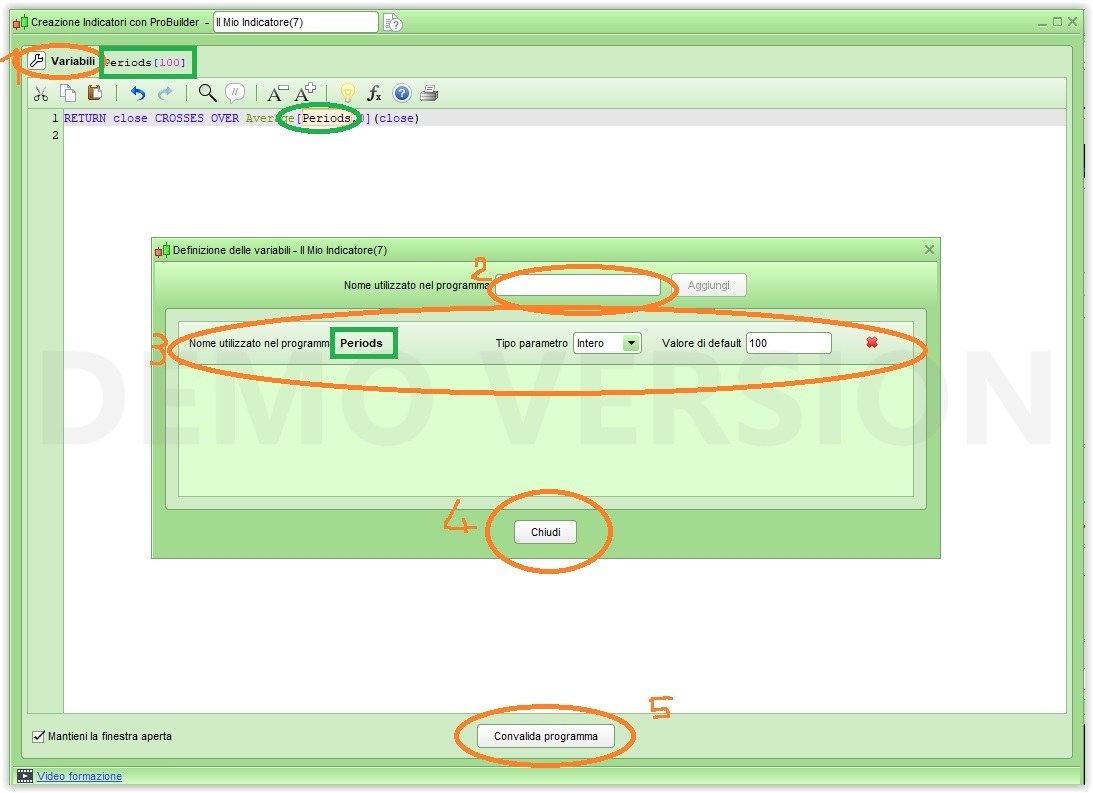
You have to use variables following the five steps (see attached pic) while in ProBuilder:
- click on the spanner (upper left corner)
- assign a name to your variable (one each time, but you can add many), that name will appear automatically mext to the sparrow after confirmation
- assign a type and default value to your variable
- close the window
- confirm your indicator by validating it
you’ll then be able to use the indicator properties to change their value anytime.
I learnt something entirely new there … using a function I never knew existed, thank you Roberto!
Just hope I remember for when I need it! 🙂
Thank you Roberto for the quick and helpful response.
To clarify, I’m looking for coding insights to detect candlestick patterns over a variable range of bars.
As I see it – based on minor experience so far with this platform – there are two generalised ways to approach solving this:
- use in-built mathematical and statistical functions to express the conditions. This leads to a common pattern of decomposing the condition into elements (commonly named c1, c2, c3…) and then testing the truth of the conditions combined using logical operators.
- write a state machine with lots of if/then and hand coded counters.
In my view, the first approach is a lot more elegant but more importantly to me, leads to less bugs as you avoid manual handling of state. I believe this approach is advocated in the manual for performance reasons (can’t find the reference now). There is no “problem” per se with 2, but I do find it a lot more error prone when creating the code.
So I’m pondering how to codify ‘one or more higher closes (than the prior bar)’ followed by ‘one or more lower closes (than the prior bar)’ in the spirit of approach 1 and looking for code ideas to point me in the right direction. Perhaps a test of the closing price causing a TRUE value and then testing an array variable for consecutive TRUE values…but in a one-two liner :).
I’m stuck so would really welcome ideas – however off the wall they may be.
If you need to detect whether an ENGULFING (Bullish and Bearish) pattern can be detected (currently or previously) you can write:
ONCE n           = 10                                        //lookback bars
Bullish          = close > open
Bearish          = close < open
Body             = abs(close - open)
BullishEngulfing = Bullish AND Bearish[1] AND Body > Body[1] //TRUE if Bullish engulfing just occurred
BearishEngulfing = Bullish[1] AND Bearish AND Body > Body[1] //TRUE if Bearish engulfing just occurred
PrevBullishEngulf= summation[n](BullishEngulfing)            //TRUE if Bullish engulfing occurred within the last "n" bars
PrevBearishEngulf= summation[n](BearishEngulfing)            //TRUE if Bearish engulfing occurred within the last "n" bars
is that something that might help you?
Thanks again Roberto. This is the style of solution I am thinking of. Converting your engulfing candle to my “higher/lower closes” is simple enough:
ONCE n = 5 //lookback bars

HigherClose = close > close[1]
LowerClose = close < close[1]

OneorMoreHigherCloses = summation[n](HigherClose)
OneorMoreLowerCloses = summation[n](LowerClose)

RETURN OneorMoreHigherCloses as "OneorMoreHigherCloses", OneorMoreLowerCloses as "OneorMoreLowerCloses"
So I am trying to figure out how to go from “count how many times the condition appears in the previous X bars” to “tell me when the condition is true in a repeated sequence up to X times”….
This
OneorMoreHigherCloses = summation[n](HigherClose) = 2
OneorMoreLowerCloses  = summation[n](LowerClose)  = 2
will be true when, within the last “n” bars, the condition occurred twice.
Sorry, this is true even when not consecutive.
We are now in the same ballpark 🙂
OneorMoreHigherCloses = summation[n](HigherClose) = n
this will be true when for ALL “n” bars the condition was true.
To spot any 2 consecutive occurrences within n bars:
n = 5
c = 2
OneorMoreHigherCloses = summation[c](HigherClose) = c
x = summation[n](OneorMoreHigherCloses)
Actually in my last example, 6 bars will be used, since if the condition is true on bar 5 it’s because it joins bar 6 to make the pair 6-5.
To make sure you have the exact number of bars you should insert this line between 2 and 3:
n = round((n / c) - 0.5)
in this case n will return 4, which scans n+1 bars.
That’s a clever approach but I think we’ve moved away from the original requirement (my post 86832 confused things – sorry for that).
Here’s the pattern description:
1. significant high = touch of the upper Bollinger (high >= BollingerUp)
2. one one or more lower closes (than the close in 1)
3. One or more higher closes (than the close in 2)
This setup is invalid after X bars. Where X is 5 but would like to test different values.
So counting or specifying a “number of bars requirement” for the “more closes” is not so relevant (but helpful for parameter experimentation in backtesting).
I imagined something like this:
// pseudo code

ONCE SigIndex = 0
SetupMaxBars = 5

SH = high >= BollingerUp[20](close) AND high >= highest[10](high)
SL = low <= BollingerDown[20](close) AND low <= Lowest[10](low)

if (SH OR SL) AND SigIndex = 0 then
    SigIndex = BarIndex
endif

OneorMoreHigherCloses = ...
OneorMoreLowerCloses = ...

// test the combined conditions
if SH AND OneorMoreLowerCloses AND OneorMoreHigherCloses AND (BarIndex - SigIndex) =< SetupMaxBars then
    SellSignal = 1
    SigIndex = SH = SL = 0
fi

if SL AND OneorMoreHigherCloses AND OneorMoreLowerCloses AND (BarIndex - SigIndex) =< SetupMaxBars then
    BuySignal = 1
    SigIndex = SH = SL = 0
fi
Does this make sense?
OneorMoreHigherCloses = summation[SetupMaxBars](SH)
OneorMoreLowerCloses  = summation[SetupMaxBars](SL)