Hi
Using PR 10.3 with IG and I cant work out what determines the start up template loaded. I have around 10 assigned to hotkeys, but no matter what I do, it always appears to load the 2nd one on startup.
any ideas?
thanks
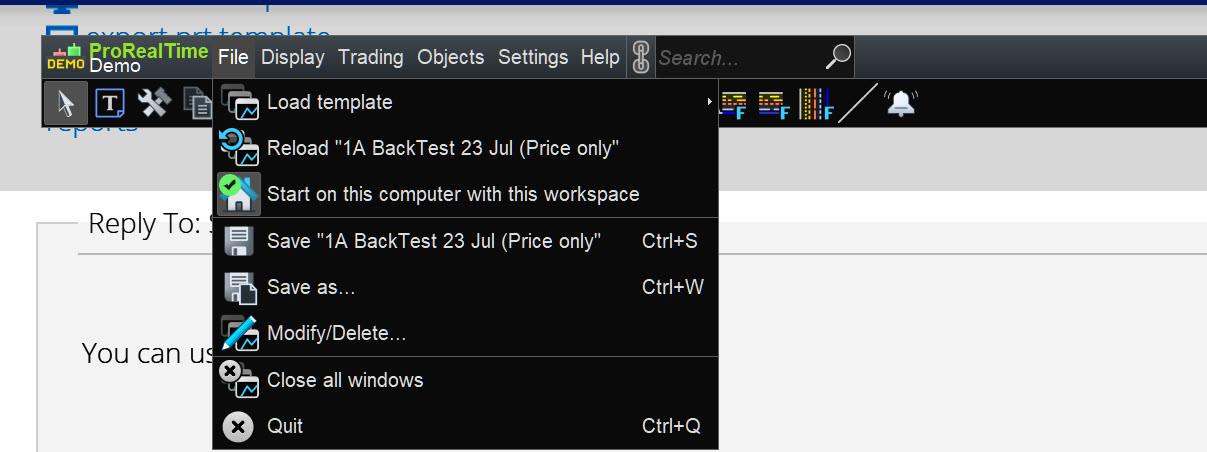
V10.3 or v11 will start up showing the Template that you last saved on Exit … see attached.
Thanks, but i’ve tried saving my last workspace and restarting – didn’t work. I also don’t have the option to “start with this workspace” as on your screenshot.
Maybe its a limitation of the IG version?
thanks for info though, ill try again.
How are you saving the Template that you want to be opened when you Login to PRT ?
Describe the saving method as …
1.
2.
3.
Ok, so……
there is no option to save as per the screenshot. But it will load the last template you used *as long as* you choose to save your existing template when you exit the app.
personally I dont think this is very intuitive, as im often rearranging my “main template” during a session then doing something else before I quit. Still, i guess ill get v11 soon, so maybe that will give me the default option.
cheers
You can go File > Save X Template at any time during and after you made changes to X Template.
You even use the shortcut Ctrl + S at any time.
BUT it is still very good best practice to go File > Quit > Save and Exit each and every time … why would you not do??
Monobrow – Maybe this helps :
First what you already know, I think :
<hr />
When you save, you *or* save to the last Template saved, *or* you explicitly save to a given name (Save as …).
Once you used an other name/Templase for saving (thus Save as …), the next time it will load from that Template.
Would you like to reload an other Template than the one last saved, than you’d need to use Load Template … you see as the first menu option in GraHal’s screenshot. This obviously means that if you at a next start of the platform want to use an other Template than the one last saved, you would need to use that first menu option. OR :
Or you assign F-keys to a Template (like F2, F3 etc.) and after loading the last saved Template, you can immediately use the F-key of choice.
<hr />
I think that this is what you’d want :
Load your Template of choice, e.g. by means of an F-key;
Save that (simple Ctrl-s), no matter you didn’t change anything.
Now at a next start up, that lastly save one will be the one which loads at startup.
IMO V10.3 and V11 work the same, regarding this.
Peter
Now at a next start up, that lastly save one will be the one which loads at startup.
This is not true, at least for me.
The only way to change the start up template is if you choose the Save option when you quit the application.
In each template I run at least 6 windows and a number of automated systems (I use a 43” screen in 4k resolution), which I often have to move around during a session, so when I quit the session, the windows are not in the default position I need so I usually don’t save.
The simple solution is in the screenshot further up, just give us an option to choose which template is default rather than having to mess about with saving on exit for default.
BUT it is still very good best practice to go File > Quit > Save and Exit each and every time … why would you not do??
Not for me, as mentioned, I move my windows and layout around a lot, so i do not wish to save on every exit of the application.
Yeah I see why your usage is different than most.
How come you don’t have v11 yet?
Or are you referring to your real Live System (none of us in UK have v11 yet in real Live),
You should have v11 in Demo Platforms??
Or are you referring to your real Live System (none of us in UK have v11 yet in real Live),
Ive not messed around with demo v11.
And yeah, Im from the Uk.. and… This afternoon was upgraded to v11… and.. I now have the option to save the config as my startup 😬
thanks all
I now have the option to save the config as my startup
Hope you are not dissapointed?
I’ve not got to grips fully with what a Workspace is?? If it means the same as Template then why didn’t PRT use the term Template.
When you find out what Workspace is, please let us know?? 🙂