


Start the order on an exact moment

Viewing 2 posts - 1 through 2 (of 2 total)

  • Author
    Posts
  • #13224 quote
    Pere
    Participant
    Veteran

    Lets suppose following code for ProOrder:

    // Definición de los parámetros del código
    DEFPARAM CumulateOrders = False // Acumulación de posiciones desactivada
    DEFPARAM FlatBefore=090000
    DEFPARAM FlatAfter=220000
    
    
    //Variables
    sl=20// Stop Loss
    xx=30// Periodos WeightedAverage
    
    wma=WeightedAverage[xx](close)
    
    
    // Condiciones para entrada de posiciones largas
    IF close CROSSES OVER wma THEN
    BUY 1 CONTRACT AT MARKET
    ENDIF
    
    // Condiciones de salida de posiciones largas
    IF close CROSSES UNDER wma THEN
    SELL  AT MARKET
    ENDIF
    
    // Condiciones de entrada de posiciones cortas
    IF close CROSSES UNDER wma THEN
    SELLSHORT 1 CONTRACT AT MARKET
    ENDIF
    
    // Condiciones de salida de posiciones cortas
    IF close CROSSES OVER wma THEN
    EXITSHORT  AT MARKET
    ENDIF
    
    // Stops y objetivos
    SET STOP pLOSS sl

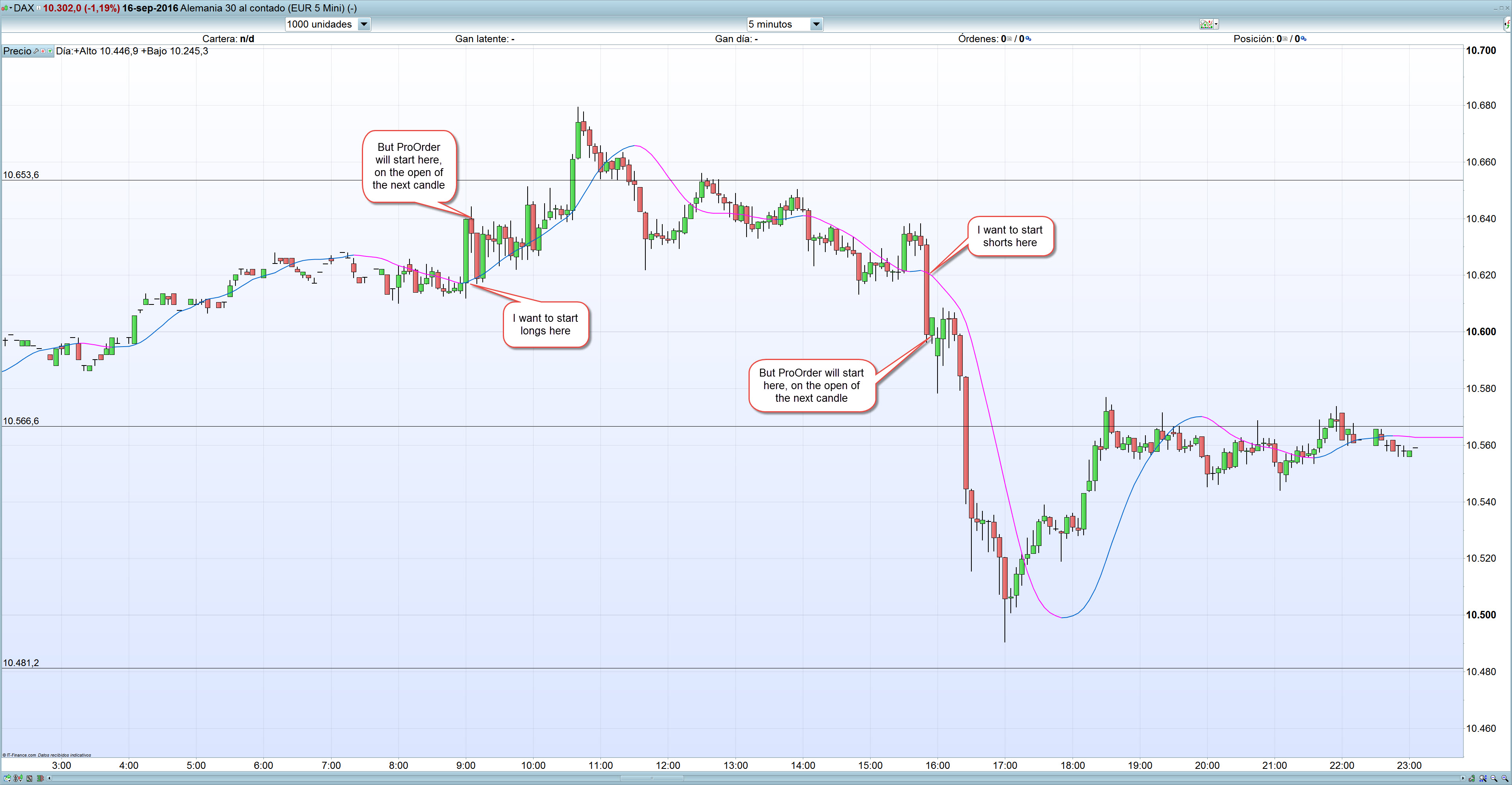
    If I start this code in ProOrder, the order will start on the open of the next candle where the price crosses over the weighted moving average, and not in the exact moment than the prices crosses over this WMA. And the next candle can be too late, or, at least, I can lose the difference between crossing and close.

    The problem is that I don’t know the instruction to change “close” to for example “price” in the code

    “IF close CROSSES OVER wma THEN”

    I also tried with for example “typical price” instead of “close”. It changes a little, but is not what desired.

    Is there any instruction to lose this problem, or which would be the way?

    Please, see the photo hereby for more understanding.

    I also tried with custoIII
    Start-ProOrder.jpg Start-ProOrder.jpg
    #13228 quote
    Nicolas
    Keymaster
    Master

    I see 2 reasons for this. Firstly a crossover is valid only when the current period is already closed. Secondly, you may already know that code are only read once per bar, so test is made at bar close then trade is launched at the open of the next one.

Viewing 2 posts - 1 through 2 (of 2 total)
  • You must be logged in to reply to this topic.

Start the order on an exact moment


ProBuilder: Indicators & Custom Tools

New Reply
Author
author-avatar
Pere @petrus Participant
Summary

This topic contains 1 reply,
has 2 voices, and was last updated by Nicolas

9 years, 5 months ago.

Topic Details
Forum: ProBuilder: Indicators & Custom Tools
Language: English
Started: 09/18/2016
Status: Active
Attachments: No files
Logo Logo
Loading...

