Paul
PaulParticipant
Master
Hi!
You can set the spread in PRT.
But I wonder. First create an static indicator based on information of the spread for different trading hours from IG website for i.e. the dax.
Then use the call function to get the information and code the spread in the strategy manually and have a more accurate backtest when trading 24h.
Is it worth it or is it not possible to code ?
I tried to get an indicator running for a visual impression.
What’s wrong with this code. Between 22u and 8u shows 0, which should be 5. Other spreads are displayed correct.
//spread settings dax

// Start Trading Window
ONCE stw1 = 090000
ONCE stw2 = 173000
ONCE stw3 = 220000
ONCE stw4 = 080000

// End Trading Window
ONCE etw1 = 173000
ONCE etw2 = 220000
ONCE etw3 = 080000
ONCE etw4 = 090000

// Trading Window specified
tw11 = time >= stw1
tw12 = time < etw1

tw21 = time >= stw2
tw22 = time < etw2

tw31 = time >= stw3
tw32 = time < etw3

tw41 = time >= stw4
tw42 = time < etw4

// trade window grouped
tw1 = tw11 and tw12
tw2 = tw21 and tw22
tw3 = tw31 and tw32
tw4 = tw41 and tw42

other = not tw1 and not tw2 and not tw3 and not tw4

// trade window setup
if other then
spread=0
elsif tw1 then
spread=1
elsif tw2 then
spread=2
elsif tw3 then
spread=5
elsif tw4 then
spread=2
endif

return spread coloured(255,69,0) style(line,2) as "spread"
Hi, your tw3 can never be true, because a number can’t be at the same time above 220000 and below 080000, so you need to approach differently the coding of night hours (something like “between 22h and 24h” or “between 0h and 8h”).
Also, please use the <> button (insert PRT code) in the message editor toolbar in order to make PRT code appear in the appropriate format, thanks.
PaulParticipant
Master
After writing it down, I realised the same as you said. I modified it, it works but the coding doesn’t look good.
//spread settings dax

// Start Trading Window
ONCE stw1 = 090000
ONCE stw2 = 173000

ONCE stw3 = 220000
ONCE stw31= 000000

ONCE stw4 = 080000

// End Trading Window
ONCE etw1 = 173000
ONCE etw2 = 220000

ONCE etw31 =235900
ONCE etw3 = 080000

ONCE etw4 = 090000

// Trading Window specified
tw11 = time >= stw1
tw12 = time < etw1

tw21 = time >= stw2
tw22 = time < etw2

tw31 = time >= stw3
tw32 = time <= etw31
tw33 = time >= stw31
tw34 = time < etw3

tw41 = time >= stw4
tw42 = time < etw4

// trade window grouped
tw1 = tw11 and tw12
tw2 = tw21 and tw22

tw3 = tw31 and tw32
tw3a = tw33 and tw34

tw4 = tw41 and tw42

other = not tw1 and not tw2 and not tw3 and not tw3a and not tw4

// trade window setup
if other then
spread=0
elsif tw1 then
spread=1
elsif tw2 then
spread=2
elsif tw3 then
spread=5
elsif tw3a then
spread=5
elsif tw4 then
spread=2
endif

return spread coloured(255,69,0) style(line,2) as "spread"
PaulParticipant
Master
another question, can you use 1 indicator and have data stored for multiple symbols i.e. dax and cac40 ?
So the indicator should have a code that match the symbol displayed, if there’s no match the line should be 0.
PaulParticipant
Master
cleaned up code
// spread settings dax

// start/end trading window
ONCE stw1 = 090000
ONCE etw1 = 173000

ONCE stw2 = 173000
ONCE etw2 = 220000

ONCE stw3 = 220000
ONCE etw3c= 235959 //currentday

ONCE stw3n= 000000 //nextday
ONCE etw3 = 080000

ONCE stw4 = 080000
ONCE etw4 = 090000

// trade window grouped
tw1 = time >=stw1 and time < etw1
tw2 = time >=stw2 and time < etw2
tw3c= time >=stw3 and time <=etw3c
tw3n= time >=stw3n and time < etw3
tw4 = time >=stw4 and time < etw4

// other trading times
ott = not tw1 and not tw2 and not tw3c and not tw3n and not tw4

// trade window setup
if ott then
spread=0
elsif tw1 then
spread=1
elsif tw2 then
spread=2
elsif tw3c then
spread=5
elsif tw3n then
spread=5
elsif tw4 then
spread=2
endif

return spread coloured(255,69,0) style(line,2) as "spread"
 Leo
LeoParticipant
Veteran
Hi,
This is the methodology I use in my codes for control the spread. Hope you find it useful as well
//for EUR/USD for IG markets

spread = 0.7
IF TIME < 070000 THEN
spread = spread*2
ELSIF TIME>193000 THEN
spread = spread*2
ENDIF
Hi, is there any way to measure the actual spread using a prorealcode program? for example, leave it running over 1 week, and then plot a graph (or store data) to record spread at different times of day and different days? thanks
There is no way to know the broker’s spread in real time with codes.
Bonjour, je profite de ce fil pour poser ma question :
En effet, après avoir rentré mon code pour le backtest, je souhaiterai l’appliquer en auto avec proorder auto trading (jusque là ça va de soit). le problème c’est que j’ai le message suivant :
“Les changements suivants doivent etre appliquées avant d’envoyer le code à proorder : Remplacer les variables par des valeurs fixes : pour préparer ce système pour le trading automatique, retirer les variables qui sont dans l’onglet “probacktest” et remplacez les par des valeurs fixes dans votre code.”
Je pense qu’il s’agit du capital et du spread (je n’ai que ça)…? Et si oui , quel code dois je inclure pour remplacer justement ces valeurs fixe du probacktest? Quelqu’un peut il m’aider?
vins – Welcome to the forums. There are some simple rules that you will need to follow. Please only use English in the English speaking forums. There is a French speaking forum if you wish to use that language. Also please update your country flag.
vins – Bienvenue sur les forums. Il y a quelques règles simples que vous devrez suivre. Veuillez n’utiliser que l’anglais dans les forums anglophones. Il y a un forum francophone si vous souhaitez utiliser cette langue. Veuillez également mettre à jour le drapeau de votre pays.
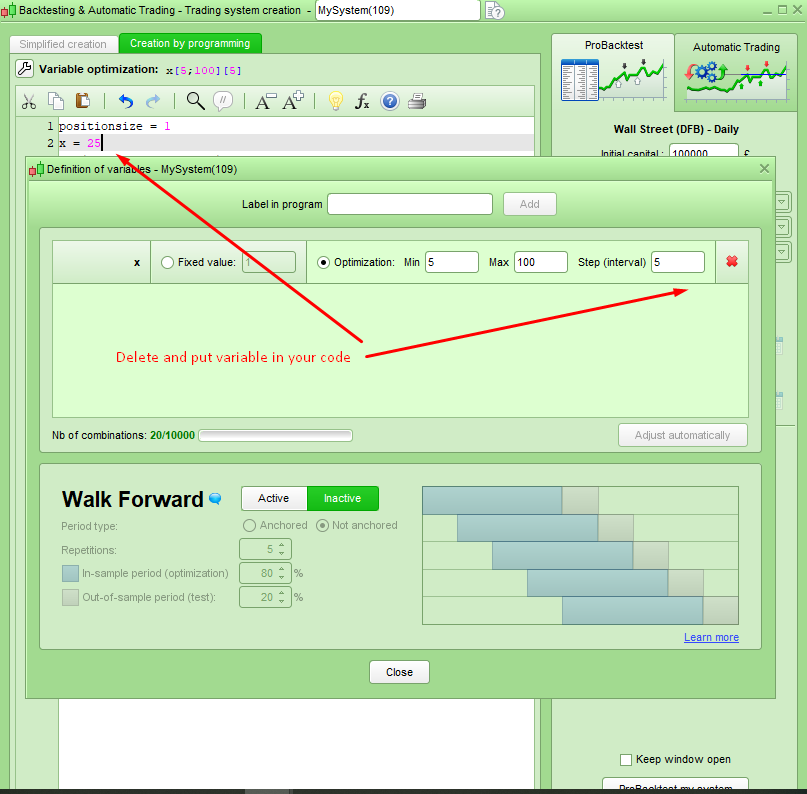
Your problem is not related to spread or capital. You must delete all optimized variables and code them directly in your strategy to run it live.
[attachment file=76030]
oh sorry vonasi, i didn’t know and i understand. 🙂
Ok, just my question is : What is the code for to put the capital and the propagation in my probacktest code (my strategy)..? By example i want to put 10000€ (capital) and 1 for the propagation.
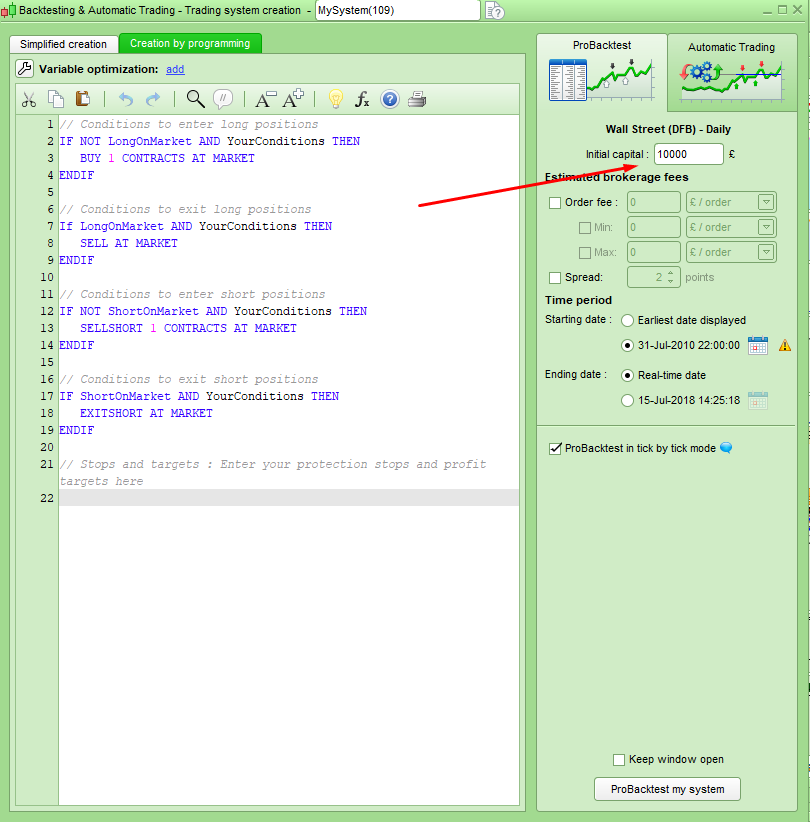
Unless you are using some form of money management within your code it is not necessary to have the capital in the code – just put the starting capital in the box shown in this image:
[attachment file=76048]
I’m not certain what you mean by propagation. If you mean position size then you can just do the following. Some instruments/brokers might need you to use PIPSIZE to get the correct size.
buy 1 contract at market
sell 1 contract at market
//or
positionsize = 1
buy positionsize contracts at market
sell positionsize contracts at market
//or
buy 1 * pipsize contracts at market
sell 1 * pipsize contracts at market
Hi All,
This spread issue is a problem. In PRT, there should be a way to display bid/ask price on the chart. From there it should be possible to build some code to get instantaneous values by calling these price indicators. Since these prices (bid/ask/middle) can be displayed on the chart, they can become an indicator. No?
For example, a MACD can be calculated on bid/ask/middle price. This can change a bit the result of the indicator, at some point in the day. (due to trading hours, volumes, liquidity, etc…).
So to begin with:
- Does anyone know how to configure the price line on the charts ? (bid/ask/middle). I just can’t find this setup.
- Did anyone already build a spread indicator? (to detect real live spread widening, not pre-coded static theoretical ones for back testing purpose)
Thank you.
Best
there should be a way to display bid/ask price on the chart
You can use the Bid/Ask Line Indicator … I have it on all the time.
Just put Bid in the Indicator search on PRT and you will see it.
If you use it on forex on low TF’s (1 min etc) you can see the Bid/Ask band flash widen very often. not so much on Indices, but it does happen out of market hours.