


Spread checkbox

Viewing 2 posts - 1 through 2 (of 2 total)

  • Author
    Posts
  • #141530 quote
    jayvee
    Participant
    Average

    Greetings all. Apologies if this has already been covered. I’m hoping someone can shed some light . When you choose to Include the spread into a strategy I.e check the  spread checkbox; it seems to only work for only certain instruments such as forex and not for others such as amazon stock. Is this right? Is there anyway to overcome this?

    #145380 quote
    Nicolas
    Keymaster
    Master

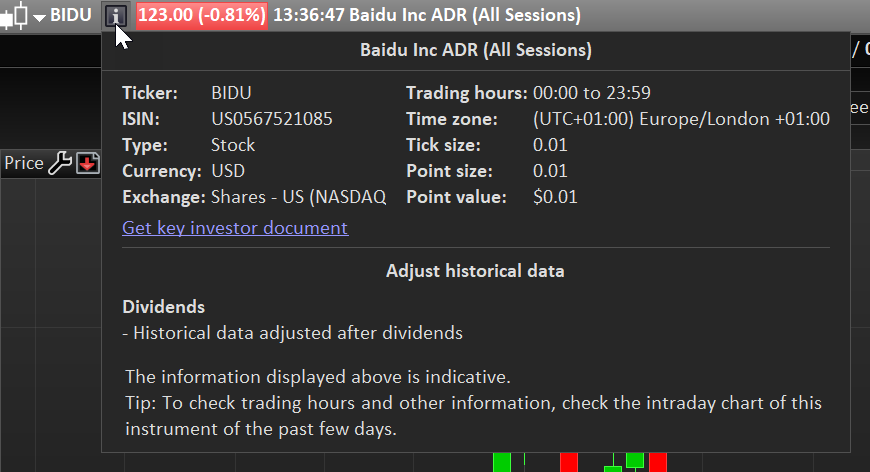
    Why do you think it does not include the spread into the backtest for stocks? Are you sure you are putting the right spread value into the spread box? You can look at the point size value of the current instrument by clicking on the small “i” icon right to the instrument name of the price chart window, in order to accordingly adapt the right spread size the instrument point size. Look at the attached picture for an example.

    prorealtime-pointsize-natural-gaz-1.png prorealtime-pointsize-natural-gaz-1.png
Viewing 2 posts - 1 through 2 (of 2 total)
  • You must be logged in to reply to this topic.

Spread checkbox


ProOrder: Automated Strategies & Backtesting

New Reply
Author
author-avatar
jayvee @jayvee Participant
Summary

This topic contains 1 reply,
has 2 voices, and was last updated by Nicolas

5 years, 5 months ago.

Topic Details
Forum: ProOrder: Automated Strategies & Backtesting
Language: English
Started: 08/13/2020
Status: Active
Attachments: 1 files
Logo Logo
Loading...
