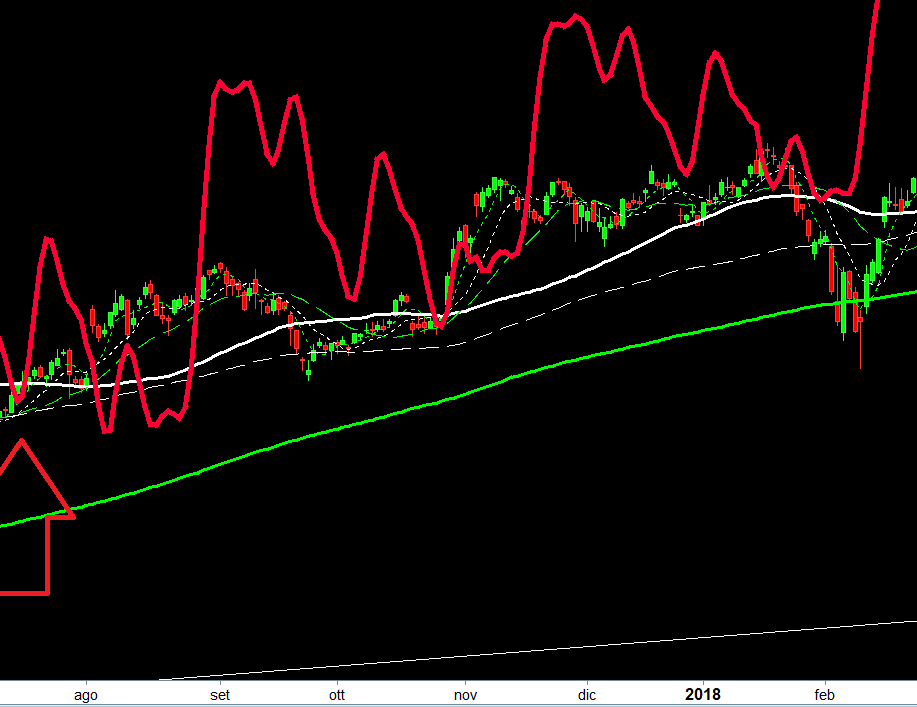
Spostare batteplan sul grafico con il mouse

Viewing 6 posts - 1 through 6 (of 6 total)
  • Author
    Posts
  • #73839 quote
    tatankayotankatatankayotanka
    Participant
    Senior

    Buonasera volevo chiedervi se qualcuno sa come (se si può fare) spostare il batteplan sul grafico dei prezzi solamente muovendolo con il mouse

    start = close [200]
    inf = lowest[200](low)
    sup= highest[200](high)
    cyclelength=2
    trend=0
    Ncicli=2
    if date>=start then
    a=a+1
    x=(360/cyclelength)*a
    phase=-90
    pi=3.1415926535
    w1=Sin(((8*x+phase)*pi)/180)
    w2=2*sin(((4*x+phase)*pi)/180)
    w3=3*sin(((2*x+phase)*pi)/180)
    w4=4*sin(((x+phase)*pi)/180)
    if (Ncicli=3) then
    w1=sin(((12*x+phase)*pi)/180)
    w2=2*sin(((6*x+phase)*pi)/180)
    w3=3*sin(((3*x+phase)*pi)/180)
    w4=4*sin(((x+phase)*pi)/180)
    endif
    ccycle=(w1+w2+w3+w4)
    grc=0.01029
    c=(grc*trend*1)
    b=b+c
    Hurst=(ccycle+b+10)*((sup-inf)/15)+inf
    endif
    return hurst as "Batteplan"
    #73840 quote
    robertogozzirobertogozzi
    Moderator
    Legend

    No, non si può. Occorre usare le proprietà dei prezzi e da li inserirlo sul grafico.

    #73906 quote
    NicolasNicolas
    Keymaster
    Legend

    Potrebbe essere possibile impostarlo automaticamente nel punto in cui desideri che venga avviato se può essere calcolato da una data formula?

    #73968 quote
    tatankayotankatatankayotanka
    Participant
    Senior

    Si Nicolas un esempio potrebbe essere il punto centrale del batteplan  nel minimi assoluto degli ultimi x giorni

    #73971 quote
    tatankayotankatatankayotanka
    Participant
    Senior

    Mi spiego meglio  vorrei agganciare (se non possibile con il mouse) in automatico  la partenza del batteplan  in corrispondenza dell’ ipotetica partenza del ciclo

    Cattura-1.png Cattura-1.png
    #73973 quote
    tatankayotankatatankayotanka
    Participant
    Senior

    Ho provato due modi come da codice prt allegato

    start = lowest[200](low)
    //start = 20160501

    ma non mi torna 🙁

Viewing 6 posts - 1 through 6 (of 6 total)

  • You must be logged in to reply to this topic.

ProRealAI ProRealAI New

Stuck on this ProBuilder code?

Describe what this topic is trying to build, in plain English, and ProRealAI writes the ProRealTime™ indicator, screener or system for you.

Available in 7 languages
Try ProRealAI

Spostare batteplan sul grafico con il mouse


ProBuilder: Indicatori & Strumenti Personalizzati

New Reply
Author
Summary

This topic contains 5 replies,
has 3 voices, and was last updated by tatankayotankatatankayotanka
8 years, 3 months ago.

Topic Details
Forum: ProBuilder: Indicatori & Strumenti Personalizzati
Language: Italian
Started: 06/20/2018
Status: Active
Attachments: 1 files
ProRealCode ProRealCode
Loading...