


Simulate higher time frame stochastics on lower time frame

Viewing 3 posts - 1 through 3 (of 3 total)

  • Author
    Posts
  • #29921 quote
    Juzz Me
    Participant
    New

    Hi,

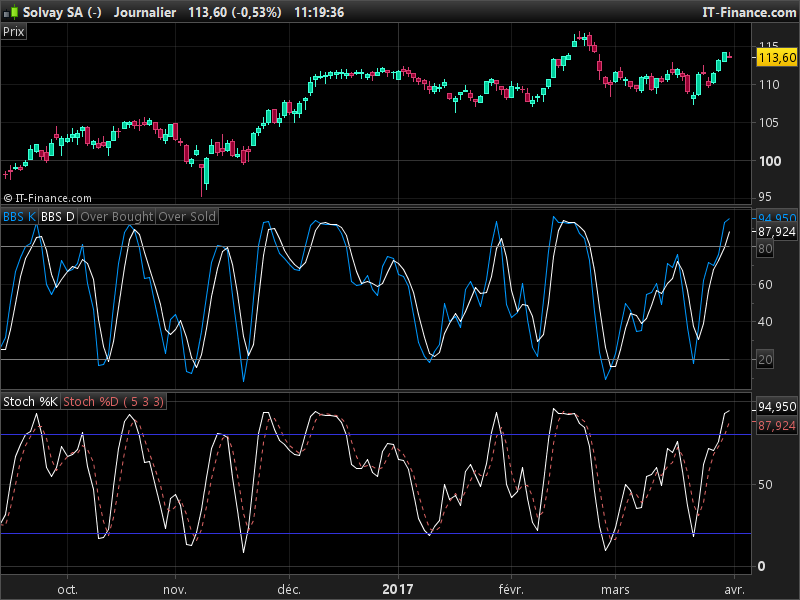
    I stopped using indicators a long time ago but stumbled over a “bar-based stochastics” (it isn’t mine but I didn’t write down where I got it from) which I find pretty amazing: It very accurately anticipates turning points, particularly when it turns south from overbought (above 80) resp north from oversold (below 20).

    Problem is that the indicator works best when put on a 5-6 times higher timeframe, i. e. if I want to see the turning points on a H1 chart, I need to put the indicator on a H5 chart (or daily and weekly chart). PRT doesn’t allow me to do so in the same chart so I need to open two, one with the H1 and one with the H5. Despite a large number of monitors, I simply don’t have the space to open a second chart for each of the instruments that I trade.

    My question is: Does anyone have a viable idea how to “simulate” the bar-based stochastic (settings 5, 3, 3) of a H5 chart in a H1 chart? I thought I could perhaps change the settings from 5, 3, 3, to higher numbers to simulate this but I got nowhere.  Is there a brilliant mind out there who can think of a solution?

    Thanks!!


    IF BARINDEX < K THEN
    RetK = 50
    RetD = 50
    ELSE
    
    minL = Lowest[K](Low)
    maxH = Highest[k](High)
    
    mins = Close - minL
    maxes = maxH - minL
    
    IF maxes > 0 THEN
    FastK = 100*mins/maxes
    ELSE
    FastK = 50
    ENDIF
    
    RetK = Average[SD](FastK)
    
    RetD = Average[D](RetK)
    
    ENDIF
    
    RETURN RetK COLOURED(0, 153, 255) as "BBS K", RetD COLOURED(255, 255, 255) as "BBS D", OB COLOURED(128, 128, 128) as "Over Bought", OS COLOURED(128, 128, 128) as "Over Sold"
    #30488 quote
    Nicolas
    Keymaster
    Master

    >> Please update your country flag in your profile. Thank you 🙂 <<

    This indicator’s code is the same as a normal stochastic, you can make comparison in your own platform like I did. About simulate the higher timeframe values of the indicator, the fast and easy way is to multiplicate the indicator period by how many current timeframe bars the higher timeframe has in 1 bar. So to get the H5 values in an H1 timeframe, you only need to multiplicate the H1 periods settings by 5. Of course it will not be as accurate as the real H5 informations..
    #30747 quote
    Juzz Me
    Participant
    New
    Thanks Nicolas, I really appreciate your input! You are right, the two indicators are largely the same but when you expand the timescale, the bar-based stochastics often turns 1-2 bars earlier than the conventional stochastics. I tried to simply multiply the %K value by 5 but, as you said, it’s just not the same. I’ll scratch my pretty head for a solution. Keep up the great job here!
Viewing 3 posts - 1 through 3 (of 3 total)
  • You must be logged in to reply to this topic.

Simulate higher time frame stochastics on lower time frame


ProBuilder: Indicators & Custom Tools

New Reply
Author
author-avatar
Juzz Me @juzz_me Participant
Summary

This topic contains 4 replies,
has 2 voices, and was last updated by Juzz Me

8 years, 10 months ago.

Topic Details
Forum: ProBuilder: Indicators & Custom Tools
Language: English
Started: 03/26/2017
Status: Active
Attachments: 1 files
Logo Logo
Loading...

