Good morning
To save myself I can’t figure out why this simple code needs an entry price when I want it to buy 1 lot at market.
I get the error message THE FOLLOWING VARIABLE IS UNDEFINED: ENTRYPRICE
Thanks for some pointers.
//Lady Luck by Flavia
// Define the trading time
TradingTime = 215900
// Define the profit target
ProfitTarget = 2
// Check if the current time is 21:59
if Time = TradingTime then
Buy 1 lot at market
endif
if LongOnMarket and (close – entryprice) >= ProfitTarget then
Sell 1 lot at market
endif
Try …
if LongOnMarket and (close – tradeprice) >= ProfitTarget then

Sell 1 lot at market
endif
 JS
JSParticipant
Senior
Hi @Trader Sab
You must replace the “EntryPrice” with “TradePrice”…
The “EntryPrice” is not a defined term in PRT so the code sees it as a variable that has no value… hence the error message…
//Lady Luck by Flavia

// Define the trading time
TradingTime = 215900

// Define the profit target
ProfitTarget = 2

// Check if the current time is 21:59
if Time = TradingTime then
Buy 1 lot at market
endif

if LongOnMarket and (close - TradePrice) >= ProfitTarget then

Sell 1 lot at market
endif
This code doesn’t open any positions as I have written it. I am really not sure why.
Do you have another suggestion_
Thanks very much for helping out
I am glad it worked for you. However I can’t get it to work. The script doesn’t open any trades on backtesting.
I have changed it but the system still doesn’t open any trades on backtesting.
Would you mind to send me the script you used?
Thank you very much
JSParticipant
Senior
Hi,
Do you use a TimeFrame of 1 minute (or less)…?
You are a champ, I was on the wrong timeframe. Was writing a script before for a hour chart.
Blond after all, thanks a million!
Hi JS
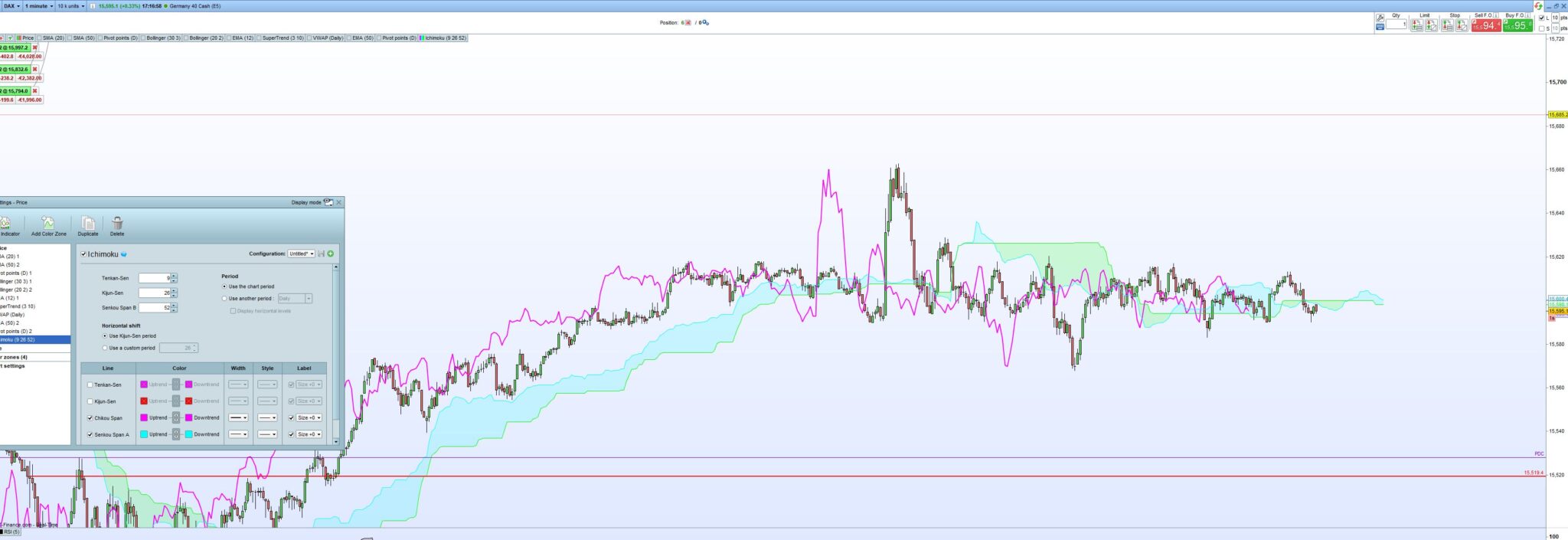
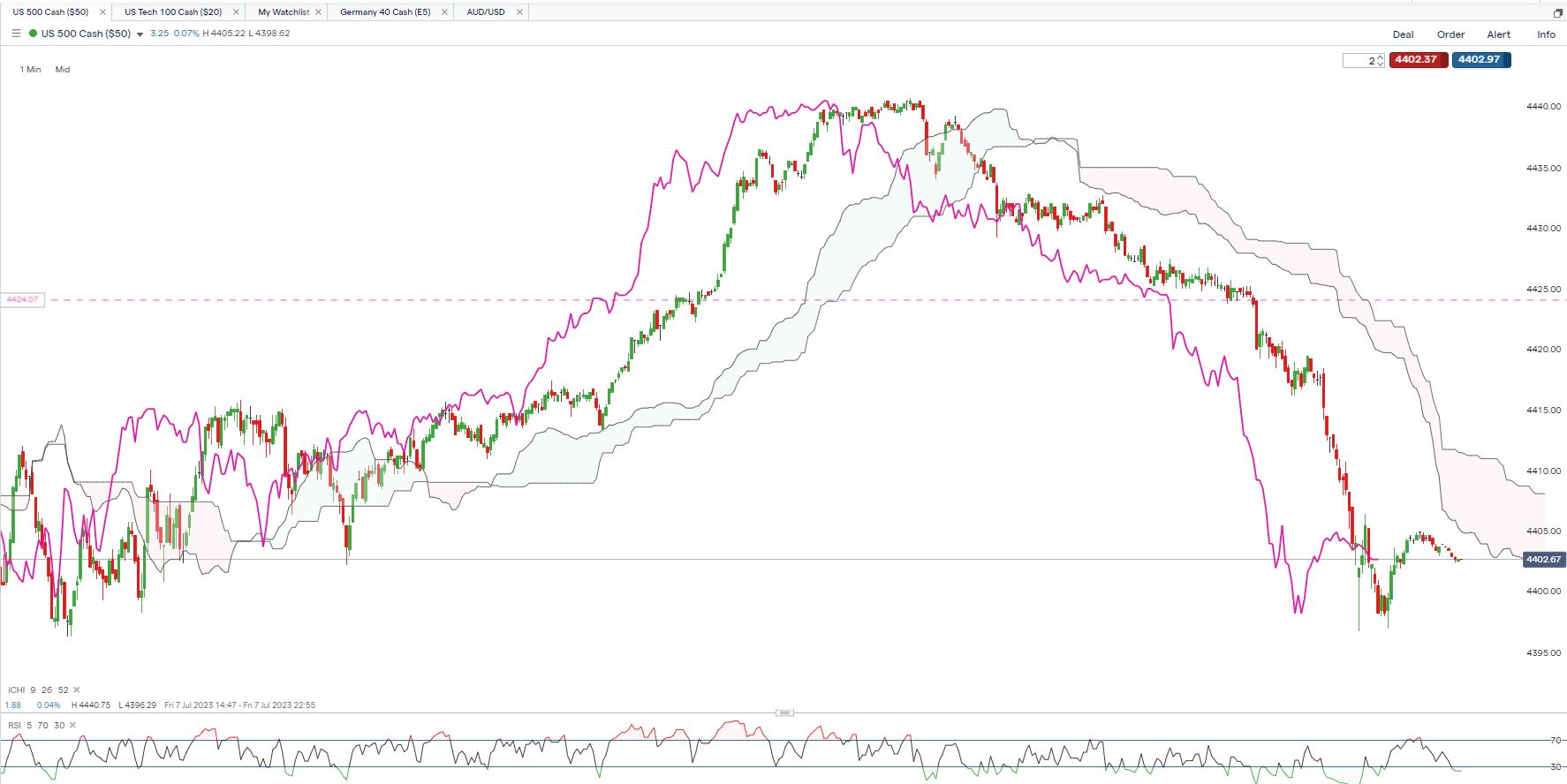
I was wondering if you could help me with again this very simple trading strategy that I would like to automate. On 1 min chart, buy long when ChikouSpan breaks above the cloud profit target 400 and trailing stoploss 25 (for an inital trial) might have to use 40 though. PRT doesn’t like my variable definition and the calculation of the Chikou Span. Highlighted in bold.
Here is my code so far:
// Definition of code parameters
DEFPARAM CumulateOrders = False // Cumulating positions deactivated
DEFPARAM FLATBEFORE = 083000
DEFPARAM FLATAFTER = 172900// Definition of code parameters
// Declare variables
var chikouSpan(0), cloudTop(0), cloudBottom(0);
var inTrade(false);
// Calculate Chikou Span value
chikouSpan = close[26];
// Calculate cloud boundaries
I attached the manal trade I did yesterday with this strategy. I would truely appreciate your support as I spent all morning trying to get it done.
Thanks a lot.
Best Regards
JSParticipant
Senior
<p style=”font-weight: 400;”>Hi Trader Sab,</p>
<p style=”font-weight: 400;”></p>
<p style=”font-weight: 400;”>I’ll have to figure this out because I’ve never used Ichimoku with anything that belongs there…</p>
<p style=”font-weight: 400;”>Probably pieces need to be programmed because I only come across a standard indicator in PRT…</p>
Many thanks, I don’t use the ichimoku cloud for anything else than when the line crosses over.
Sorry it didn’t copy all the code before:
// Definition of code parameters
DEFPARAM CumulateOrders = False // Cumulating positions deactivated
DEFPARAM FLATBEFORE = 083000
DEFPARAM FLATAFTER = 172900
// Declare variables
var chikouSpan(0), cloudTop(0), cloudBottom(0);
var inTrade(false);
// Calculate Chikou Span value
chikouSpan = close[26];
// Calculate cloud boundaries
cloudTop = max(tenkanSen[9], kijunSen[26]);
cloudBottom = min(tenkanSen[9], kijunSen[26]);
// Entry condition
if (ValueWhen(chikouSpan > cloudTop, chikouSpan, 1) = chikouSpan) and (not inTrade) then
buy at market;
inTrade = true;
ENDIF
// Exit condition
if (ValueWhen(chikouSpan < cloudBottom, chikouSpan, 1) = chikouSpan) and inTrade then
sell at market;
inTrade = false;
ENDIF
Stops and Targets
SET STOP $TRAILING 25
SET TARGET $PROFIT 400
I truly appreciate you having a look at it. Very thankful, as it is a great strategy but a bit tedious to look at on the 1 min chart. (I actually hate to trade 1 min charts!!!)
JSParticipant
Senior
Hi @Trader Sab
What signals do you want to use?
The “normal” Close above the cloud is Long?
The “normal” Close under the cloud is Short?
Both Long and Short or only Long?
Or are you using a different signal…?
Hi JS
I started coding it but could get the long signal working, so I asked you for help after many hours trying to figure it out.
Ultimately I like to use it long and short.
Here is today’s manual trade. First the long and then the short set up. It is really simple but very effective, especially if we have a clear trend.
Thank you so much for helping me out.
JSParticipant
Senior
Hi,
I think I have bad news, the Ichimoku Kinko Hijo is a great indicator but unsuitable to make it an automatic trading system.
This is because SenkouSpanA and SenkouSpanB are plotted in the future (BarIndex+26) and the ChikouSpan in the past (BarIndex-26).
Although I can calculate with previous values, for example Close[n], there is no possibility to calculate with shifted values, for example Close[n] shifted to BarIndex+26…
There is an Ichimoku trading system in the library, but it uses the wrong values for example:
SenkouSpanA = (Tenkansen[M]+Kijunsen[M])/2 //Default setting M = 26
While the correct calculation should be:
SenkouSpanA = (TenkanSen + KijunSen)/2 and shifted this to BarIndex+26
Perhaps someone else knows how to calculate with values that have shifted over time?