Showing different time period in backtest

Viewing 12 posts - 1 through 12 (of 12 total)
  • Author
    Posts
  • #145057 quote
    TempusFugit
    Participant
    Veteran

    Hi all,

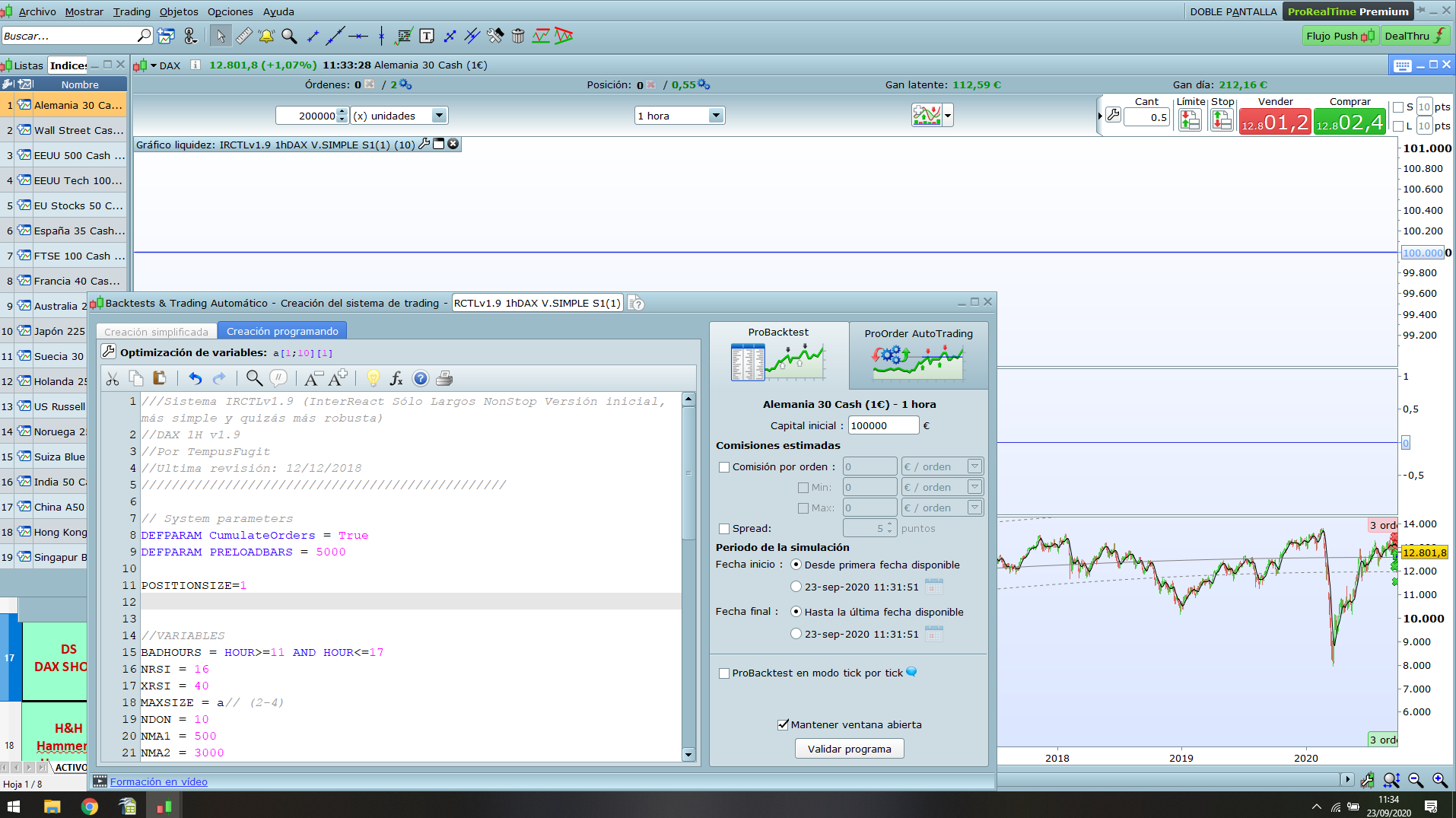
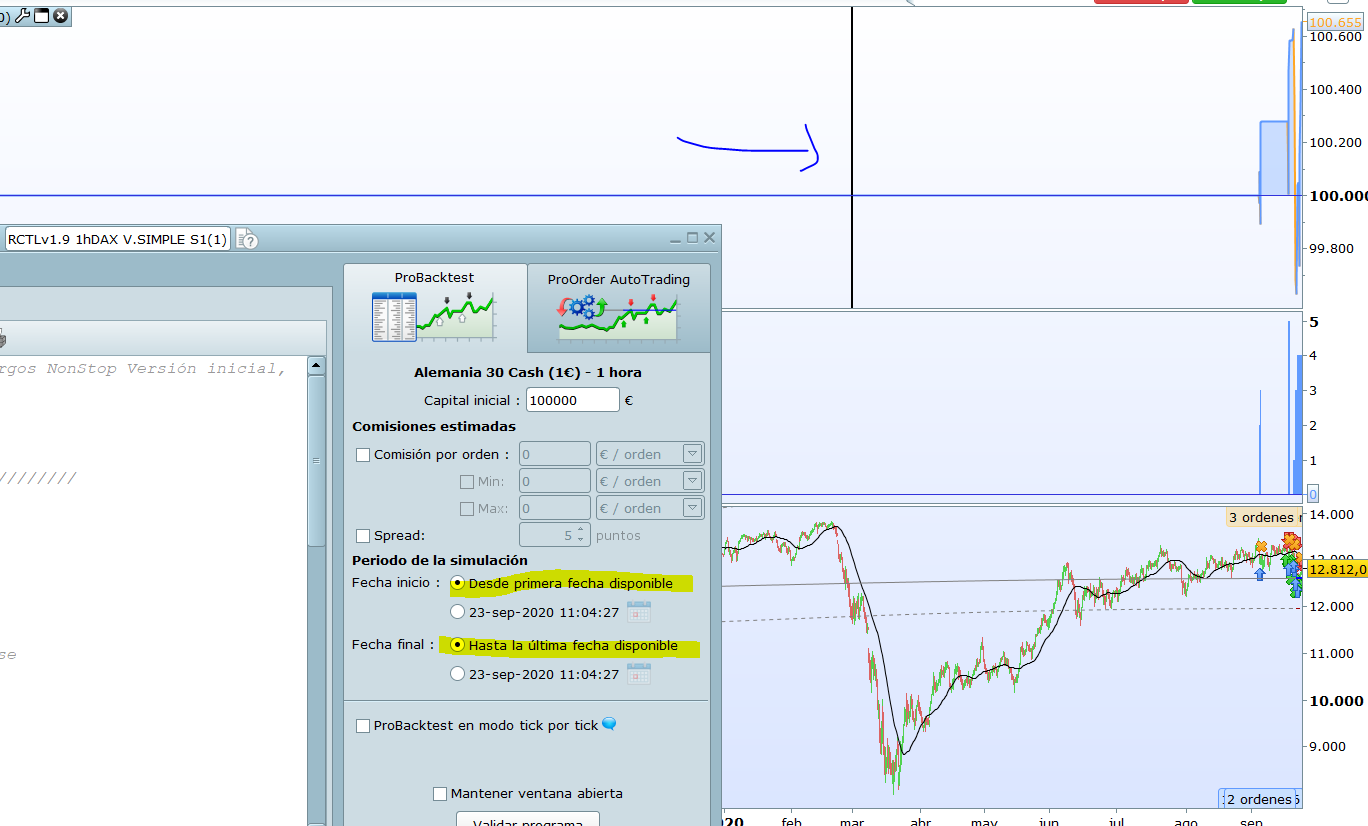
    I am experiencing another weird issue with the backtests the last week or so… Sometimes, just once in a while, when I run a backtests the results appear for a different time period I asked for. For instance I mark all the time period  available (200.000 candles) and it shows the results only for part of it. In that case if I try to run the backtest again it can show the right period or another different again and so on… It can be very frustrating when it happens, although only once in a while.

    In the image attached you can see an example of this happening

    Is this happening to anyone else?

    Does anybody know how to fix this issue? Maybe some stored memory in my computer???

    Thanks in advance

    Captura-4.png Captura-4.png
    #145060 quote
    robertogozzi
    Moderator
    Master

    The whole screen is not visible, so I cannot know exactly what may have been the cause.

    It happens at times when you have more than one chart open with different TF’s (mainly when you want to debug MTF strategies).

    I restart my backtest.

    #145064 quote
    Nicolas
    Keymaster
    Master

    Close all the windows and restart a new backtest and/or close the platform and restart from scratch.

    #145065 quote
    TempusFugit
    Participant
    Veteran

    Thanks Roberto,

    The image was just to understand what is the issue in case my words are not clear. Anyway here you have the whole screen… in this case no trades apperared, and everything is the same that the previous backtest… sometimes it just seem to  do nothing.

    Only one chart open and no MultiTimeframe,

    And it happens for different systems and actives, but just occasionally, it cannot be code related I think

    #145066 quote
    TempusFugit
    Participant
    Veteran

    Thanks Nicolas,

    I tried to restart the platform but not closing all the windows. I will try closing everything and restart the computer now

    Close all the windows and restart a new backtest and/or close the platform and restart from scratch.

    #145068 quote
    TempusFugit
    Participant
    Veteran

    Sorry I think I didn´t attached the image in the previous message. Here it is

    Captura-5.png Captura-5.png
    #145070 quote
    TempusFugit
    Participant
    Veteran

    I have to leave now but later I will continue working with PRT and I will tell you if the issue continue.

    Thanks

    #145075 quote
    robertogozzi
    Moderator
    Master

    Both your chart and backtest panel report “1 hora”.

    #145092 quote
    TempusFugit
    Participant
    Veteran
    Yes, the chart is TF1h, so?….

    Both your chart and backtest panel report “1 hora”.

    #145093 quote
    TempusFugit
    Participant
    Veteran

    The issue continues after restart everything. I hope it´s just a temporary problem, it doesn´t happen all the time but it´s very anoying.

    Thanks anyway mates 🙂

    #145143 quote
    Nicolas
    Keymaster
    Master

    Is the problem present with and without the “tick by tick” option?

    #145258 quote
    TempusFugit
    Participant
    Veteran

    Hi,

    I still don´t know the reason but at least I think I found WHEN it happens. I seems to only occur with “DEFPARAM CumulateOrders = true”  and at the same time the “tick by tick” option is NOT checked. Maybe you also need the 200.000 bars limit because for example in TF1h you won´t see the backtest before 2010

    These two options are not something I usually use in my backtests, but precisely the last days I´ve working with two systems with CumulateOrders=true and I guess that´s the reason is something I am experiencing now and not before

    Well, I guess that now I know how to avoid it, I  can put that into the “weird things of PRT” box and move on  🙂

    Thanks for the imputs

    robertogozzi and GraHal thanked this post
Viewing 12 posts - 1 through 12 (of 12 total)
  • You must be logged in to reply to this topic.

Showing different time period in backtest


ProOrder: Automated Strategies & Backtesting

New Reply
Author
Summary

This topic contains 11 replies,
has 3 voices, and was last updated by TempusFugit
5 years, 5 months ago.

Topic Details
Forum: ProOrder: Automated Strategies & Backtesting
Language: English
Started: 09/23/2020
Status: Active
Attachments: 2 files
Logo Logo
Loading...