Hi,
Is it possible to set the target based on volume change?
For example:
The idea is: Set the initial target to 10 points but when the volume reaches 10.000 points in the current bar, then the target changes to 25 points.
I tested with the code below:
//profit & loss
if Volume > 10000 then
SET TARGET PROFIT 25
else
SET TARGET PROFIT 10
With this code, the target is set based on the previous bar. So if the volume of the previous bar is > 10.000 then the trade
begins and the target is immediately set to 25.
But the idea is that, when the trade begins, the initial target is set for 10 points and if the volumes is > 10.000,
the target is automatically set to 25.
Is that possible?
There you go:
IF MyLongConditions THEN
   BUY 1 CONTRACT AT MARKET
   SET TARGET pPROFIT 10      //or SET TARGET PROFIT 10 * PipSize
ENDIF
IF Volume > 10000 THEN
   SET TARGET pPROFIT 25      //or SET TARGET PROFIT 25 * PipSize
ENDIF
Thanks @robertogozzi!
I testen and the code is working but when the trade starts, the Target is immediately set to 25. I think it is looking to the previous Volume candle.
Is the scenario below possible:
– The trade starts
– Target is set 10
– Volume is building up (1,2,10,28,89,136,1450,3378,6980….10.000) -> so the target is still 15
– Volume is > 10.000 ( f.e. 11289…)
– Target is changing to 25
I used the code mentioned below to test:
//order launch (example) would be set to any other entry conditions
c1 = close>close[1]

if c1 AND CLOSE>MA then
BUY 1 LOT AT MARKET
SET TARGET pPROFIT 10
ENDIF
IF Volume > 10000 THEN
SET TARGET pPROFIT 25
ENDIF


//order launch (example) would be set to any other entry conditions
c2 = close<close[1]

if c2 AND CLOSE<MA then
SELLSHORT 1 LOT AT MARKET
SET TARGET pPROFIT 10
ENDIF
IF Volume > 10000 THEN
SET TARGET pPROFIT 25
ENDIF
Did I something wrong?
Richard, did you actually check what the volume *is* ? If it is 100000 then it would right away trigger the condition in the same (current !) bar.
Besides that, it looks like you want the Target raised when the evolvement of the current bar (of say 10 minutes) depicts that. That is not possible, although working with Multiple Timeframes would allow for it indirectly.
I think it is looking to the previous Volume candle.
Thus nope (Yes actually 😉 ), if the volume of the previous candle is 100000, the Target would go to 25 right away. But all you can ever look at *is* the previous candle.
Your code is called at the end of the last candle.
So I suspect your volume is so high always, or at least during the moments you are testing this.
Graph Volume
Volume is the Volume traded in one bar of the chosen time frame, it can be 10000 from the start!
What do you mean by Volume is building up (1,2,10,28,89,136,1450,3378,6980….10.000) ?
Hi,
At the start of every trade, the volume starts with ‘0’.
What I mean is that if the volume raises, in the current bar, up to 10000 then it triggers to set the target from 10 to 25.
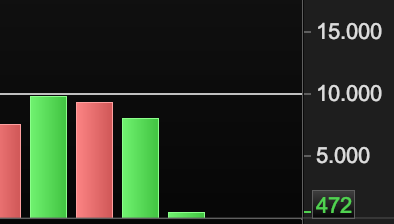
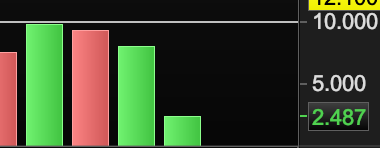
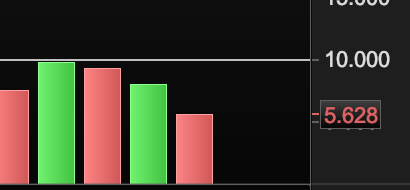
See attached screenshots of the volume bar.
Richard, Yes. But you can’t grab data from within one bar (cabdle). Please reread Roberto’s last post and mine …
Thanks @PeterSt, it is clear to me.
Maybe you mean one of these two:
//order launch (example) would be set to any other entry conditions
c1 = close>close[1]

if c1 AND CLOSE>MA then
   BUY 1 LOT AT MARKET
   SET TARGET pPROFIT 10
   MyVolume = Volume
ENDIF

//order launch (example) would be set to any other entry conditions
c2 = close<close[1]

if c2 AND CLOSE<MA then
   SELLSHORT 1 LOT AT MARKET
   SET TARGET pPROFIT 10
   MyVolume = Volume
ENDIF
//
IF (MyVolume + Volume) > 10000 THEN
   SET TARGET pPROFIT 25
ENDIF
//order launch (example) would be set to any other entry conditions
c1 = close>close[1]
MyVolume = MyVolume + Volume
if c1 AND CLOSE>MA then
   BUY 1 LOT AT MARKET
   SET TARGET pPROFIT 10
   MyVolume = 0
ENDIF
//order launch (example) would be set to any other entry conditions
c2 = close<close[1]
if c2 AND CLOSE<MA then
   SELLSHORT 1 LOT AT MARKET
   SET TARGET pPROFIT 10
   MyVolume = 0
ENDIF
//
IF OnMarket AND MyVolume > 10000 THEN
   SET TARGET pPROFIT 25
ENDIF
Hi @robertogozzi,
I have tested both codes and both codes works but when the volume is > 10000, the target don’t change in the current bar. The code looks only to the volume from the previous bar.
Thanks for your help!