hi
I do this small code, Do you know pls why my stop loss is executed when the price is not even reached and why a partial exit and not total?
that is the code :
myMACD = MACD[12,26,9](close)
long = myMACD crosses over 0

IF long THEN
BUY 1 CONTRACTS AT MARKET
ENDIF

//Stop for the whole orders
Set Stop Loss 20*pipsize

Graph PositionPrice AS "PositionPrice"
Graph PositionPrice - 20*pipsize AS "SL"
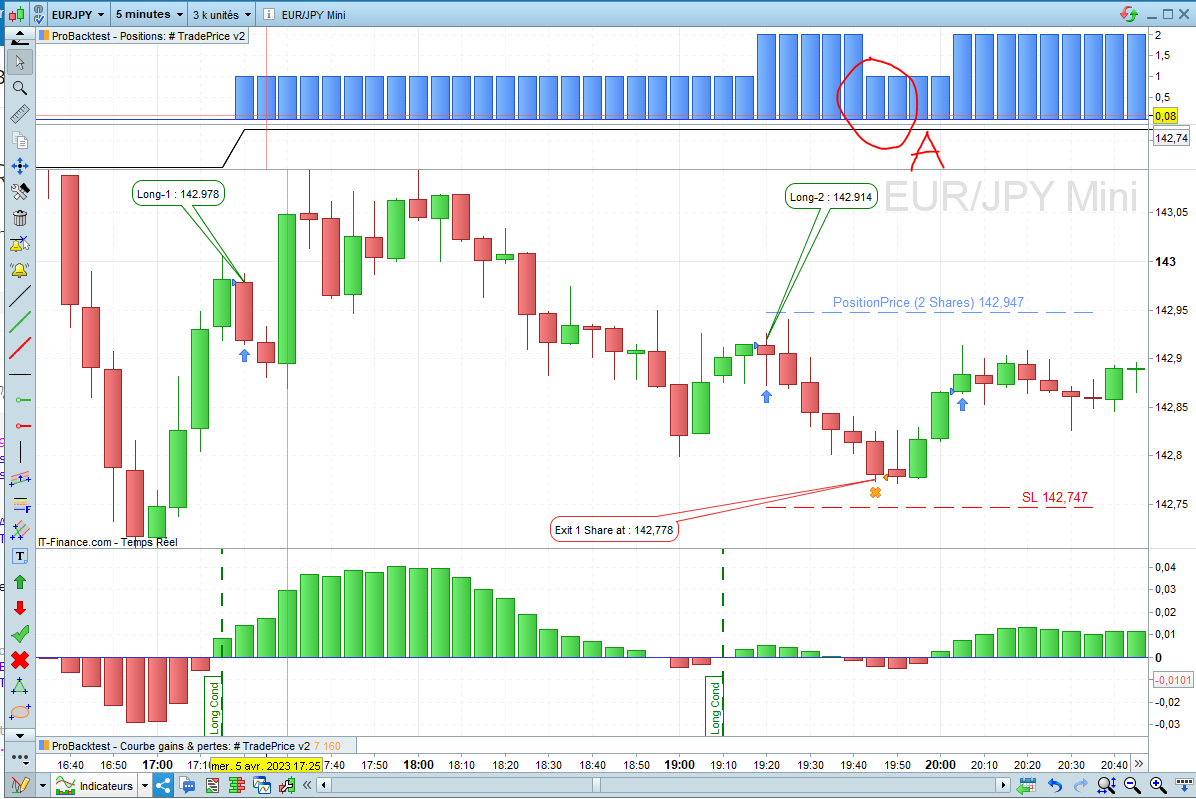
you can see on the photo :
Long-1 = 142,978
Long-2 = 142,914
So PositionPrice is = (142,978 + 142,914) / 2 = 142,946 Round by PRT to 142,947
PositionPrice = 142,947
SL = PositionPrice – 20 pips = 142,947 – 0,20 = 142,747
SL = 142,747
Exit 1 Shares = 142,778
you can see the SL is not reached but I have an exit at 142,778 ? and they sell only 1 shares, why not 2 shares (Totaly exit)
tks in advance for all your light 😃
 JS
JSParticipant
Master
Hi ZeroCafeine,
The Stop Loss is added to each individual order…
Long Order 1: 142,978
Stop Loss: 142.978 – 0.20 = 142.778
Exit first long at: 142,778
Long order2: 142,914
Stop Loss: 142,914 – 0,20 = 142,714
Exit second order at: 142,714
ok ok understand, so it’s better to get the tradeprice (or positionprice) and to create a Sell Stop Order at the price of TradePrice – SL*pipsize ? or somethink like that ?
or they have other solution ?
JSParticipant
Master
Hi,
I think this is best used:
Sell at PositionPrice-20*pipsize STOP
or use the new instruction:
SET STOP PRICE PositionPrice-20*pipsize
Tks for you too, I will do some test and post here the result,
how to if I want to control the quantity of selling in your case with this code ?, exemple I want to sell at stop the half quantity or 10 or 90% ?
ok tks you, So I tested you 2 solution and it’s working fine,
the
@JS solution, I am executed as a Sell (Normal sell at Stop Price), small triangle on the graph, I was able to control the quantity like this :
Sell CountOfPosition Shares at PositionPrice-20*pipsize STOP // JS
the
@Nicolas solution, I am executed as an Stop Loss, small cross on the graph, How can the quantity be controlled in this case?
Both solutions I suppose
@Nicolas’ solution is safer as it will take me out of the market anyway? Or am I wrong?
As for JS’s solution, is it possible that for X reason I won’t be executed and I’ll end up with open lines again at the next candle? Or am I wrong?
In any case, I would prefer using SET STOP PRICE as it should act as a “real” stoploss regarding the IG server (such as the classic SET STOP LOSS).
It is not possible to close partially with any of these instructions, you need a MARKET order to do that.
ok tks you, so with SET STOP PRICE it’s better andI I will be executed at the market but normally I will also have priority over the other pending limit orders in the broker’s order list ?
Is it better to sell a limit order below the market price at the moment T and that way at least I will be executed quickly at the market below the current price but not at any price (as the lowest of the wick 😅 ), I don’t know if I am clear enough in my explanation?
and also it is not possible to select the quantity in the case of SET STOP PRICE right ?
it’s great the programming, I think to a question and I find the answer by myself but at the same time I find myself with a new question 🤣
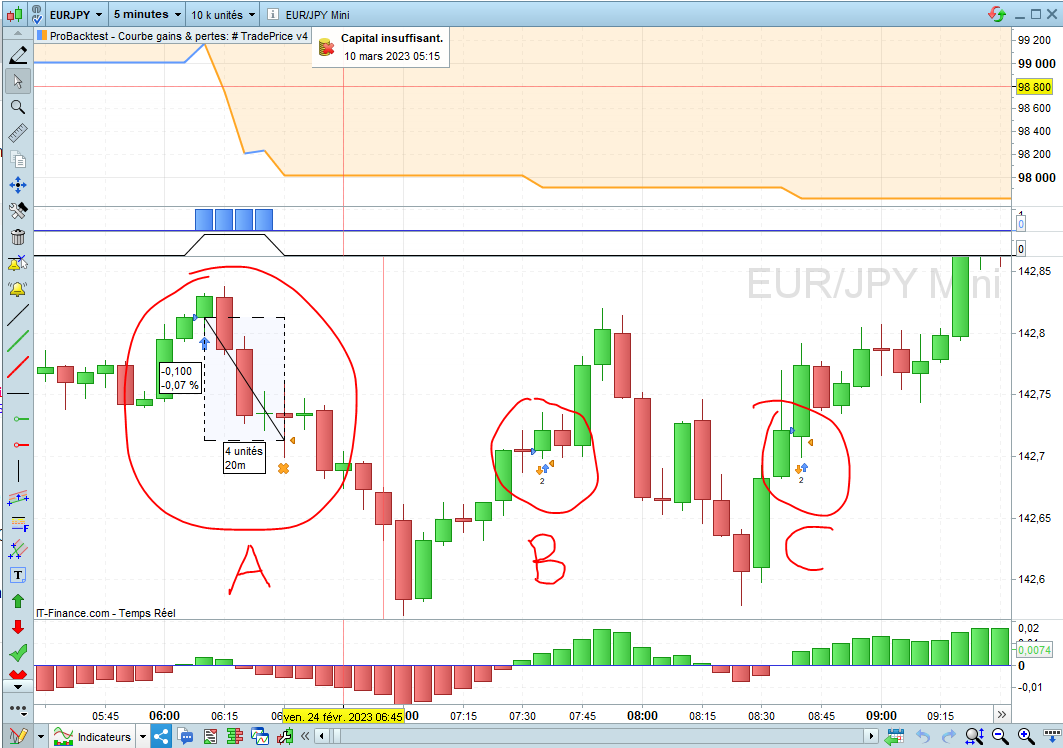
Why do I have buys and sells in the same candle?
I understand that in order to avoid this problem you have to create a stop loss order only when the buy condition is true like the following example:
myMACD = MACD[12,26,9](close)
long = myMACD crosses over 0

IF long THEN
BUY 1 CONTRACTS AT Close Limit
SET STOP PRICE PositionPrice-10*pipsize // Nico
ENDIF
on the other hand when the Stop is out of the IF condition as in the example above, you can see on the picture that I have a problem only in the point B and C but not on A :
myMACD = MACD[12,26,9](close)
long = myMACD crosses over 0

IF long THEN
BUY 1 CONTRACTS AT Close Limit
ENDIF

SET STOP PRICE PositionPrice-10*pipsize // Nico
tks you
Start going crazy with this candle by candle programming 😂,
I notice now that if my StopLoss order is executed candle by candle then I have a better execution for my exit, if I understand correctly the program will not consider the close of the current candle to execute my stop loss but it will check the price on smaller time units,
Whereas if my stop loss is only executed when the buy condition is true, in this case I notice that the StopLoss sale is only executed in the next candle when the Close of the previous candle is lower than my StopLoss price
So far I don’t have a problem understanding it, but I hope I’m not talking nonsense,
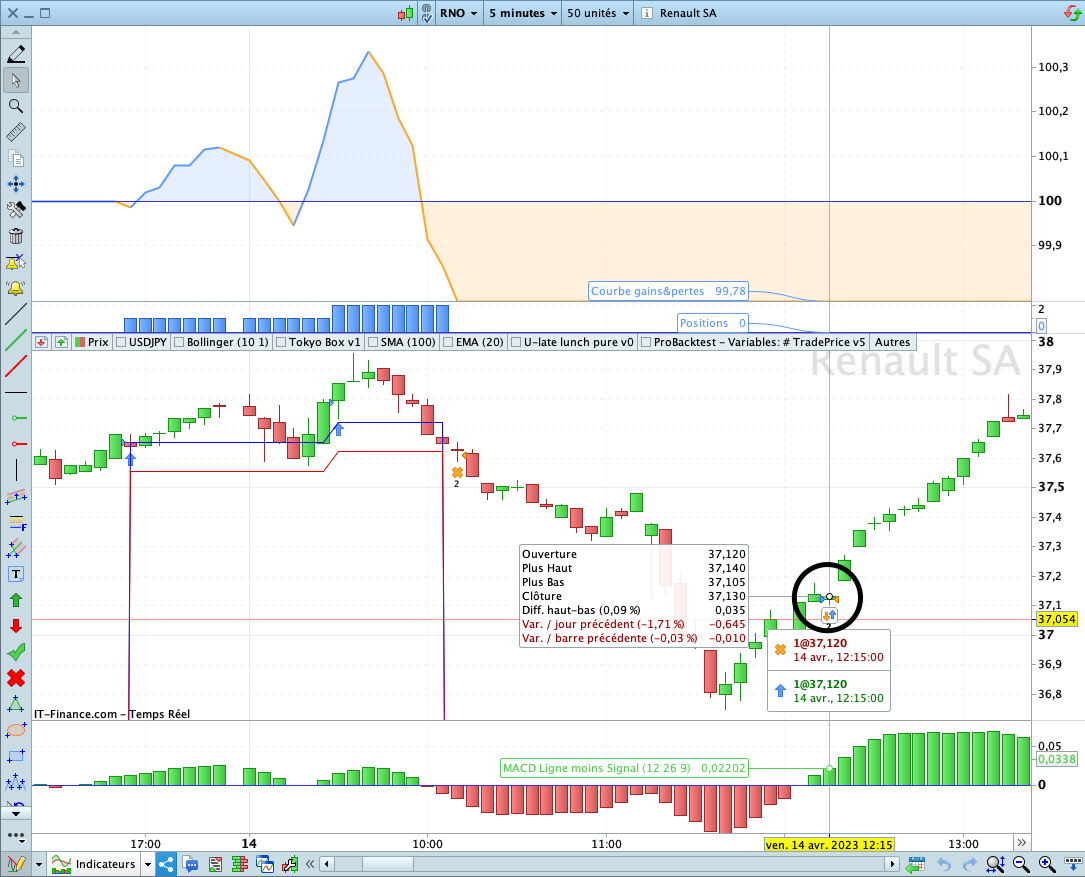
But what still bothers me is why I had an entry and an exit on the same candle?
entry and an exit on the same candle?
Entry Conditions = True and Exit Conditions = True … both in the same candle?
Very likely to occur with a Stop at 10 pips only?
what is the true Exit condition that you see pls ?,
Maybe you have a different eyes then me ?
Also the 10pips it’s just for the exemple, you can see in the photo just below inside the circle the both of entry and exit price are the same
I stopped from my bicycle for answer you 🤣🤣🤣, tks again for your answer 😊
Also the 10pips it’s just for the exemple
So what code are we discussing then
The screenshot with the circle shows entry and exit at the same price of 37120 … is that what we are discussing? If Yes, what code was driving that trade entry and exit?
Good bike, lovely evening, nice tree-lined avenue! 🙂
Hi,
if you use positionprice in the “set stop price” instruction sent at same time the buy order is sent, with no other ongoing long (as this code cumulates order) then your positionprice doesn’t exist yet (graph it you’ll see it at 0, and 0-10=-10), it will only exist after the buy is executed at open of next candle.
You can try this modification in the way you set the stop in your code:
if longonmarket then
SET STOP PRICE PositionPrice-10*pipsize
else
set stop price close-10*pipsize
endif
Also, you didn’t ask (and this is not related to the entry-exit in same candle query), but are you sure you want to send a pending order “at close limit”? Assuming this is for IG, if using pending order rather than at market order, you’d have to take into account minimum distance between price and pending order level for given asset…