Hi,
I need urgent help on this. My scripts start stopping during high volume in a market or sudden up & down movements.
I run this script with a time interval of 1 min. Every time there is a high volume the script stops buying or selling. It does not stop it just does not open a new position. I have run in the test environment with different time intervals and also these scripts stop at a high volume, like with an opening of a trading window.
Thanks for your help
Greeting, Hubert Simonis
DEFPARAM CumulateOrders = FALSE

// INPUT

STARTTIME = 000000

ENDTIME = 220000

EURO = 1.10415

EXPOEURO = 7500

PRO = 0.1
LOS = 0.2

// CALCULATIONS

MAXLOSS = ((EXPOEURO / 100) * -1)

EXPOSURE = (EXPOEURO * EURO)

TRAIL = LOS * (EXPOSURE /100)

NUMBEROFCONTRACTS = (EXPOSURE / Open ) * (1 / POINTVALUE)

// CONDITIONS

Condition0 = not onmarket and strategyprofit = 0
Condition1 = not onmarket and positionperf(1) >= 0 and longonmarket[1]
Condition2 = not onmarket and positionperf(1) < 0 and shortonmarket[1]
Condition3 = not onmarket and positionperf(1) < 0 and longonmarket[1]
Condition4 = not onmarket and positionperf(1) >= 0 and shortonmarket[1]
Condition5 = strategyprofit < MAXLOSS
Condition6 = currenttime >= starttime and currenttime <=endtime

if Condition0 and Condition6 or Condition1 and Condition6 or Condition2 and Condition6 then

Buy NUMBEROFCONTRACTS CONTRACTS AT MARKET

endif

if Condition3 and Condition6 or condition4 and Condition6 then

SELLSHORT NUMBEROFCONTRACTS CONTRACTS AT MARKET

endif

if Condition5 then
QUIT
endif

// STOPS

SET STOP $TRAILING TRAIL

SET TARGET %PROFIT PRO
I can’t see any reference to VOLUME, is there any missing code?
Hi Robert,
Thanks for your reply.
There is no volume statement in the script. The uploaded script is the whole script.
During a high volume it looks like orders get cancelled and no new order is created.
The script continues to run but without any others in the market.
Due to this I have no order when there is a nice rally.
Please let me know any advise.
Line 36 misses parenthesis for a correct test of any of the conditions.
For Forex pairs IG does not return volumes, at present.
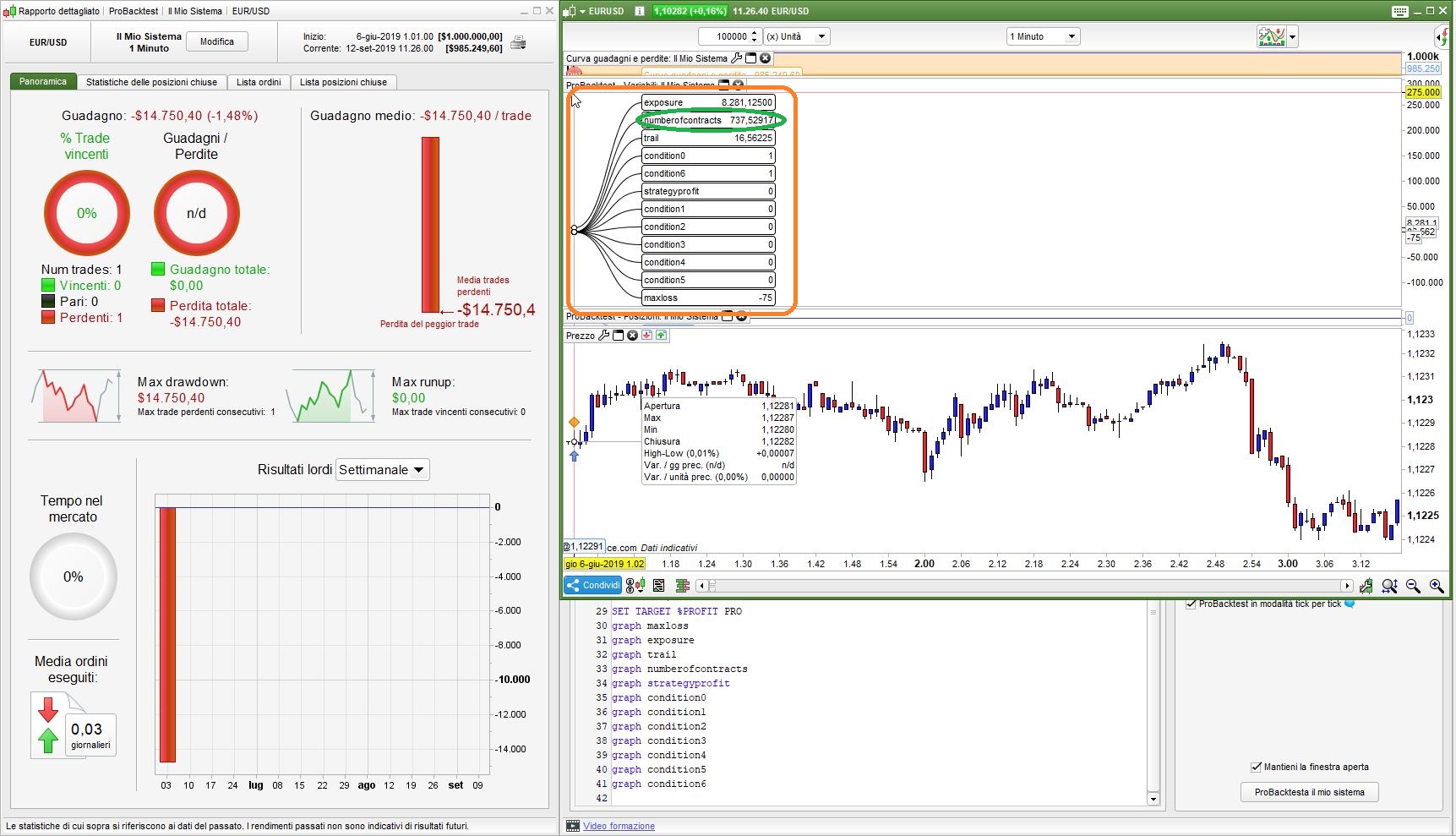
Your calculations of your position size seems to be incorrect, yielding over 737 contracts!
If you add these line at the end of your code:
graph pro
graph maxloss
graph exposure
graph trail
graph numberofcontracts
graph strategyprofit
graph condition0
graph condition1
graph condition2
graph condition3
graph condition4
graph condition5
graph condition6
you’ll be able to GRAPH all variables needed to debug your code to be able to detect errors, by watching the VARIABLES’ window in ProBackTest.
The problem is not in spikes, but in some of your calculations.
Hi Robert and Nicolas,
Big thank you for the tips (still learning how to code 🙂
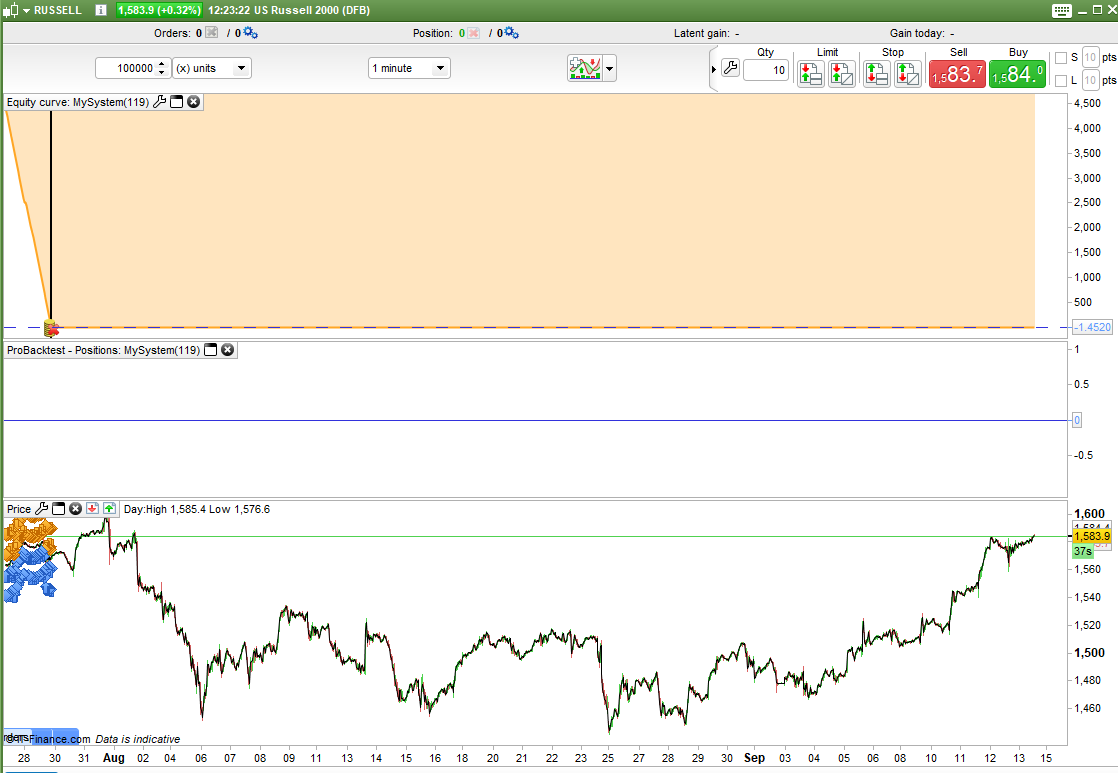
I am running the script on Russell 2000 and in this case the number of contract calculation is correct (0.53 contracts).
The results of the script are quite good I would say.
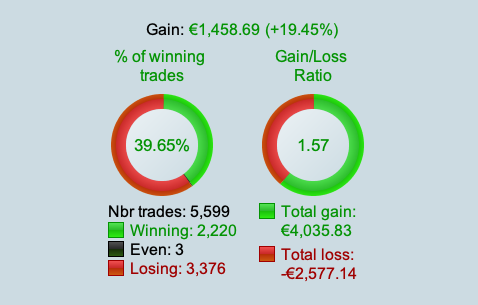
% Winning Trades 70%
Gain / Loss 1.17
Time interval 1 min
I would be surprised it the error is just the misses parenthesis but I have updated the script and run it in demo, so lets see what happens when Russell 2000 opens today (15:30 local time Netherlands).
Yesterday evening I created a simple version of the script to see if that runs better.
Would this script be ok ? Any tips ?
//-------------------------------------------------------------------------
// Main code : Index Mix R2000 - SIMPLE v1
//-------------------------------------------------------------------------
DEFPARAM CumulateOrders = FALSE
DEFPARAM FLATBEFORE = 000000
DEFPARAM FLATAFTER = 220000

Condition0 = not onmarket and strategyprofit = 0
Condition1 = not onmarket and positionperf(1) >= 0 and longonmarket[1]
Condition2 = not onmarket and positionperf(1) < 0 and shortonmarket[1]
Condition3 = not onmarket and positionperf(1) < 0 and longonmarket[1]
Condition4 = not onmarket and positionperf(1) >= 0 and shortonmarket[1]

if Condition0 or Condition1 or Condition2 then

Buy 0.53 CONTRACTS AT MARKET

endif

if Condition3 or condition4 then

SELLSHORT 0.53 CONTRACTS AT MARKET

endif

if strategyprofit < -75 then
QUIT
endif

SET STOP $TRAILING 16.665

SET TARGET $PROFIT 8.333
Greetings Hubert
Hi,
Update after the Russell 2000 trading window opening of today ; only the scripts that used the 5 sec timeframe survived the first few hours. Rest stopped opening orders.
I am fine with the 5 sec interval but i am still wondering how this is possible, any thoughts ?
I am updated my code in the following way.
Any tips are highly appreciated. Many thanks
DEFPARAM CumulateOrders = FALSE

timeframe (5 seconds)

// INPUT

STARTTIME = 000000

ENDTIME = 220000

EURO = 1.105222

EXPOEURO = 7500

PRO = 0.1
LOS = 0.2

// CALCULATIONS

MAXLOSS = ((EXPOEURO / 100) * -1.5)

EXPOSURE = (EXPOEURO * EURO)

TRAIL = LOS * (EXPOSURE /100)

NUMBEROFCONTRACTS = (EXPOSURE / Open ) * (1 / POINTVALUE)

// CONDITIONS

Condition0 = not onmarket and strategyprofit = 0
Condition1 = not onmarket and positionperf(1) >= 0 and longonmarket[1]
Condition2 = not onmarket and positionperf(1) < 0 and shortonmarket[1]
Condition3 = not onmarket and positionperf(1) < 0 and longonmarket[1]
Condition4 = not onmarket and positionperf(1) >= 0 and shortonmarket[1]
Condition5 = strategyprofit < MAXLOSS
Condition6 = currenttime >= starttime and currenttime < endtime

if (Condition0 and Condition6) or (Condition1 and Condition6) or (Condition2 and Condition6) then

Buy NUMBEROFCONTRACTS CONTRACTS AT MARKET

endif

if (Condition3 and Condition6) or (condition4 and Condition6) then

SELLSHORT NUMBEROFCONTRACTS CONTRACTS AT MARKET

endif

if Condition5 then
QUIT
endif

// STOPS

SET STOP $TRAILING TRAIL

SET TARGET %PROFIT PRO
Line 3 is useless, just run it from a 5-second TF, since you are not using multiple TF’s.
ProOrder needs 1 bar to update the (Long/Short)OnMarket status, so when a trade opens and closes on the same bar your conditions are impossible to be verified.
Thanks!
How could i resolve this ?
check if the trade is in same bar ? Barindex = tradeindex ?
Check not be OnMarket now and not to have been the previous bar, still STRATEGYPROFIT is different because a trade opened and closed on the same bar:
IF Not OnMarket AND Not OnMarket[1] AND StrategyProfit <> StrategyProfit[1] THEN
 . //do whatever you need to
ENDIF
thanks, this helps for the performance of the last trade but I can’t define if this trade was long or short.
Any suggestion ?
Thanks, Hubert
Hi Robert,
I worked till late on my script and finally I found it out.
The system doesn’t get stuck anymore and the back test results are very good (last 2 weeks) but also in the very bear week of 26 August.
DEFPARAM CumulateOrders = FALSE

// Russell 2000
// Timeframe 1 min

// INPUT

STARTTIME = 000000

ENDTIME = 220000

EURO = 1.10989

EXPOEURO = 7500

PRO = 0.04
LOS = 1.5

// CALCULATIONS

MAXLOSS = ((EXPOEURO / 100) * -5)

EXPOSURE = (EXPOEURO * EURO)

TRAIL = LOS * (EXPOSURE /100)

NUMBEROFCONTRACTS = (EXPOSURE / Open ) * (1 / POINTVALUE)

// CONDITIONS

NOTTRADING = not onmarket
WINDOW = currenttime >= starttime and currenttime <= endtime
SAMEBAR = tradeindex = barindex
OTHERBAR = tradeindex < barindex
MOREPROFIT = strategyprofit >= strategyprofit[1]
LESSPROFIT = strategyprofit < strategyprofit[1]
NOPROFIT = strategyprofit = 0
LASTLONG = longonmarket[1]
LASTSHORT = shortonmarket[1]

CURRENTshort = (Average[20](close) >= Average[50](close))
CURRENTlong = (Average[20](close) < Average[50](close))

FIRSTORDER = NOTTRADING and window and NOPROFIT

CONTINUELONG = NOTTRADING and window and OTHERBAR and MOREPROFIT and LASTLONG
SWITCHLONG = NOTTRADING and window and OTHERBAR and LESSPROFIT and LASTSHORT
SWITCHSHORT = NOTTRADING and window and OTHERBAR and LESSPROFIT and LASTLONG
CONTINUESHORT = NOTTRADING and window and OTHERBAR and MOREPROFIT and LASTSHORT

CONTINUESAMEBAR = NOTTRADING and window and SAMEBAR

CONTINUELONGINBAR = CONTINUESAMEBAR and CURRENTLONG
CONTINUESHORTINBAR = CONTINUESAMEBAR and CURRENTSHORT

if not firstorder and not continuelong and not switchlong and not switchshort and not continueshort and not continuelonginbar and not continueshortinbar then
CONTINUELONG = NOTTRADING and window and OTHERBAR and CURRENTlong
CONTINUESHORT = NOTTRADING and window and OTHERBAR and CURRENTshort
endif


if FIRSTORDER or CONTINUELONG or SWITCHLONG or CONTINUELONGINBAR then

Buy NUMBEROFCONTRACTS CONTRACTS AT MARKET

endif

if SWITCHSHORT or CONTINUESHORT or CONTINUESHORTINBAR then

SELLSHORT NUMBEROFCONTRACTS CONTRACTS AT MARKET

endif

if strategyprofit < MAXLOSS then
QUIT
endif

// STOPS

SET STOP $TRAILING TRAIL

SET TARGET %PROFIT PRO

//graph window
//graph NOTTRADING
//graph OTHERBAR
//graph SAMEBAR
//graph MOREPROFIT
//graph LESSPROFIT
//graph LASTLONG
//graph LASTSHORT
//graph FIRSTORDER
//graph CONTINUELONG
//graph SWITCHLONG
//graph CONTINUELONGINBAR
//graph SWITCHSHORT
//graph CONTINUESHORT
//graph CONTINUESHORTINBAR
With orders AT MARKET it’s easy, if you place a BUY order then you know it’s a LONG trade, if it’s a SELLSHORT then you place a SHORT order.
If it’s a pending order you can reference STRATEGYPROFIT to tell whether it was a winning or losing strategy, then check the prior two TRADEPRICE to tell if it was a Long or a Short trade.
How are you getting any results? It runs out of money and quits almost immediately. If I remove the QUIT then I can see that it just sucks the account dry.
I tested with 0.3 spread and tick by tick on.