


Screener For Multiple TF’s

Viewing 3 posts - 1 through 3 (of 3 total)
  • Author
    Posts
  • #206028 quote
    Paulg999Paulg999
    Participant
    New

    Hi,


    Is someone able to help me with a multi-timeframe Pro-screener?


    Longs are essentially as described below with the shorts in reverse.

    55ema > 144ema

    55ema < 21sma

    42sma > 55ema

    42sma < 21sma

    8ema < 21sma


    I have created a basic version below but I think it will require some modification if my questions are to be answered.


    Questions

    1. I want the screener to advise which Timeframe meets the condition.
    2. Can the screener also advise if it is Long or Short?
    3. I would like the screener to work for the following timeframes 5m, 15, & 1Hr


    Any help is greatly appreciated.


    //Long

    Timeframe(5 minute)


    indicator1 = ExponentialAverage[55](close)

    indicator2 = ExponentialAverage[144](close)

    c1 = (indicator1 > indicator2)


    indicator3 = ExponentialAverage[55](close)

    indicator4 = Average[21](close)

    c2 = (indicator3 < indicator4)


    indicator5 = Average[42](close)

    indicator6 = ExponentialAverage[55](close)

    c3 = (indicator5 > indicator6)


    indicator7 = Average[42](close)

    indicator8 = Average[21](close)

    c4 = (indicator7 < indicator8)


    indicator9 = ExponentialAverage[8](close)

    indicator10 = Average[21](close)

    c5 = (indicator9 < indicator10)


    SCREENER[c1 AND c2 AND c3 AND c4 AND c5]


    //Short

    Timeframe(5 minute)


    indicator1 = ExponentialAverage[55](close)

    indicator2 = ExponentialAverage[144](close)

    c1 = (indicator1 < indicator2)


    indicator3 = ExponentialAverage[55](close)

    indicator4 = Average[21](close)

    c2 = (indicator3 < indicator4)


    indicator5 = Average[42](close)

    indicator6 = ExponentialAverage[55](close)

    c3 = (indicator5 < indicator6)


    indicator7 = Average[42](close)

    indicator8 = Average[21](close)

    c4 = (indicator7 < indicator8)


    indicator9 = ExponentialAverage[8](close)

    indicator10 = Average[21](close)

    c5 = (indicator9 > indicator10)


    SCREENER[c1 AND c2 AND c3 AND c4 AND c5]

    #206054 quote
    robertogozzirobertogozzi
    Moderator
    Legend

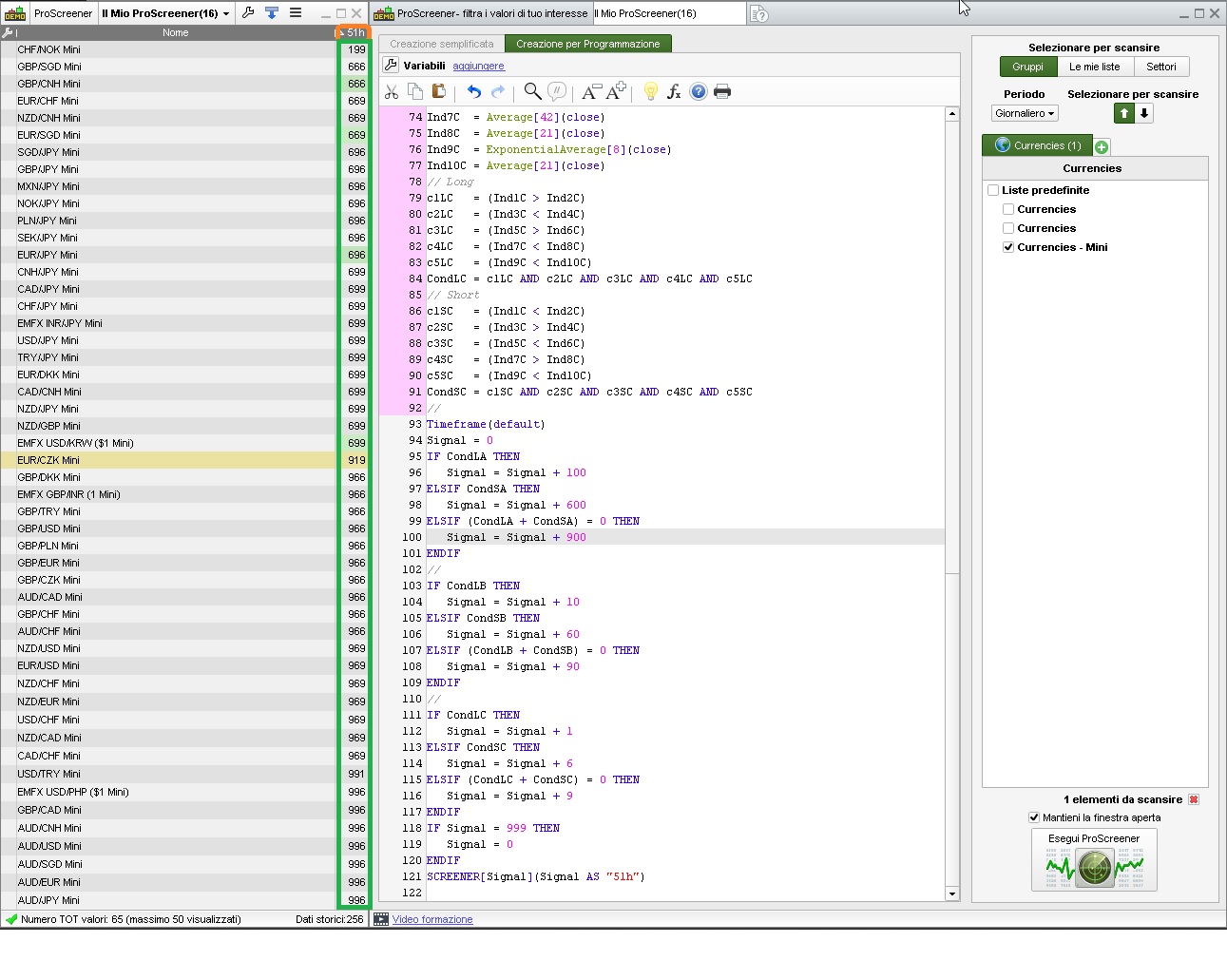
    There you go:

    // F stands for  5-min  TF
    // 1 stands for 15-min  TF
    // h stands for  1-hour TF
    //
    // Returns 9 for each TF when no signal is met,1-2-3=Long, 6-7-8=Short
    // Timeframe      5m  15m  1h
    //      Long       1   2    3
    //     Short       6   7    8
    //
    // examples:
    //    198   (5min=Long, 15min=none,  1h=Short)
    //    929   (5min?none, 15min=Short, 1h=none)
    //    999   none in all TFs
    //
    Timeframe(5 minute)
    Ind1A  = ExponentialAverage[55](close)
    Ind2A  = ExponentialAverage[144](close)
    Ind3A  = ExponentialAverage[55](close)
    Ind4A  = Average[21](close)
    Ind5A  = Average[42](close)
    Ind6A  = ExponentialAverage[55](close)
    Ind7A  = Average[42](close)
    Ind8A  = Average[21](close)
    Ind9A  = ExponentialAverage[8](close)
    Ind10A = Average[21](close)
    // Long
    c1LA   = (Ind1A > Ind2A)
    c2LA   = (Ind3A < Ind4A)
    c3LA   = (Ind5A > Ind6A)
    c4LA   = (Ind7A < Ind8A)
    c5LA   = (Ind9A < Ind10A)
    CondLA = c1LA AND c2LA AND c3LA AND c4LA AND c5LA
    // Short
    c1SA   = (Ind1A < Ind2A)
    c2SA   = (Ind3A > Ind4A)
    c3SA   = (Ind5A < Ind6A)
    c4SA   = (Ind7A > Ind8A)
    c5SA   = (Ind9A < Ind10A)
    CondSA = c1SA AND c2SA AND c3SA AND c4SA AND c5SA
    //
    Timeframe(15 minute)
    Ind1B  = ExponentialAverage[55](close)
    Ind2B  = ExponentialAverage[144](close)
    Ind3B  = ExponentialAverage[55](close)
    Ind4B  = Average[21](close)
    Ind5B  = Average[42](close)
    Ind6B  = ExponentialAverage[55](close)
    Ind7B  = Average[42](close)
    Ind8B  = Average[21](close)
    Ind9B  = ExponentialAverage[8](close)
    Ind10B = Average[21](close)
    // Long
    c1LB   = (Ind1B > Ind2B)
    c2LB   = (Ind3B < Ind4B)
    c3LB   = (Ind5B > Ind6B)
    c4LB   = (Ind7B < Ind8B)
    c5LB   = (Ind9B < Ind10B)
    CondLB = c1LB AND c2LB AND c3LB AND c4LB AND c5LB
    // Short
    c1SB   = (Ind1B < Ind2B)
    c2SB   = (Ind3B > Ind4B)
    c3SB   = (Ind5B < Ind6B)
    c4SB   = (Ind7B > Ind8B)
    c5SB   = (Ind9B < Ind10B)
    CondSB = c1SB AND c2SB AND c3SB AND c4SB AND c5SB
    //
    Timeframe(1 hour)
    Ind1C  = ExponentialAverage[55](close)
    Ind2C  = ExponentialAverage[144](close)
    Ind3C  = ExponentialAverage[55](close)
    Ind4C  = Average[21](close)
    Ind5C  = Average[42](close)
    Ind6C  = ExponentialAverage[55](close)
    Ind7C  = Average[42](close)
    Ind8C  = Average[21](close)
    Ind9C  = ExponentialAverage[8](close)
    Ind10C = Average[21](close)
    // Long
    c1LC   = (Ind1C > Ind2C)
    c2LC   = (Ind3C < Ind4C)
    c3LC   = (Ind5C > Ind6C)
    c4LC   = (Ind7C < Ind8C)
    c5LC   = (Ind9C < Ind10C)
    CondLC = c1LC AND c2LC AND c3LC AND c4LC AND c5LC
    // Short
    c1SC   = (Ind1C < Ind2C)
    c2SC   = (Ind3C > Ind4C)
    c3SC   = (Ind5C < Ind6C)
    c4SC   = (Ind7C > Ind8C)
    c5SC   = (Ind9C < Ind10C)
    CondSC = c1SC AND c2SC AND c3SC AND c4SC AND c5SC
    //
    Timeframe(default)
    Signal = 0
    IF CondLA THEN
       Signal = Signal + 100
    ELSIF CondSA THEN
       Signal = Signal + 600
    ELSIF (CondLA + CondSA) = 0 THEN
       Signal = Signal + 900
    ENDIF
    //
    IF CondLB THEN
       Signal = Signal + 10
    ELSIF CondSB THEN
       Signal = Signal + 60
    ELSIF (CondLB + CondSB) = 0 THEN
       Signal = Signal + 90
    ENDIF
    //
    IF CondLC THEN
       Signal = Signal + 1
    ELSIF CondSC THEN
       Signal = Signal + 6
    ELSIF (CondLC + CondSC) = 0 THEN
       Signal = Signal + 9
    ENDIF
    IF Signal = 999 THEN
       Signal = 0
    ENDIF
    SCREENER[Signal](Signal AS "51h")
    x-10.jpg x-10.jpg My-Screener.itf
    #206277 quote
    Paulg999Paulg999
    Participant
    New

    Thank you so much.

    Have been very busy leading up to Christmas & only just got a chance to check emails.

    Have a wonderful Christmas.


    KR

    Paul.

Viewing 3 posts - 1 through 3 (of 3 total)
  • You must be logged in to reply to this topic.

ProRealAI ProRealAI New

Stuck on this ProBuilder code?

Describe what this topic is trying to build, in plain English, and ProRealAI writes the ProRealTime™ indicator, screener or system for you.

Available in 7 languages
Try ProRealAI

Screener For Multiple TF’s


ProScreener: Market Scanners & Detection

New Reply
Author
author-avatar
Paulg999 @paulg999 Participant
Summary

This topic contains 2 replies,
has 2 voices, and was last updated by Paulg999Paulg999

3 years, 9 months ago.

Topic Details
Forum: ProScreener: Market Scanners & Detection
Language: English
Started: 12/19/2022
Status: Active
Attachments: 2 files
ProRealCode ProRealCode
Loading...

