






SCALPING INDICATOR

Viewing 15 posts - 16 through 30 (of 56 total)
  • Author
    Posts
  • #56006 quote
    Madrosat
    Participant
    Master

    Hello Ale

    I would like to integrate in a strategy the 2 candles following the arrow like zones of no sale when the arrow is down and inversely the 2 candles following the arrow of the top like a zone of non-purchase
    How is it possible
    He does not repaint I hope ??
    the v3 returns me an error message !!!

    #56009 quote
    ALE
    Moderator
    Master

    Hi Madrosat
    could you explain it with your code?
    Thanks
    Ale

    #56013 quote
    Nicolas
    Keymaster
    Master

    He does not repaint I hope ??

    Once again, there’s no repainting code in prorealtime.

    #56025 quote
    ALE
    Moderator
    Master

    What’s repainting?🤔

    #56030 quote
    noisette
    Participant
    Veteran

    A repainting indicator means an indicator calculted with later candles instead of previous candles.

    You’ll find lot of these “magic indicator” tiping “repainting indicator” in google.

    Thank you for the code.

    ALE thanked this post
    #56031 quote
    Madrosat
    Participant
    Master

    Repainting indicator is an indicator that keeps changing its values. Repainting indicators always use future data (bars to the right) to come up with values and entry signals. This is how repainting indicators make sure their historical entry and exit signals look extremely accurate and flawless.

    Obviously the indicators that repaint are not usable in automatic trading.
    What I just wanted to know is in your code how can I get the signal that gives the arrow to use it in different automatic strategies ??

    ALE thanked this post
    #56042 quote
    ALE
    Moderator
    Master

    @madrosat

    I’ll make an explanation about signal to simplify work of all!

    asap

    thanks

    #56061 quote
    ALE
    Moderator
    Master

    @Madrosat

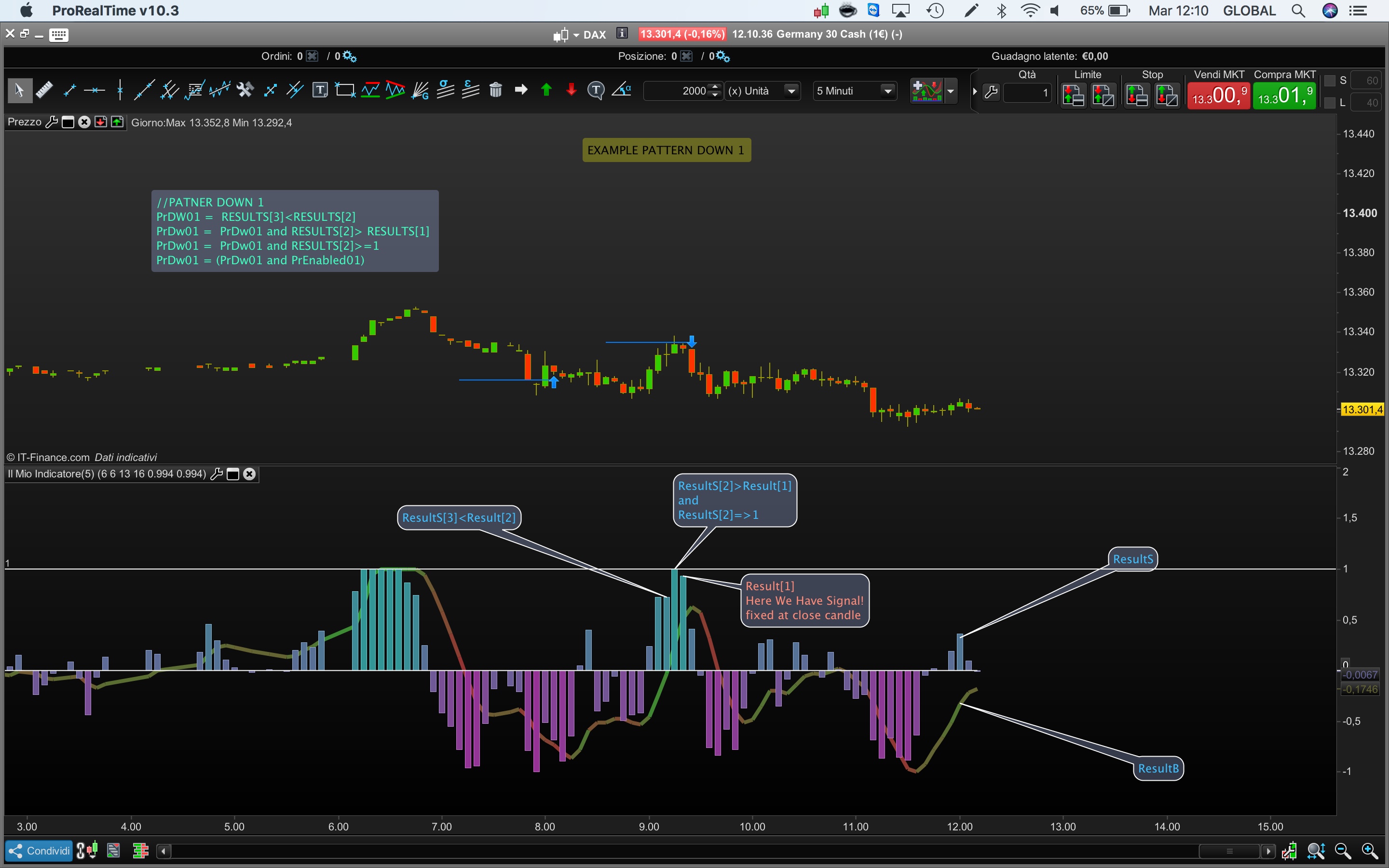
    I’ve make an explanation with the attached pictures, I’ve attached oscillator used in the Scalping Indicator. The oscillator is a modified version of Universal of John Elehrs : https://www.prorealcode.com/prorealtime-indicators/universal-oscillator-john-ehlers/

    Please don’t hesitate to ask more questions

    Thanks

    Ale

    GraHal thanked this post
    EX_P01_DOWN.jpeg EX_P01_DOWN.jpeg Modiefied-Universal-Oscillator.itf
    #56070 quote
    Nicolas
    Keymaster
    Master

    Since the pattern is detected on a bounded oscillator, you could try to add price confirmation (bullish / bearish candlesticks formation, MA slope, etc.).

    ALE thanked this post
    #56085 quote
    JR1976
    Participant
    Veteran

    HI Ale ,

    sorry but after an import of  SCALPING_IND vers 3 ,  doesn’t appears any oscillator or something else .

    Could be some error in the code ?

    #56089 quote
    ALE
    Moderator
    Master

    Scalping indicator v3 is not an oscillator. Have you follow inatruction in First page?

    #56133 quote
    JR1976
    Participant
    Veteran

    Hi ALe , indicator ?

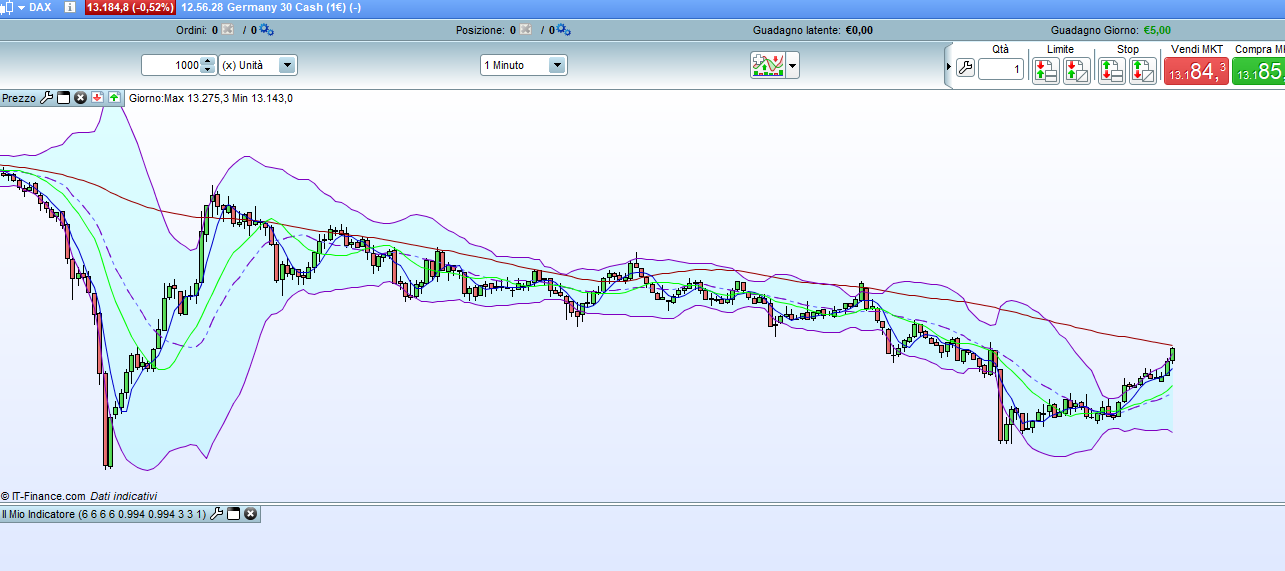
    I’am start  as indicator , After set the variable ,  this the screenshot

    ???

    il-mio-indicatore.png il-mio-indicatore.png
    #56138 quote
    ALE
    Moderator
    Master

    Try with it, it the same but on my platform it work

    SCALPING-INDICATOR-V3_COPY.itf
    #56500 quote
    JR1976
    Participant
    Veteran

    OK ora funziona


    Codice interessante

    Grazie

    ALE thanked this post
    #56504 quote
    ALE
    Moderator
    Master

    glad to hear it

Viewing 15 posts - 16 through 30 (of 56 total)
  • You must be logged in to reply to this topic.

SCALPING INDICATOR


ProOrder: Automated Strategies & Backtesting

New Reply
Author
author-avatar
ALE @aleale Moderator
Summary

This topic contains 55 replies,
has 15 voices, and was last updated by ALE

7 years, 8 months ago.

Topic Details
Forum: ProOrder: Automated Strategies & Backtesting
Language: English
Started: 12/16/2017
Status: Active
Attachments: 21 files
Logo Logo
Loading...
