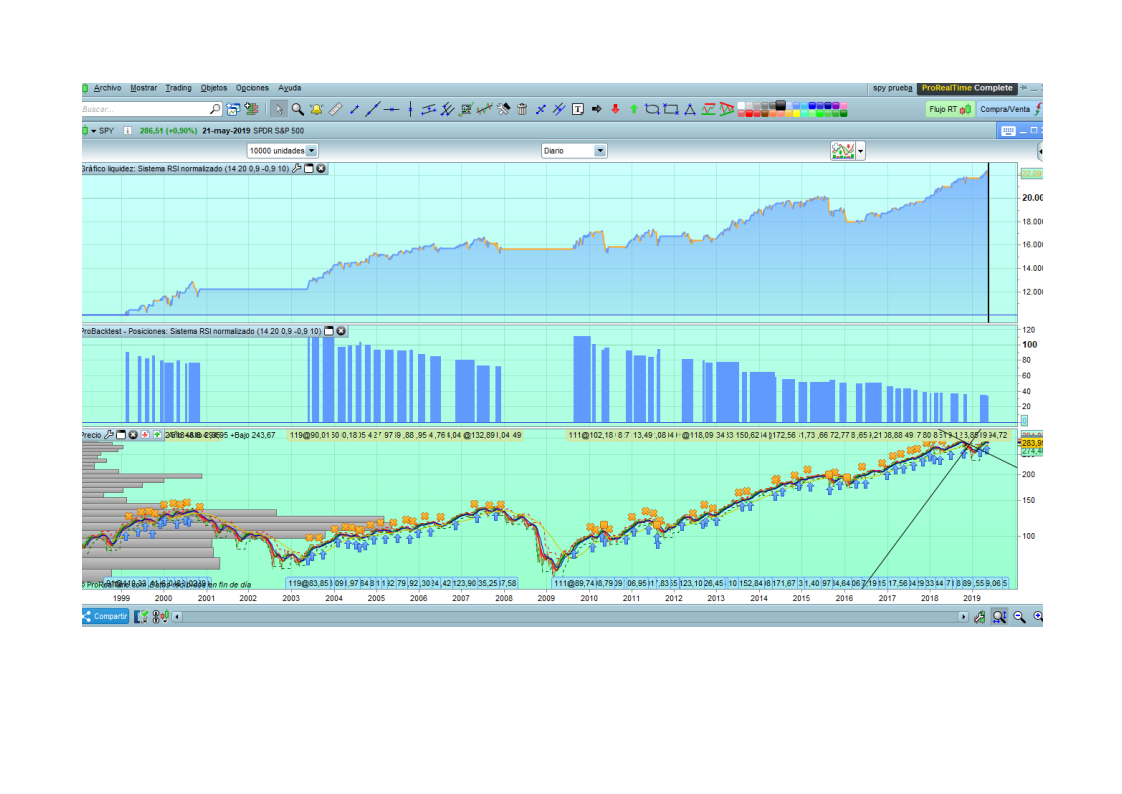
“RSI normalizado” System about RSI indicator, based on SPY.

Viewing 14 posts - 1 through 14 (of 14 total)
  • Author
    Posts
  • #99087 quote
    Milochenta
    Participant
    New
    #99143 quote
    robertogozzi
    Moderator
    Master

    What is this topic all about?

    What’s your question?

    #99147 quote
    Nicolas
    Keymaster
    Master

    @milochenta

    Thanks for that nice picture, but could you please tell us more about your system please? 🙂

    #99212 quote
    Milochenta
    Participant
    New

    Sorry but I have edited the post badly. Now you can see it well in another new post

    this is the code…

    var….R=14, p=20, a= 0.9, b= -0.9, and c[5,10][1] this is optimizable

    miRSI = RSI[r](close)
    bolDn = BollingerDown[p](miRSI)
    bolUp = BollingerUp[p](miRSI)
    // lineaUp = a
    // lineaDown = bRSIn = (((miRSI - bolDn) / (bolUp - bolDn))*2)-1
    
    filtro1 = average [30]>average[250]
    
    // Condiciones para entrada de posiciones largas
    IF NOT LongOnMarket AND RSIn crosses over b and filtro1 THEN
    BUY 10000 cash AT MARKET
    ENDIF
    
    // Condiciones de salida de posiciones largas
    If LongOnMarket AND RSIn crosses under a THEN
    SELL AT MARKET
    ENDIF
    
    SET STOP %LOSS c
    #99217 quote
    Vonasi
    Moderator
    Master

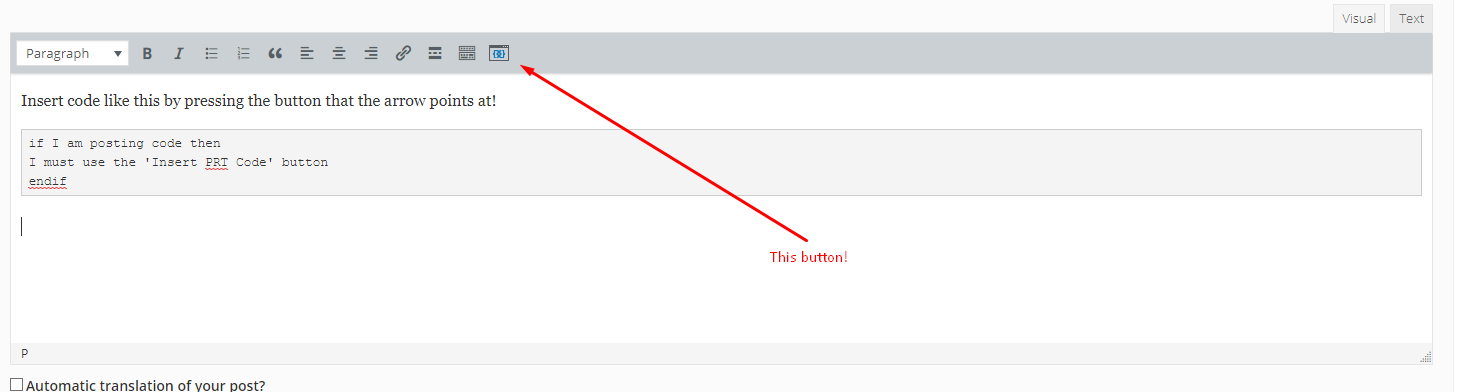
    Milochenta– Welcome to the forums. There are few basic rules that you need to follow when posting in the forums. One of these is that you are should use the ‘Insert PRT Code’ button when putting code in your post as this makes it far easier for others to read and understand. I have tidied up your last post for you but please use the ‘Insert PRT Code’ button in your future posts. 🙂

    #99218 quote
    robertogozzi
    Moderator
    Master

    Sorry, but I still cannot read any question, isn’t there one?

    #99276 quote
    Milochenta
    Participant
    New

    I’m sorry, but I had made a mistake and I could not find the right way to send the code. I promise to learn for the next time. Thanks for your consideration.
    regards

    #99279 quote
    Milochenta
    Participant
    New

    I send you the code directly because I didn’t know how I had to envy….

    r=14, p=20, a=0.9, b=-0.9, c=[5,10][1]
    
    
    miRSI = RSI[r](close)
    bolDn = BollingerDown[p](miRSI)
    bolUp = BollingerUp[p](miRSI)
    // lineaUp = a
    // lineaDown = bRSIn = (((miRSI - bolDn) / (bolUp - bolDn))*2)-1
    
    
    filtro1 = average [30]>average[250]
    
    
    // Condiciones para entrada de posiciones largas
    IF NOT LongOnMarket AND RSIn crosses over b and filtro1 THEN
    BUY 10000 cash AT MARKET
    ENDIF
    
    
    // Condiciones de salida de posiciones largas
    If LongOnMarket AND RSIn crosses under a THEN
    SELL AT MARKET
    ENDIF
    
    
    SET STOP %LOSS c
    #99280 quote
    Milochenta
    Participant
    New

    What do you think about the strategy?

    #99285 quote
    GraHal
    Participant
    Master

    Please post the itf file with the variable values set up in the optimiser and I’ll give it a whirl?

    I’m not an expert coder and below is confusing me??

    lineaDown = -0.9RSIn = (((miRSI - bolDn) / (bolUp - bolDn))*2)-1
    #99286 quote
    Vonasi
    Moderator
    Master

    The ‘Insert PRT button’ can be easily found – just look at the attached image!

    Screenshot_4-1.png Screenshot_4-1.png
    #99411 quote
    Milochenta
    Participant
    New

    At the first line you can see the variables, a and b are 0.9 and -0.9, and you can change this with 0.1, between 1 and 0.5, and -1 and -0.5… the best result is 0.9

    #99412 quote
    GraHal
    Participant
    Master

    Using your value for c=[5,10][1] then your last line of code will never work

    SET STOP %LOSS [5,10][1]

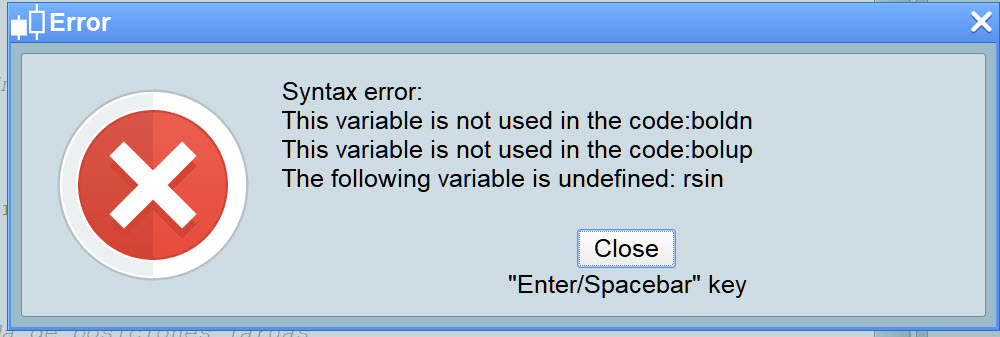
    Also I get attached error message.

    There is so much wrong I don’t know where to start.

    I suggest you sort above and the screen message attached and repost if you need to?

    Milo.jpg Milo.jpg
    #99415 quote
    robertogozzi
    Moderator
    Master

    @Milochenta

    I know you’re a newbie with PRT and may have a hard life trying to learn, but you should master copying & pasting, since you must have used it sometimes, no matter what platform or operating system!

    After 13 posts we still can’t see your correct code!

    Please Milochenta, enter ProOrder and make sure you are having a perfectly running strategy, do Copy & Paste from there, then post it again using the “insert PRT code” button.

    You’ll spare us plenty of time to help you, if needed!

    GraHal thanked this post
Viewing 14 posts - 1 through 14 (of 14 total)

  • You must be logged in to reply to this topic.

“RSI normalizado” System about RSI indicator, based on SPY.


ProOrder: Automated Strategies & Backtesting

New Reply
Author
author-avatar
Milochenta @milochenta Participant
Summary

This topic contains 13 replies,
has 5 voices, and was last updated by robertogozzi
6 years, 9 months ago.

Topic Details
Forum: ProOrder: Automated Strategies & Backtesting
Language: English
Started: 05/22/2019
Status: Active
Attachments: 3 files
Logo Logo
Loading...