ROC MA

Viewing 5 posts - 1 through 5 (of 5 total)

  • Author
    Posts
  • #90245 quote
    robert123robert123
    Participant
    Master
    #90247 quote
    robert123robert123
    Participant
    Master
    //x=0  ///default 12
    
    CHANGE=ROC[x](close)
    If change > 0 then
    Price=low[0]
    elsif change < 0 then
    price=high[0]
    endif
    
    
    return average[4](price)
    
    #90253 quote
    NicolasNicolas
    Keymaster
    Legend

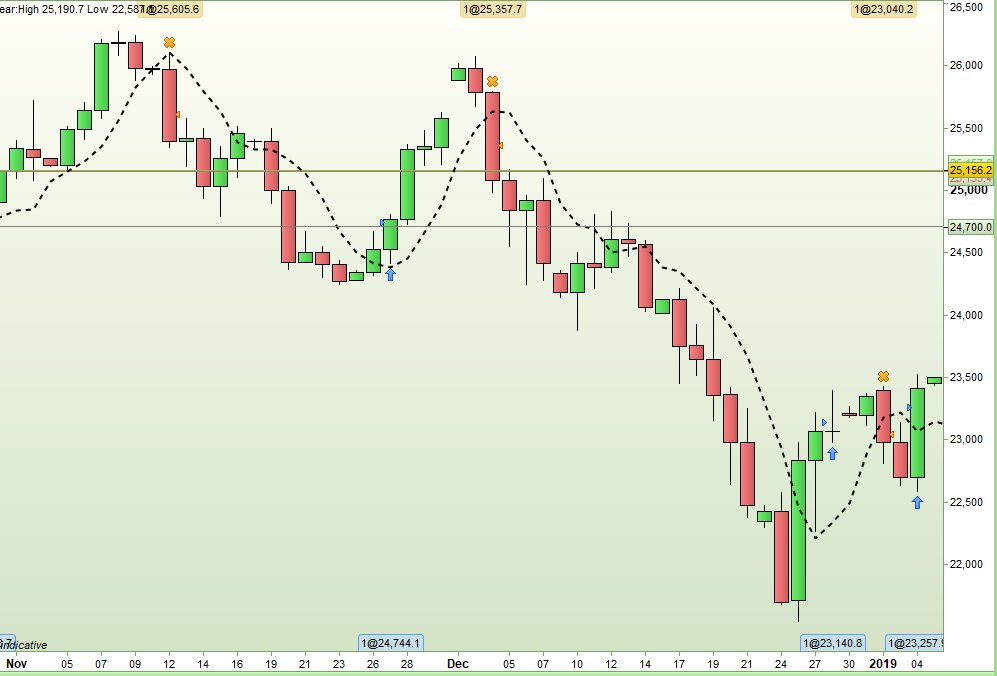
    Thanks Robert, I think that you want to share with us that code you made? If so, how would you use it and how does it looks?

    #90259 quote
    VonasiVonasi
    Moderator
    Master

    It is quite interesting to adapt the idea to other indicators. Here is a similar code but for the RSI[2]:

    x = 2  
     
    CHANGE = rsi[x](close)
    If change >= 50 then
    Price = low
    elsif change < 50 then
    price = high
    endif
     
    return average[4](price)

    [attachment file=90260]

    Screenshot_1.png Screenshot_1.png
    #90303 quote
    robert123robert123
    Participant
    Master

    Thanks Vonasi for uploading an image, I didn’t have time yesterday.

    It works well on all time frames. If the lower are messy look towards the higher….

    RR

Viewing 5 posts - 1 through 5 (of 5 total)

  • You must be logged in to reply to this topic.

ProRealAI ProRealAI New

Stuck on this ProBuilder code?

Describe what this topic is trying to build, in plain English, and ProRealAI writes the ProRealTime™ indicator, screener or system for you.

Available in 7 languages
Try ProRealAI

ROC MA


ProBuilder: Indicators & Custom Tools

New Reply
Author
author-avatar
robert123 @robert123 Participant
Summary

This topic contains 4 replies,
has 3 voices, and was last updated by robert123robert123
7 years, 8 months ago.

Topic Details
Forum: ProBuilder: Indicators & Custom Tools
Language: English
Started: 02/01/2019
Status: Active
Attachments: 2 files
ProRealCode ProRealCode
Loading...