request: variation on wave volume chart

Viewing 9 posts - 1 through 9 (of 9 total)

  • Author
    Posts
  • #67379 quote
    Real Pro
    Participant
    Average

    Is this the place to request coding?

    https://www.jigsawtrading.com/2014/12/11/swing-charts-cumulative-delta-ninjatrader/

    This is the display I’d like to emulate.  Very similar to codes already avaliable in the library, but the display is different (overlaid on price chart with swing volume and price excursion displayed).

    Hope you can help, Nicolas.  Thanks.

    #68248 quote
    Real Pro
    Participant
    Average

    Paging Nicolas…. 🙂

    #68309 quote
    Nicolas
    Keymaster
    Master

    Sorry, but I’m quite busy and still until the end of the Month I think..

    Your request seems easy to do though, you can copy/paste the code of the Wave volume indicator from the library and adjust the x,y coordinates to display on the price chart (x coordinate should be the same, as it is barindex).

    Real Pro thanked this post
    #68341 quote
    Real Pro
    Participant
    Average

    Thanks Nicolas.  I’m trying but making a mess of it.

    Anyone else like to help?

    #68342 quote
    GraHal
    Participant
    Master

    Post what code you have so far … makes it easier for any helpers as they don’t have to go looking via links etc.

    Something may leap out as we look at the code?

    Real Pro thanked this post
    #68348 quote
    Real Pro
    Participant
    Average

    Post what code you have so far … makes it easier for any helpers as they don’t have to go looking via links etc. Something may leap out as we look at the code?

    Thanks GraHal,

    Currently, this just plots Zigzag when applied to the price pane.  Everything I change seems to mess it up.

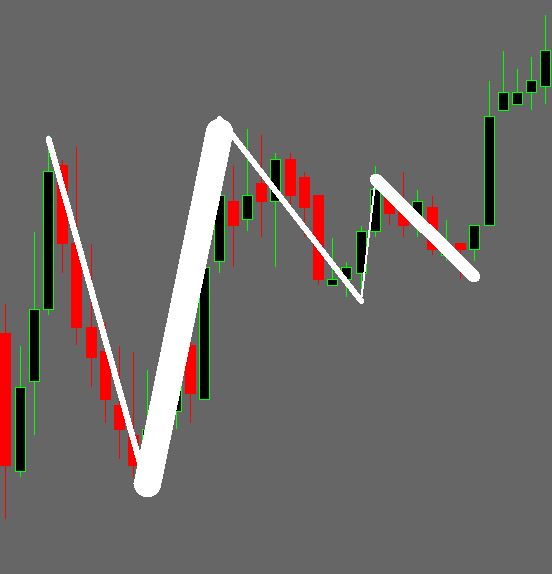
    I’d like to have the CumV reflected in the thickness of the zig line.  Big CumV = thick line, small cumV = thin line.  I think that would make it really easy to assess the market in a glance.  Slightly different to the original request, but better in my view.


    //PRC_CumulativeVolume ZigZag | indicator
    //17.02.2017
    //Nicolas @ www.prorealcode.com
    //Sharing ProRealTime knowledge
    
    // --- parameters
    percentVariation = b
    
    zz = ZigZag[percentVariation](close)
    
    peak = zz<zz[1] and zz[1]>zz[2]
    tough = zz>zz[1] and zz[1]<zz[2]
    
    cumV = cumV+volume
    
    if peak then
    //text = cumV/1000
    //drawtext("#text#K",barindex[1],cumV[1]+0.17*cumV[1],Dialog,Bold,12) coloured(0,200,0)
    
    cumV = Volume
    color = -1
    //previousX = barindex[1]
    //previousY = cumV[1]+0.20*cumV[1]
    
    elsif tough then
    //text = cumV/1000
    //drawtext("#text#K",barindex[1],cumV[1]+0.23*cumV[1],Dialog,Bold,12) coloured(200,0,0)
    
    cumV = Volume
    color = 1
    //previousX = barindex[1]
    //previousY = cumV[1]+0.20*cumV[1]
    endif
    
    return zz coloured by color
    #68350 quote
    Real Pro
    Participant
    Average

    The pseudocode would be something like:

    T = line thickness

    If cumV < 10 then T = 1

    If cumV >10 and <20 then T = 2

    If cumV >20 and <30 then T = 3

    Plot zigzig with line thickness of T.


    It looks great on a chart, but coding it is hard for me.

    #68352 quote
    GraHal
    Participant
    Master

    You got an example chart to post on here to temp the super-coders (not me) !!?? 🙂

    #68353 quote
    Real Pro
    Participant
    Average

    I have it on Amibroker, but when I try it on PRT, the available line thicknesses won’t allow much of a difference in thickness.  SO I’m glad you asked.  I don’t think it will work.

Viewing 9 posts - 1 through 9 (of 9 total)

  • You must be logged in to reply to this topic.

request: variation on wave volume chart


ProBuilder: Indicators & Custom Tools

New Reply
Author
author-avatar
Real Pro @real-pro Participant
Summary

This topic contains 8 replies,
has 3 voices, and was last updated by Real Pro

7 years, 10 months ago.

Topic Details
Forum: ProBuilder: Indicators & Custom Tools
Language: English
Started: 04/06/2018
Status: Active
Attachments: 1 files
Logo Logo
Loading...