Hi everyone,
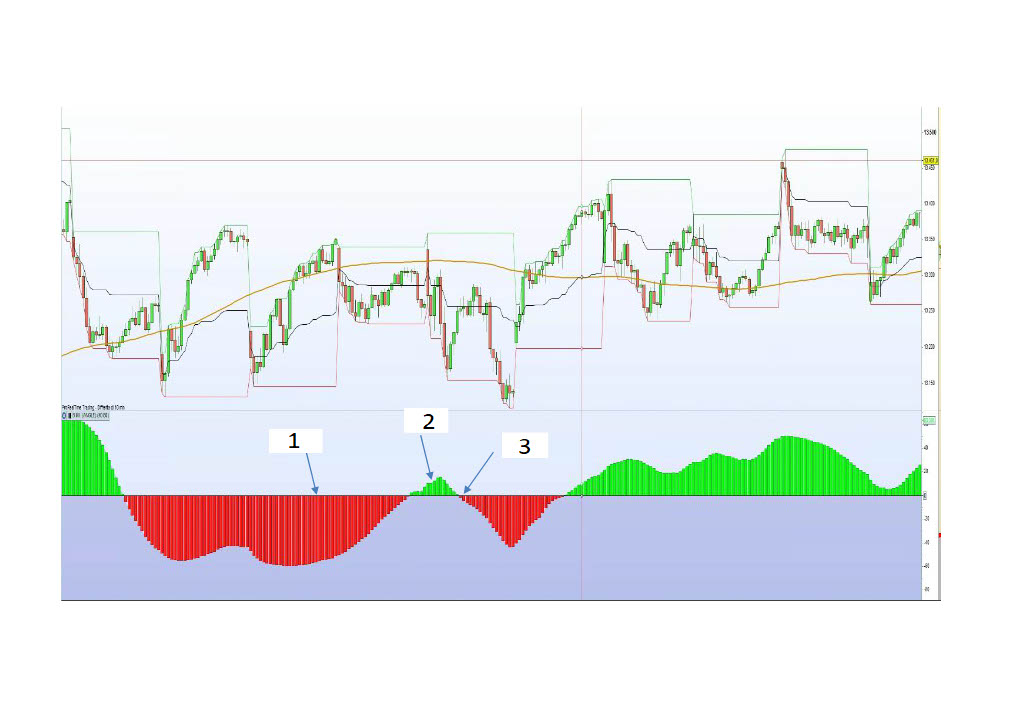
I need help to understand how to code a condition, maybe two. As you can see in attachment, there is an oscillator. I’d like to define the condition of this generic indicator as follow:
1) oscillator has to be in red condition , so indicator<0 more than for example 50 bars.
2) then second condition oscillator has to be green no more than 10 bars
3)oscillator has to cross Zero line from green to red, that is the trigger Short in this case.
How could I code it?
thank’s in advance to everyone that can help me.
Alessio
in particular the indicator is B.M.I. angle.
B.M.I. Angle of MA
how can I create those conditions? Hope Roberto can help me
// — settings
//Periode = 10 //Période de la MM
//nbChandelier= 20 // Nombre de chandeliers sur lesquels on évalue la pente
// — end of settings
MM = Exponentialaverage[Periode](close)
ADJASUROPPO = (MM-MM[nbchandelier]*pipsize) / nbChandelier
ANGLE = (ATAN(ADJASUROPPO))
if angle>0 then
r=0
g=255
else
r=255
g=0
endif
RETURN angle coloured(r,g,0) style(histogram) as “Angle”, 0 as “level 0”
Hi,
// — settings
Periode = 10 //Période de la MM
nbChandelier= 20 // Nombre de chandeliers sur lesquels on évalue la pente
// — end of settings

MM = Exponentialaverage[Periode](close)
ADJASUROPPO = (MM-MM[nbchandelier]*pipsize) / nbChandelier
ANGLE = (ATAN(ADJASUROPPO))
if angle>0 then
r=0
g=255
else
r=255
g=0
endif

c1= angle<0
c2= angle>0
c3= summation[50](c1)=50
c4= angle crosses over 0 and c3[1]
c5= c2 and summation[10](c4)>=1 and (c4[1] or c5[1])
c6= angle crosses under 0 and c5[1]

if c6 then
DRAWARROWDOWN(barindex, 2*highest[10](angle)) coloured("red")
endif

RETURN angle coloured(r,g,0) style(histogram) as "Angle", 0 as "level 0"
Hi JC,
thank you for your answer. I have a question: C3 means that condition is true if Bar are exactly 50 ?if I need more than 50 bars, Should I write C3=summation[50](c1)>50 ?
what does C3[1] mean? previous condition of C3 ?but which one? I don0t understand the code
thank you in advance for your answer
Alessio
Hi,
C3 means it’s true if C1 was true 50 times out of 50 in the latest 50 candles, meaning the one it’s read on and its 49 previous ones. So if this is true regardless of how many more red bars there was before these 50, then the “more than 50” case is covered.
C3[1] means value of C3 for previous candle before the one it’s read on (writing c3[2] would have been value of C3 2 candles ago, etc…).
Thank you very much for your explanation. Is it too much if I ask you also the long side of the same code?
1) oscillator has to be in green condition , so indicator>0 more than for example 50 bars.
2) then second condition oscillator has to be red no more than 10 bars
3)oscillator has to cross Zero line from red to green, trigger Long.
thank you very much in advance
alessio
Here is added long side too:
// — settings
Periode = 10 //Période de la MM
nbChandelier= 20 // Nombre de chandeliers sur lesquels on évalue la pente
// — end of settings

MM = Exponentialaverage[Periode](close)
ADJASUROPPO = (MM-MM[nbchandelier]*pipsize) / nbChandelier
ANGLE = (ATAN(ADJASUROPPO))
if angle>0 then
r=0
g=255
else
r=255
g=0
endif

c1= angle<0
c2= angle>0

c3= summation[50](c1)=50
c4= angle crosses over 0 and c3[1]
c5= c2 and summation[10](c4)>=1 and (c4[1] or c5[1])
c6= angle crosses under 0 and c5[1]

if c6 then
DRAWARROWDOWN(barindex, 2*highest[10](angle)) coloured("red")
endif

c7= summation[50](c2)=50
c8= angle crosses under 0 and c7[1]
c9= c1 and summation[10](c8)>=1 and (c8[1] or c9[1])
c10= angle crosses over 0 and c9[1]

if c10 then
DRAWARROWUP(barindex, 2*lowest[10](angle)) coloured("green")
endif

RETURN angle coloured(r,g,0) style(histogram) as "Angle", 0 as "level 0"
thank you. for some reasons condition N°2, related to C5 and C9 do not work, I don’t know why.
c5= c2 and summation[10](c4)>=1 and (c4[1] or c5[1])
I would not know how this works out by guarantee or better : what is intended, without braces. E.g. :
c5= (c2 and summation[10](c4)>=1 and (c4[1]) or c5[1])
c2= angle>0
what do you mean “c2 does not work”? Please describe in details what you consider as not working, or we are left guessing multiple hypothesis from “just a potential typo in copy/paste, but which one…”, to “trying to find cases with c2 true when it should be wrong”, via “c2 works but conditions with use of c2 don’t give intended results”, etc…
The “…and (c4[1] or c5[1])” was there to either initialize the series of c5 with a c4 at previous candle (c4[1]), or subsequently for a new c5 to be preceded itself by a c5 at previous candle (c5[1]). The purpose was to rule out the few cases where a c4 occurs but is quickly followed by a c1 and then by a c2 again, all within 10 bars. So a series of c5 only occurs directly after c4, no unbroken chain of events.
Hi JC, adding the braces it works. thank’s for the code! very appreciated
Alessio