Report to Excel

Viewing 9 posts - 1 through 9 (of 9 total)

  • Author
    Posts
  • #161370 quote
    OMXet
    Participant
    Junior

    Hi

    A simple question: How can I convert “Detailed report/Closed positions list” into an Excel-fil?

    Surely easy but I don’t know  ;>(

    #161371 quote
    GraHal
    Participant
    Master

    Try drag and drop and let us know if it worked?

    #161373 quote
    OMXet
    Participant
    Junior

    Well, that is the first way I tried. Didn’t work ;>(

    #161374 quote
    Vonasi
    Moderator
    Master

    The drag and drop method still works fine for me. I just click hold and drag the window contents into the Excel symbol on my task bar and then the Excel window appears and I drag it into that and drop it where I want it by releasing the mouse button.

    OMXet thanked this post
    #161375 quote
    OMXet
    Participant
    Junior

    Hi again

    I can hold and drag the whole window “Detailed report” but NOT into Excel

    #161379 quote
    OMXet
    Participant
    Junior

    Heureka


    Now it worked


    THANKS

    GraHal thanked this post
    #161459 quote
    Nicolas
    Keymaster
    Master

    You can export to CSV too.

    #183199 quote
    murre87
    Participant
    Senior

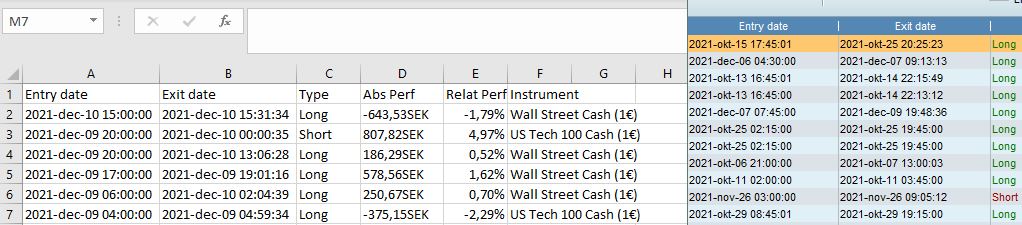
    Enyone with excell sckills? I want create a nice graph for how my trading develops, but as you can see I get with time. I just need dates to create the graph.

    time.jpg time.jpg
    #183219 quote
    GraHal
    Participant
    Master
Viewing 9 posts - 1 through 9 (of 9 total)

  • You must be logged in to reply to this topic.

Report to Excel


ProOrder: Automated Strategies & Backtesting

New Reply
Author
author-avatar
OMXet @omxet Participant
Summary

This topic contains 8 replies,
has 5 voices, and was last updated by GraHal

4 years, 2 months ago.

Topic Details
Forum: ProOrder: Automated Strategies & Backtesting
Language: English
Started: 02/14/2021
Status: Active
Attachments: 1 files
Logo Logo
Loading...