Renko Moving Average Filter Regression
Forums › ProRealTime English forum › ProBuilder support › Renko Moving Average Filter Regression
- This topic has 3 replies, 3 voices, and was last updated 5 years ago by
Bel.
-
-
04/24/2020 at 2:25 PM #127814
Hi,
I was interested in developing a Renko moving average indicator based on Nicolas’s code here: https://www.prorealcode.com/topic/discussion-re-pure-renko-strategy/page/5/#post-122154
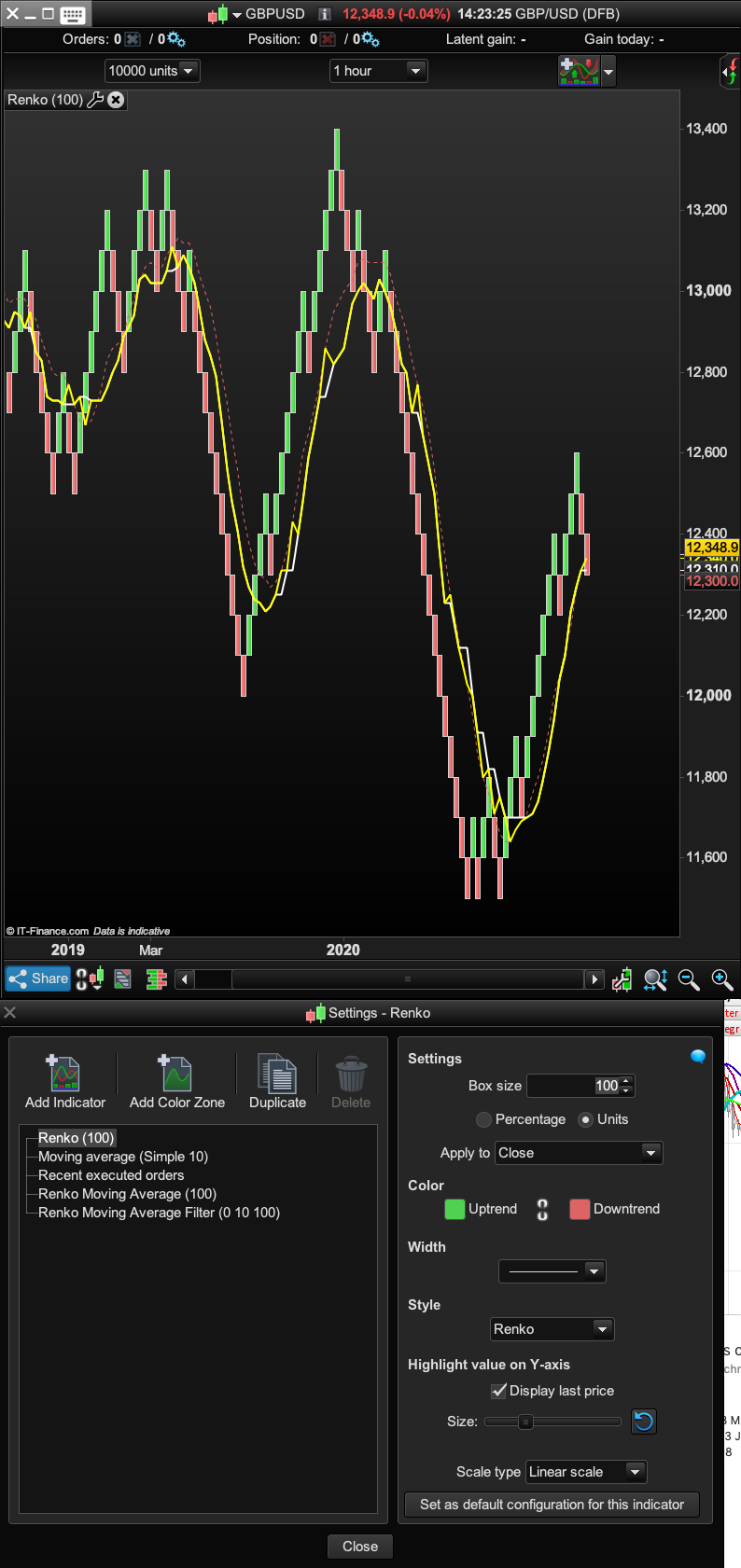
but with the idea of having different moving average types like the Moving Average Filter Regression: https://www.prorealcode.com/prorealtime-indicators/average-filter-regression/It’s just that the AVG line seems a bit jerky and not smooth? Pls see image and yellow average.
Also how can you add “priceMAperiod” (because it’s part of a “once” statement) to the variables so you can adjust the moving average without having to go into the code and change it from 10 to 100 for example?Cheers!
Renko Average Filter Regression12345678910111213141516171819202122232425262728293031323334353637383940414243444546474849505152535455565758596061626364656667686970717273747576777879808182838485868788899091929394959697//Renko Moving Average Filter Regression///BoxSize = 100//Average[N,M](price)//Where M can be set with any of these values, to return the specific moving average calculation://0 = SMA//1 = EMA//2 = WMA//3 = Wilder// --- parameters// MAType = 0Series = CustomClose// priceMAperiod = 10// ---//-----------------------------//// SMA - Simple Moving Average ////-----------------------------//IF MAType = 0 THENpriceMAperiod = MAX(priceMAperiod, 1)AVG = Average[priceMAperiod](Series)ENDIF//----------------------------------//// EMA - Exponential Moving Average ////----------------------------------//IF MAType = 1 THENpriceMAperiod = MAX(priceMAperiod, 1)AVG = ExponentialAverage[priceMAperiod](Series)ENDIF//-------------------------------//// WMA - Weighted Moving Average ////-------------------------------//IF MAType = 2 THENpriceMAperiod = MAX(priceMAperiod, 1)AVG = WeightedAverage[priceMAperiod](Series)ENDIF//------------------------------//// WIMA - Wilder Moving Average ////------------------------------//IF MAType = 3 THENpriceMAperiod = MAX(priceMAperiod, 1)AVG = WilderAverage[priceMAperiod](Series)ENDIF//Boxsize = 100renkoMax = ROUND(close / boxSize) * boxSizerenkoMin = renkoMax - boxSizeonce usema=1if usema thenonce priceMAperiod=10count=0sum=0lastbox=0for i = 0 to barindex doif renkomax[i]<>lastbox thenlastbox=renkomax[i]count=count+1median=((renkomax[i]+renkomin[i])/2)sum=sum+medianif count=priceMAperiod+1 thensum=sum-lastlast=medianbreak//endifendifnextonce avg=undefinedif last<>last[1] thenavg = sum/priceMAperiodendifendifRETURN AVG coloured(255,255,0) style(line, 2) as "Renko Mvg Ave Filter"04/24/2020 at 4:48 PM #127866Ouch! Not that easy!! Renko are not time dependent, so you can’t use a classic period (which is based on normal candlestick) and use it on the custom renko bricks i created in this code…
I did a simple MA, which is nothing less than an arithmetic average, sum all the price (which here are the renko Close) and divide the sum by the period, easy.
But if you want to make the same with other types of MA, which have very different kind of calculation, that would involve a very difficult coding. Without array, in v10.3, you should give up now.
And in v11, even with array, you don’t have to code it, because it is now possible to apply any custom indicator on renko charts.
1 user thanked author for this post.
04/24/2020 at 8:36 PM #12791605/06/2020 at 12:25 PM #130216 -
AuthorPosts
Find exclusive trading pro-tools on