Renko "bug" (Display price levels of recently…)

Viewing 3 posts - 1 through 3 (of 3 total)
  • Author
    Posts
  • #87086 quote
    margincallcat
    Participant
    Average

    I dont know if this is the place to post it but a “bug” that annoys the hell out of me is that when i click “Display price levels of recently executed orders on chart” (on my candlestick chaert) any Renko Chart currently in use switches to a Candle Stick chart.

    I use 2 windows/charts; one candlestick and one renko. I dont always want the executed orders visible on my chart, so whenever i want to look at previous orders my renko chart -along with all its settings- becomes a default candlestick chart.

    This is really frustrating as it hinders the workflow for no good reason at all.


    Hopefully this can be resolved in the future.


    Regards

    Viktor

    Skärmavbild-2018-12-14-kl.-11.03.42.png Skärmavbild-2018-12-14-kl.-11.03.42.png
    #87278 quote
    Nicolas
    Keymaster
    Master

    Yes I think that it will sort out in a next version. I know that price only charts like renko are on their way to be completely revamped (to add any indicator for instance), so I think this kind of related issue should be also fixed.

    #87560 quote
    Pierre
    Moderator
    Average

    Hi,

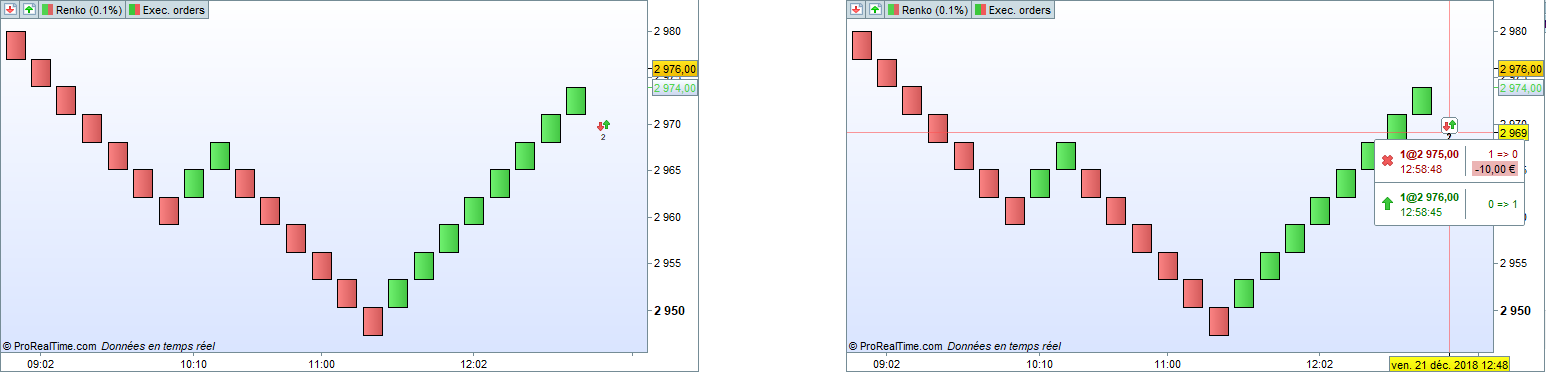
    Indeed I can confirm that ProRealTime v11 lets you display recently executed orders on Renko charts.

    Here is an exclusive preview 😉

    [attachment file=87561]

    ProRealTime v11 will be released within a few months.

    Regards,

    Pierre

    Renko-ProRealTime-v11.png Renko-ProRealTime-v11.png
Viewing 3 posts - 1 through 3 (of 3 total)

  • You must be logged in to reply to this topic.

Renko "bug" (Display price levels of recently…)


Platform Support: Charts, Data & Broker Setup

New Reply
Author
Summary

This topic contains 2 replies,
has 3 voices, and was last updated by Pierre

7 years, 2 months ago.

Topic Details
Forum: Platform Support: Charts, Data & Broker Setup
Language: English
Started: 12/14/2018
Status: Active
Attachments: 2 files
Logo Logo
Loading...