Remove top bar in charts…

Viewing 5 posts - 1 through 5 (of 5 total)
  • Author
    Posts
  • #173445 quote
    Roberto S.
    Participant
    Average

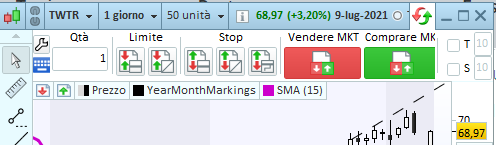
    Hi, is it possible to remove the top bar about orders in charts (in attachment a screenshot).
    Because I am trying to have very small windows for tickers I am following and that bar is quite huge for my taste 😀
    Regards

    screenshot_20210710192218.png screenshot_20210710192218.png
    #173449 quote
    JC_Bywan
    Moderator
    Master

    Hi, you can click on the red and green curved arrows above comprare mkt on right side, it should remove it (and clicking again on these should bring it back)

    #173454 quote
    Roberto S.
    Participant
    Average

    Thanks @Noobywan, when I click on this another bar about portfolio appears.
    Clicking again it shows again the order bar under that portfolio bar summary making the situation even worst.
    How can I remove then that portfolio summary bar?
    Regards

    #173460 quote
    JC_Bywan
    Moderator
    Master

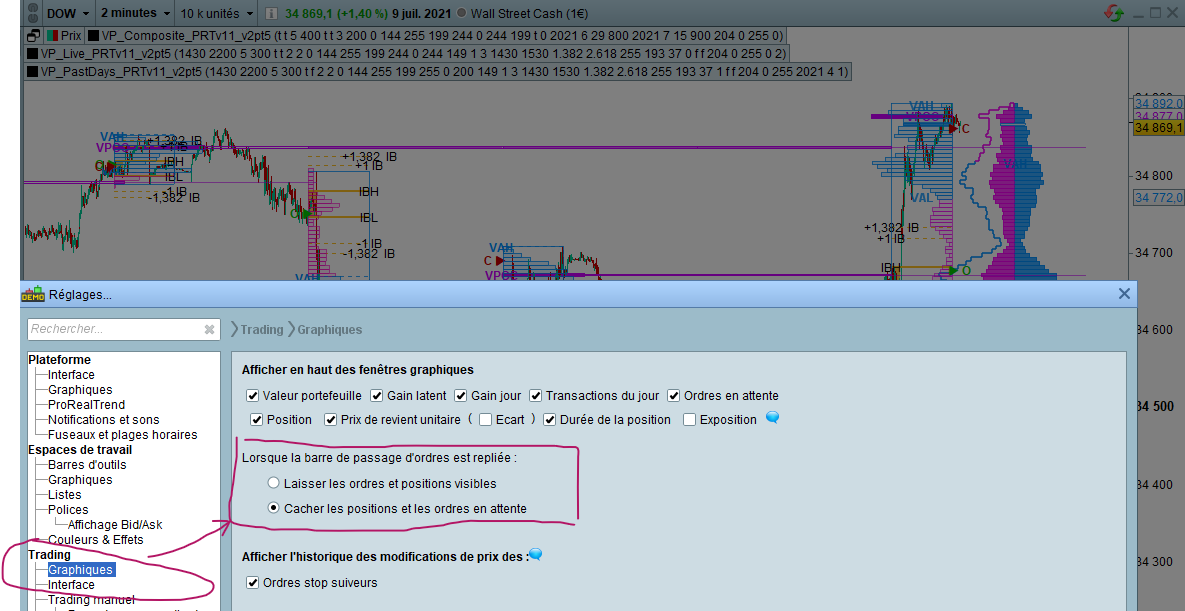
    You probably need to change from the main PRT menu the setting hiding orders too when order bar is reduced, as per image attached of the settings menu.

    Then when trying again, hopefully other settings won’t prevent from getting same minimal top bar as per my graph behind the settings menu, with price window directly below chart title.

    ReglageBarrePassageOrdresRepliee.png ReglageBarrePassageOrdresRepliee.png
    #173553 quote
    Roberto S.
    Participant
    Average

    Thanks Noobywan, I don’t have a Trading section in the settings.

    Probably because I have the free EOD “edition” of Prorealtime…

Viewing 5 posts - 1 through 5 (of 5 total)

  • You must be logged in to reply to this topic.

Remove top bar in charts…


Platform Support: Charts, Data & Broker Setup

New Reply
Author
author-avatar
Roberto S. @roberto-s Participant
Summary

This topic contains 4 replies,
has 2 voices, and was last updated by Roberto S.
4 years, 7 months ago.

Topic Details
Forum: Platform Support: Charts, Data & Broker Setup
Language: English
Started: 07/10/2021
Status: Active
Attachments: 2 files
Logo Logo
Loading...