BardParticipant
Master
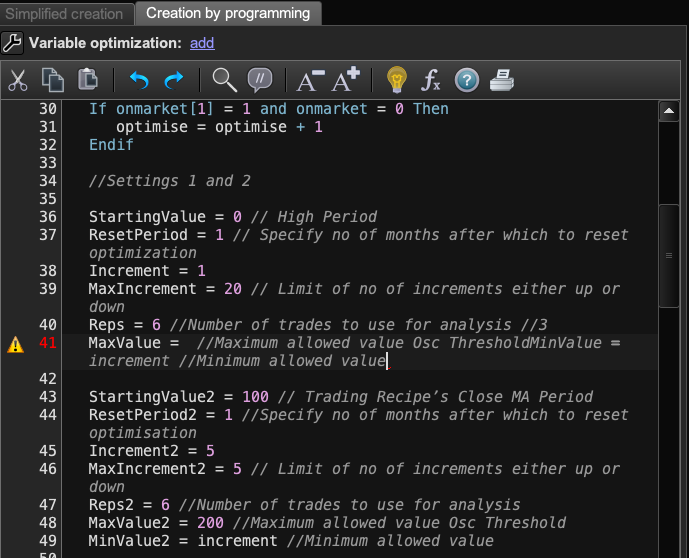
Hi, does anybody know how to get rid of these formatting error red marks? Pls see image:
Normally when I create code in Apple Text Edit and paste into PRT I see these spacing error warnings. They’re normally easy to get rid of by bringing the line after it, up to the red mark and then hitting return to take the moved line back down to where it came from. Other times you just hit backspace a couple of times and the red mark goes, but this time I have tried all these methods and even rewriting parts of the code but nothing gets rid of the red mark warnings?
Any ideas?
Cheers,
There is an error on that line because “MaxValue = ” NOTHING!
BardParticipant
Master
Can’t see the wood for the trees! 😃 Thanks @Nicolas
Hahahahah … it’s due to the other Issues you are having with that latest release … I’ve been there lots through life, a few things go bad and we start seeing bad everywhere! 🙂
Hope you get sorted somehow re your other Issues!
BardParticipant
Master
I think it’s safe to say I’ve moved way beyond paranoid over what to expect from PRT! Haha. I just came across this image trying to convince Vonasi that my unused line spacing issue wasn’t user error, (which I’ll be the first to admit if I’ve made a mistake as I have here and elsewhere on this forum). Next time the video camera is ready!