


Range breakout-indicator

Viewing 5 posts - 1 through 5 (of 5 total)

  • Author
    Posts
  • #236492 quote
    SnorreDK
    Participant
    Junior

    Hi. Im trying to write an indicator for this, but not getting it right.

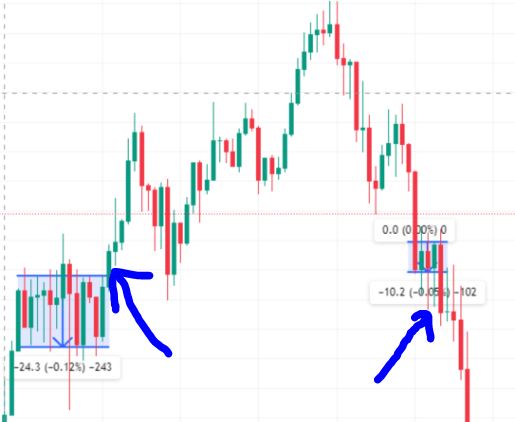
    What we are looking for is a price consolidation that usually stays within a 10-40 point range.

    We want to see the price stay within this range for at least 5 candlesticks, where a lower timeframe (TF) would require more bars to confirm the consolidation.

    The example picture  is on a 15-minute TF for Tech100

    Next, we want to see the price break out with reasonable strength, where at least 50% of the breakout bar is outside this “box.”

    There are two different approaches for trading this:

    1. If the trend is upward, we take an entry at the bottom of the consolidation after a certain number of bars, and the opposite at the top if the trend is downward.
    2. An entry is taken as the breakout occurs, preferably when the breakout bar is outside the box, to avoid false moves.

    This pattern can also occur in larger intervals. For example, we have a range of over 100 points on NAS in a 5-minute TF.

    The main rule is that we want to see the price find clear resistance on both the upside and downside, and then break out with significant strength.

    // Parameters
    minBars = 5            // Minimum number of bars for consolidation
    maxRangePoints = 40    // Maximum range in points for consolidation
    minRangePoints = 10    // Minimum range in points for consolidation
    breakoutStrength = 0.5 // At least 50% of the breakout bar must be outside the box
    
    // Variables to store the highest and lowest prices within the consolidation range
    highestHigh = highest(minBars)(high)
    lowestLow = lowest(minBars)(low)
    
    // Check if the range is within the defined point range
    priceRange = highestHigh - lowestLow
    
    if priceRange <= maxRangePoints * pipsize and priceRange >= minRangePoints * pipsize then
        // Draw the consolidation box
        drawrectangle(barindex[minBars], highestHigh, barindex, lowestLow, colorRGBA(100, 100, 255, 50))
        
        // Check for a breakout
        if close > highestHigh and (close - highestHigh) >= (high - low) * breakoutStrength then
            DRAWTEXT("▲", barindex, high, color.green)
        elsif close < lowestLow and (lowestLow - close) >= (high - low) * breakoutStrength then
            DRAWTEXT("▼", barindex, low, color.red)
        endif
    endif
    
    return close
    
    breakout.jpg breakout.jpg
    #236498 quote
    robertogozzi
    Moderator
    Master

    The are so many syntax errors befiore you can say if it works or not.

    First you have to correct them.

    #236501 quote
    SnorreDK
    Participant
    Junior

    Im not that good in cooding.
    Would you help me?

    #236510 quote
    Nicolas
    Keymaster
    Master

    Here is below a modified version of your code that work “ok” for me:

    // Parameters
    minBars = 5            // Minimum number of bars for consolidation
    maxRangePoints = 40    // Maximum range in points for consolidation
    minRangePoints = 10    // Minimum range in points for consolidation
    breakoutStrength = 0.5 // At least 50% of the breakout bar must be outside the box
    
    // Variables to store the highest and lowest prices within the consolidation range
    highestHigh = highest[minBars](high)[1]
    lowestLow = lowest[minBars](low)[1]
    
    // Check if the range is within the defined point range
    priceRange = highestHigh - lowestLow
    
    if priceRange <= maxRangePoints * pipsize and priceRange >= minRangePoints * pipsize then
    // Draw the consolidation box
    drawrectangle(barindex[minBars], highestHigh, barindex, lowestLow) coloured(100, 100, 255,75)
        
    // Check for a breakout
    if close > highestHigh and (close - highestHigh) >= (high - low) * breakoutStrength then
    DRAWTEXT("▲", barindex, high ) coloured("green")
    elsif close < lowestLow and (lowestLow - close) >= (high - low) * breakoutStrength then
    DRAWTEXT("▼", barindex, low) coloured("red")
    endif
    endif
    
    return close
    robertogozzi and SnorreDK thanked this post
    #236512 quote
    robertogozzi
    Moderator
    Master

    Is must be a code snippet by some AI code generator, as no one could find those instruction formats in the PRT manual and the online PRC documentation.

    This is the error free code:

    // Parameters
    minBars = 5            // Minimum number of bars for consolidation
    maxRangePoints = 40    // Maximum range in points for consolidation
    minRangePoints = 10    // Minimum range in points for consolidation
    breakoutStrength = 0.5 // At least 50% of the breakout bar must be outside the box
     
    // Variables to store the highest and lowest prices within the consolidation range
    highestHigh = highest[minBars](high)
    lowestLow = lowest[minBars](low)
     
    // Check if the range is within the defined point range
    priceRange = highestHigh - lowestLow
     
    if priceRange <= maxRangePoints * pipsize and priceRange >= minRangePoints * pipsize then
    // Draw the consolidation box
    drawrectangle(barindex[minBars], highestHigh, barindex, lowestLow) coloured(100, 100, 255, 50)
        
    // Check for a breakout
    if close > highestHigh and (close - highestHigh) >= (high - low) * breakoutStrength then
    DRAWTEXT("▲", barindex, high)  coloured("Green")
    elsif close < lowestLow and (lowestLow - close) >= (high - low) * breakoutStrength then
    DRAWTEXT("▼", barindex, low) coloured("Red")
    endif
    endif
     
    return close
    SnorreDK thanked this post
Viewing 5 posts - 1 through 5 (of 5 total)
  • You must be logged in to reply to this topic.

Range breakout-indicator


ProBuilder: Indicators & Custom Tools

New Reply
Author
author-avatar
SnorreDK @snorredk Participant
Summary

This topic contains 4 replies,
has 3 voices, and was last updated by robertogozzi
1 year, 6 months ago.

Topic Details
Forum: ProBuilder: Indicators & Custom Tools
Language: English
Started: 08/19/2024
Status: Active
Attachments: 1 files
Logo Logo
Loading...

