


Range avec ligne des 50%

Viewing 3 posts - 1 through 3 (of 3 total)

  • Author
    Posts
  • #169724 quote
    Boris
    Participant
    Average

    Bonjour à toutes et à tous !

    Je me permets de poster ce message car après de nombreuses heures d’essai je n’arrive pas a coder l’indicateur suivant :

    • Plus haut et plus bas d’une certaine période (exemple 00H00 a 08H00) pour former un range sur cette période ainsi qu’une ligne a 50% de la hauteur de ce même range.

    J’ai essayé plusieurs choses, mais les commandes DRAWLINE etc me mettent des lignes un peu partout sur le graphique en diagonale etc.. Je n’arrive pas a coder ligne du haut et ligne du bas/2 durant une période fixe.

    Si quelqu’un passe par ici et pourrait m’aider je lui en serais vraiment reconnaissant !

    Agréable journée et merci 🙂

    #169824 quote
    Nicolas
    Keymaster
    Master

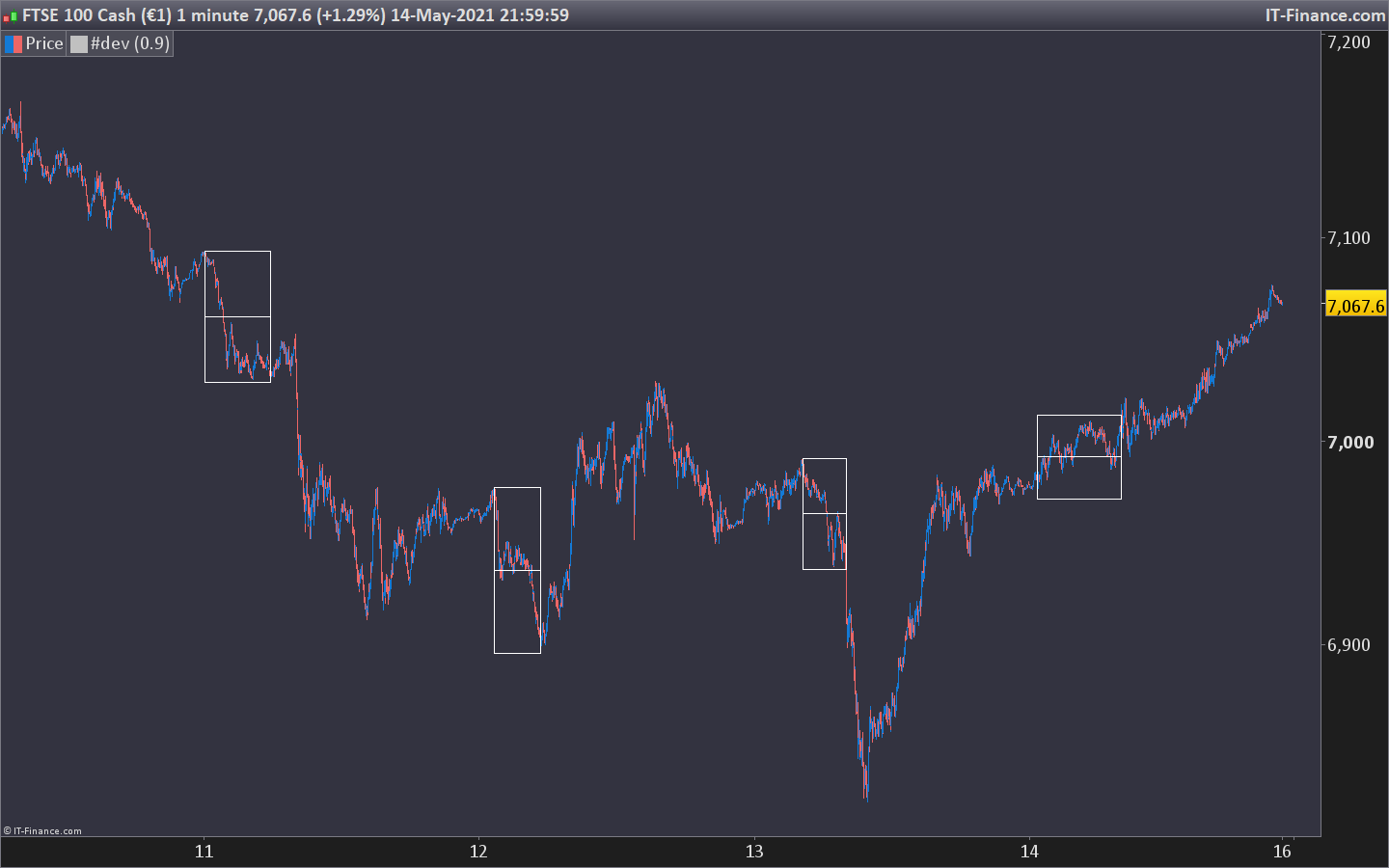
    Le code ci-dessous trace des boîtes entre les horaires programmés avec un traie horizontale dans leur milieu.

    timec= time>=000000 and time<080000
    if timec then 
    hh=max(hh,high)
    ll=min(ll,low)
    if hh<>hh[1] then 
    hhbar=barindex
    endif
    if ll<>ll[1] then 
    llbar=barindex
    endif
    endif
    if not timec and timec[1] then 
    drawrectangle(hhbar,hh,llbar,ll)
    drawsegment(hhbar,(hh+ll)/2,llbar,(hh+ll)/2)
    //rest 
    hh=0
    ll=close*100
    endif
    
    return
    Boris and icharttop thanked this post
    range-box.png range-box.png
    #169871 quote
    Boris
    Participant
    Average

    Olalaaah merci beaucoup Nicolas.. C’est tout à fait ce que je recherchais.

    Merci pour ton aide, aujourd’hui et en general d’ailleurs

    Bonne journée 🙂

Viewing 3 posts - 1 through 3 (of 3 total)
  • You must be logged in to reply to this topic.

Range avec ligne des 50%


ProBuilder : Indicateurs & Outils Personnalisés

New Reply
Author
author-avatar
Boris @boris Participant
Summary

This topic contains 2 replies,
has 2 voices, and was last updated by Boris

4 years, 9 months ago.

Topic Details
Forum: ProBuilder : Indicateurs & Outils Personnalisés
Language: French
Started: 05/15/2021
Status: Active
Attachments: 1 files
Logo Logo
Loading...
