I would be most grateful if somebody could help answer the following questions:
1. First question I have is; When I send an automatic trade program to ProOrder for automatic execution, will that program be affected by any changes to time zones or trading hours that I perform AFTER having sent the program to ProOrder for automatic trading?
2. Second question is; Can I have two automatic trade programs being automatically executed on the same instrument by ProOrder, that have different settings for time zone and/or trading hours? If not, what timeframe and/or trading hours will be given priority?
3. If I have a trading program being automatically executed by ProOrder, is there any way to check what time zone & trading hours this program is using for the instrument it is trading (if different from my current setting on the platform. ie I have changed setting after having submitted the program to ProOrder for auto-execution)?
4. If I develop two trading systems for the same instrument, that I backtest and potentially auto-execute on different settings for time zone & trading hours, how would you suggest tracking the timezone & trading hours used during development & auto-execution? For example, a system that is being auto-executed may for any reason stop and I decide to make some changes to the code before restarting it. If I make some changes to the program and I have changed time zone and/or trading hours on the platform from that initially used when developing the system, expected results will not be the same. Is there a suggested method to ensure that when I resubmit after making a change, that the system is resubmitted with the same time zone & trading hours used during development?
As stated, any help in clarifying what the precise rules are would be most appreciated!!
Maybe you should just set up a dummy strategy or two that just trade at certain times and run them live on demo and then make the changes to time zones etc that you have questions about and just see what happens?
I just leave my time zone set how it came out of the factory and use my brain to calculate what time different things happen in different parts of the world so I can’t answer your questions. Not messing with the settings saves an awful lot of confusion and doubts. If every strategy uses just one time zone then every thing starts from the same datum so you have eliminated one area where problems might occur.
See that’s the catch! To use my brain…. I wanted to avoid that as it is relatively error-prone…. 😉
@Wilko if you could ask 1 question at a time and with as few words as possible it would be less overfacing / overwhelming and so more likely to get and answer?
Then ask the next question etc?
Just an idea anyway.
will that program be affected by any changes to time zones or trading hours that I perform AFTER having sent the program to ProOrder for automatic trading?
I would say Yes, but not 100% sure. Like Vonasi I never change my timezone settings for that reason.
Why not try a Backtest and then change time zones and / or trading hours and see if results change?
Let us know the results please?
For information … I changed my platform from UTC +0:00 to UTC +3:00 (Exit / Save as the instructions say).
I ran the same System on Backtest for each Timezone, results are …
- UTC + 0:00 BT result = £2013 Gain
- UTC + 3:00 BT result = £1053 Gain
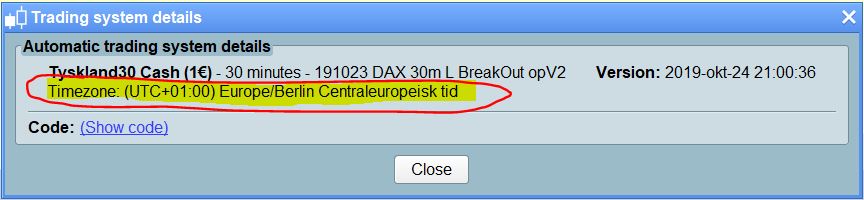
The answer I had from ProRealTime was that each system that you set live is associated with the time zone setting that is in effect at the time of of launching the program live. In other words, if I start live trading ot eg. a system that trades DAX and I have UTC+1 at the time, this will be the setting for system as long as it live trades. If I the start live trading of eg. a system that trades the DOW and I have changed settings while for example backtesting this algo to UTC-5, then if that is still the seeting at the time I launch the system live, that time setting will be associated with that system. The timezone associated with any system that is trading live can be seen if you click to view the details and code of any live system which is shown in the list of Running systems in the ProOrderAutomaticTrading
This means that systems that are trading live remain unaffected by any changes to platform settings after the system has been sent off for live trading.
Hahaha … just shows how wrong we can be! 🙂
Thank you for reporting back @Wilko … nice work!
This means that systems that are trading live remain unaffected by any changes to platform settings after the system has been sent off for live trading.
That strategies are placed on the PRT server and run from there so just saving the settings you are using when you place it live would make sense.
This has raised questions …
UK in Summer is on timezone UTC+1.
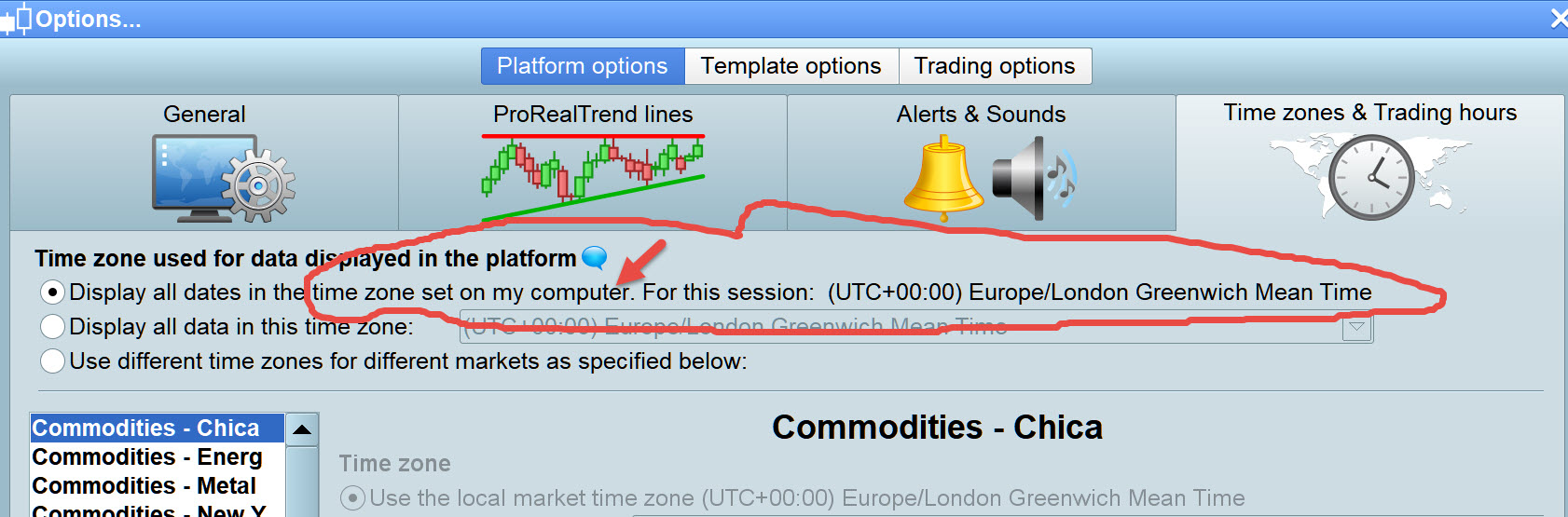
My Platform is set to UTC + 0.00 due to the setting as shown attached … same as my PC. But my PC was running on UTC +1 during the Summer!?
After Wilko findings above, I checked Systems which had been set live months ago during the Summer (when UK is on UTC +1) and the Systems state UTC + 0:00.
Surely this means that Times on my Systems have been running at 1 hour different from the timezone I have been living in during the Summer months??
Unfortunately, I am not certain how PRT handles changes when daylight savings time switches. However, given that I have had no issues running systems on DAX, I believe they adapt the UTC-setting to reflect daylight savings time. This would make sense from a user friendliness perspective. However, if you run a system on an American index, such as the DOW and your platform is set to Central European Time, you are likely to follow European DST rather than US DST. This may create problems during the time that Europe has switched and not US, and vice versa.
All good reasons to get rid of any seasonal time changes through out the world. We are in a modern computerised world where this sort of thing just adds confusion – we are no longer farmers who need daylight!
2. Second question is; Can I have two automatic trade programs being automatically executed on the same instrument by ProOrder, that have different settings for time zone and/or trading hours? If not, what timeframe and/or trading hours will be given priority?
Now I am in the zone with Timezones (thought / slept on it) … Yes you can but you would need to change timezone settings then Exit the Platform, Save on Exit, then open Platform again and then set your Auto-System 2 running on Timezone 2. Then change back to your main default Timezone, then Exit / Save then open again, then continue doing whatever!
Bit of a faff above would seem??
EDIT / PS
A faff for Demo but maybe not for Real Live (less Systems)??
However, we would have to test on Demo using Timezone 2 else we would not be confident with results??
I won’t be able to help with potential differences between demo and live. I never use demo. I kinda prefer learning the hard way.
Thanks, Wilko, for bringing up this important topic. I would also like to live-trade two strategies using different trading hours (one using all available intraday bars, and the other only 8:00 to 22:00 CET). Do you – or anybody else in the forum – have a definite answer if it works to launch 2 strategies with different trading hour settings on the same instrument?
Yes, for sure. You could also use different trading hours in the same strategy, say Long from 9 to 11 and Short from 15 to 17. Or whatever else you want.
Whenever you enter a trade for selected hours, just write:
IF time >= 090000 AND time <= 110000 AND MyConditions AND Not OnMarket THEN
BUY 1 CONTRACT AT MARKET //or SELLSHORT for short trades
ENDIF
your trades will always be entered according to your local TZ. If you want to trade during the another session (American, European or Asian), then you will have to change the above code so that they reflect that TZ.
The above code works the same in Canada as in Paris and Sydney. It will enter trades from 9 thru 17 local time.
There’s no provision in the PRT language for different TZ’s other than your local one.