Pullback in Trend indicator

Viewing 2 posts - 1 through 2 (of 2 total)
  • Author
    Posts
  • #139101 quote
    Oliviertrader2020
    Participant
    Average

    Hello,

    This is my first indicator for Prorealcode!
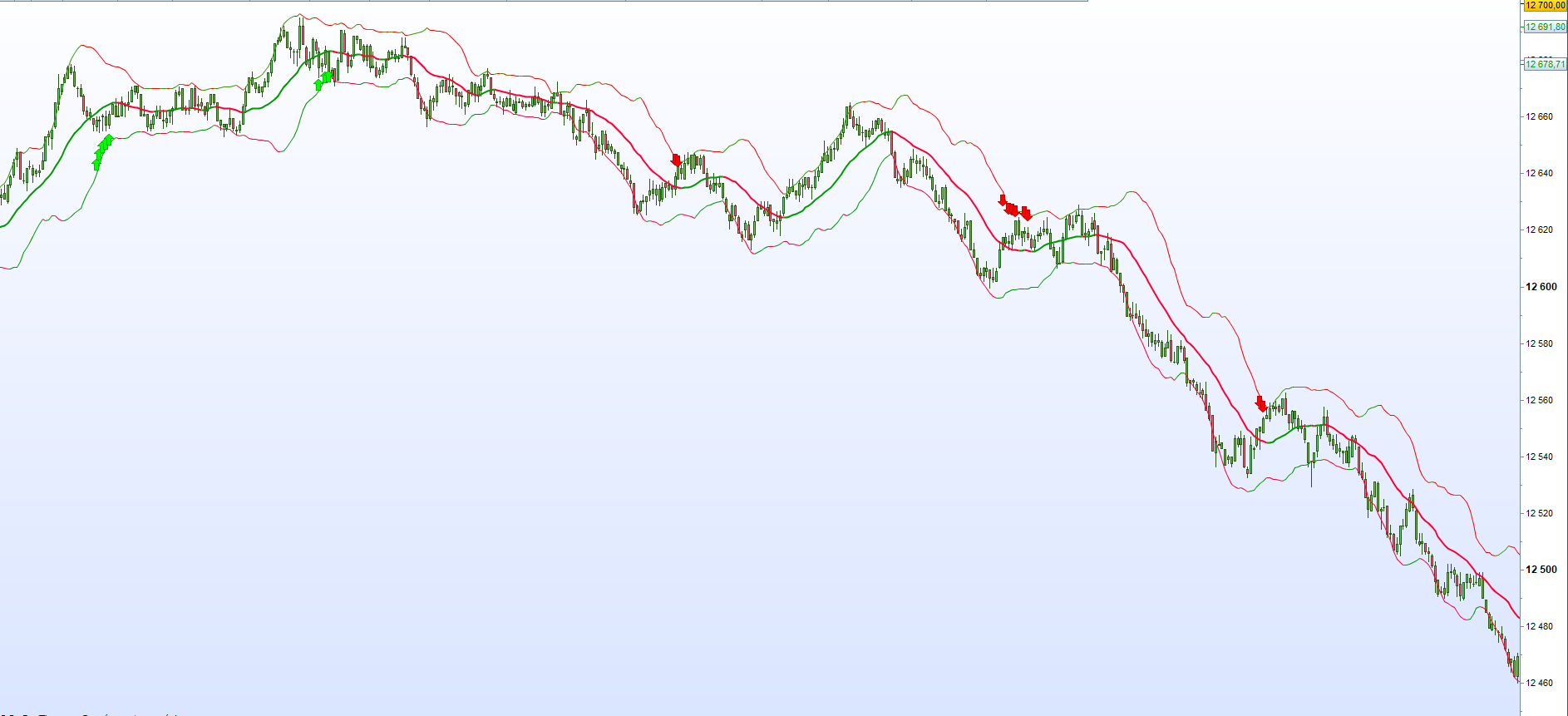
    It allows to detect trends and indicates when the pullback ends.

    The code is quite simple :
    For a bullish trend the short moving averages are above the long ones, the low bollinger band is higher than the previous period, and the price is still below the moving average 20.

    I take a trade as soon as the price pass the highest/lowest of the previous candle.
    For stop loss and takeprofit, I use it in 2 ways depending on the presence or absence of bottom trend on the upper TF:

    1. With a trend also on higher TFs :
    StopLoss above/below the former high/low
    TP1: the opposite bollinger band
    TP2: the Fibonnacci extension 161.8.

    2. With no trend on the upper TF :
    StopLoss above/below the previous spark plug.
    TP1: the moving average 20
    TP2: The Opposite Bollinger Band

    If you have any ideas for improvements don’t hesitate to share them.
    I still need to make some improvements before posting the final version in the library.

    Pullback in trend :

    
    // Conditions for bollinger band
    indicator1 = BollingerDown[20](close)
    c1 = (indicator1 > indicator1[1])
    indicator2 = BollingerUp[20](close)
    c2 = (indicator2 < indicator2[1])
    
    // Conditions for moving average
    c3 = (BollingerDown[20](close)>Average[50](close) AND Average[50](close) > Average[100](close) AND Average[100](close) > Average[200](close))
    c4 = (BollingerUp[20](close)< Average[50](close) AND Average[50](close) < Average[200](close) AND Average[100](close) < Average[200](close))
    C5 = high < Average[20](close)
    C6 = low > Average[20](close)
    
    IF C1 AND C3 AND C5 then
    DRAWARROWUP(barindex[1],BollingerDown[20])coloured(0,255,0)
    endif
    
    IF C2 AND C4 AND C6 then
    DRAWARROWDOWN(barindex[1],BollingerUp[20])coloured(255,0,0)
    endif
    
    Return
    PULLBACK-IN-TREND.png PULLBACK-IN-TREND.png
    #139156 quote
    Nicolas
    Keymaster
    Master

    Thanks for sharing, it’s visually interesting and will certainly suit some other needs for people looking for this kind of setup.

Viewing 2 posts - 1 through 2 (of 2 total)
  • You must be logged in to reply to this topic.

Pullback in Trend indicator


ProBuilder: Indicators & Custom Tools

New Reply
Summary

This topic contains 1 reply,
has 2 voices, and was last updated by Nicolas

5 years, 7 months ago.

Topic Details
Forum: ProBuilder: Indicators & Custom Tools
Language: English
Started: 07/12/2020
Status: Active
Attachments: 1 files
Logo Logo
Loading...