PRT V12 the best ever done…….

Viewing 7 posts - 1 through 7 (of 7 total)

  • Author
    Posts
  • #226068 quote
    MaoRai54
    Participant
    Master

    Hello to everybody,

    I was so anxious to have v12 available but reading some comments i’m still waiting to use it.

    I can’t find clear and deep explanation of its features.  No one detailed explanation from PRT.  I cannot understand which will be the huge improvements, except the preview as Trading view.

    I remember that we mentioned the possibility to have a trading system which was using different indexes but i’m not able to know how to do it. In their general presentation it’s not mentioned.   do you know if it’s possible?     In my mind it has to be a very interesting step forward; I’d be able, for example, to compare Dax with us500 etc.

    Why no one till now have published a deep report on the features of V12 ?

    Thanks in advance for your comments

    #226075 quote
    GraHal
    Participant
    Master

    I guess you have seen this Topic …

    ProRealTime v12 – list of new features to come!

    MaoRai54 thanked this post
    #226108 quote
    MaoRai54
    Participant
    Master

    Hi GraHal,

    many thanks for reminding me this post. I saw it last year but i forgot it.

    Well, now i had a quick view of all its pages but i was unable to find who i’m looking for. I mean the possibility to create an auto strategy in which, for example, the buy/sell orders on Dax are related to the trend of SP500. So, using different indexes or forex pairs to decide buy/sell.

    Anyone could be so kind to tell me if it’s available in v.12 ?

    thanks in advance

    #226109 quote
    PeterSt
    Participant
    Master

    Not possible.

    We have “Calculated Instruments” (improved version of what was already there in V11 named “spreads”) but they can not be used in AutoTrading.
    Sorry … 🙁

    GraHal and MaoRai54 thanked this post
    #226531 quote
    rpaul1
    Participant
    New

    Hi,


    Fairly new to PRT… so not sure how to create a new subject POST.

    Essentially, I just got a new NewBook Pro (running M2 Pro chip with Sonoma Os).  I am unable to download the correct version of PRT for this new MBP.  I can see that PRT offer 2 options (one for the older MBP – using the “Intel chip” and another for the newer machine – “Apple Proccesor”).  However, when i try to download the Apple Processor version it prompts me to download Rosetta, which is odd as it should run PRT natively.  Interestingly, if I select the other option (INTEL), it still prompts me to download Rosetta.

    Has anyone managed to run ProReal Time in the newer MacBook Pro’s (M1, M2 or M3 chips)?  If so, are you running WITHOUT Rosetta?  Where did you download from?

    Any help greatly appreciated.

    #226596 quote
    PeterSt
    Participant
    Master

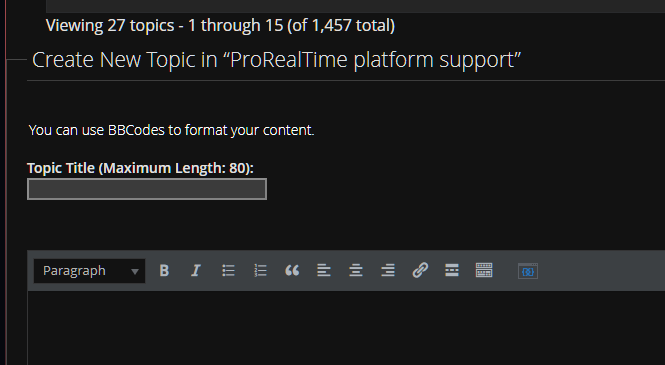
    Hey @rpaul1, welcome. I see you found the other existing topic for this https://www.prorealcode.com/topic/no-luck-prt-apple-processor-launch-installing/ but for the next time, scroll all the way to the bottom and there you can start a new topic (after selecting the proper board). Thus first select a board in the top (see first attachment for an example), and then scroll to the bottom and see what you see in the 2nd attachment.

    Regards,
    Peter

    image_2024-01-19_171237964.png image_2024-01-19_171237964.png image_2024-01-19_171339263.png image_2024-01-19_171339263.png
    #226615 quote
    rpaul1
    Participant
    New

    Hi @PeterSt,

    Thanks for that guidance.  Much appreciated.

Viewing 7 posts - 1 through 7 (of 7 total)

  • You must be logged in to reply to this topic.

PRT V12 the best ever done…….


Platform Support: Charts, Data & Broker Setup

New Reply
Author
author-avatar
MaoRai54 @maorai Participant
Summary

This topic contains 6 replies,
has 4 voices, and was last updated by rpaul1

2 years ago.

Topic Details
Forum: Platform Support: Charts, Data & Broker Setup
Language: English
Started: 01/06/2024
Status: Active
Attachments: 2 files
Logo Logo
Loading...