


PRT v11 – CurrentDayOfWeek

Viewing 3 posts - 1 through 3 (of 3 total)
  • Author
    Posts
  • #155121 quote
    smf1
    Participant
    Average

    Hello,

    I built an indicator that use the function CurrentDayOfWeek and it worked perfectly before the version 11 of PRT. With the v11 the function CurrentDayOfWeek returns exaclty the same value of DayOfWeek. I wrote an email to the PRT support thinking the problem was simply a bug that came out with the release of the new version, but instead the answer from the support is this: “After analysis, this is not a mistake but a behaviour that we have changed in order to have the same results between BackTesting and Indicator. Moreover, it will be not sense when you have in the past to be able to know a future date.

    I must admit I’m a little stunned by the answer, but I take note of the position of PRT and ask help here.

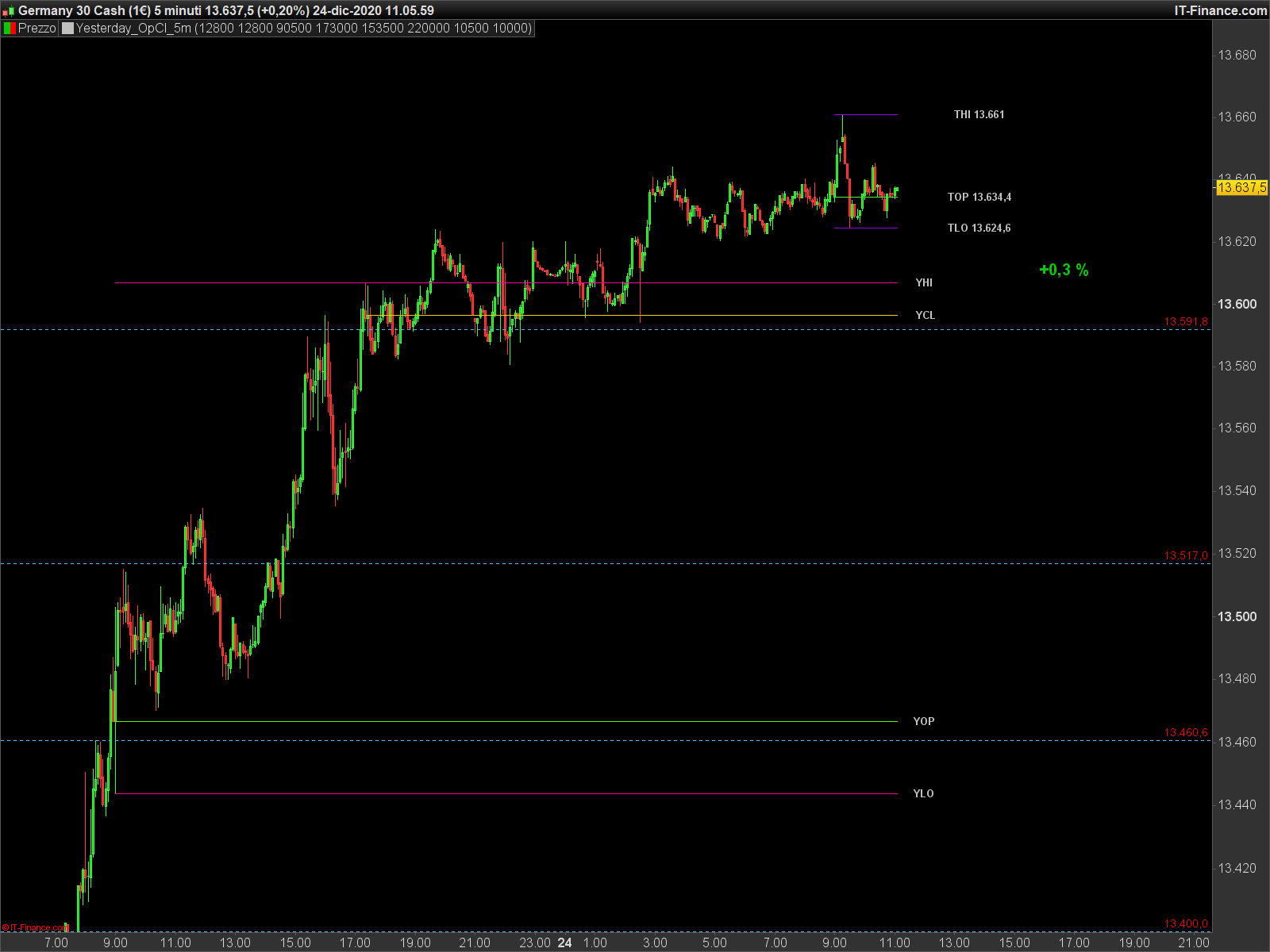
    My indicator draw lines on the chart reporting yesterday and today Open, High, Low, Close for Dax, Nasdaq and Forex pairs and take into consideration open and close time of the session (excluding overnight). Given the different session open and close time, it distinguish Dax, Nasdaq and Forex pairs using price. So, for example, Dax open is set at 9.00 AM and close at 5.30 PM. In order to recognize the previous day and detect the relative open, high, low and close values, I use CurrentDayOfWeek and set as previous day = CurrentDayOfWeek-1 or previous day=5 (friday) if CurrentDayOfWeek is 1 (monday).

    Considering the PRT support answer my indicator cannot work with PRT11 (I wonder what the sense of keeping the function CurrentDayOfWeek!). Do you have any alternative solutions to obtain the same lines on my charts? I attach the ITF file here and an immage of a chart as example.

    Thanks a lot

    Stefano

    YT_HiLoClOp.itf DAX-5-minuti.png DAX-5-minuti.png
    #155163 quote
    robertogozzi
    Moderator
    Master

    I’ve never used CURRENTDAYOFWEEK. To return yesterday’s and today’s values, I use:

    ONCE PrevOpen  = 0
    ONCE PrevHigh  = 0
    ONCE PrevLow   = 0
    ONCE PrevClose = 0
    ONCE CurrOpen  = 0
    ONCE CurrHigh  = 0
    ONCE CurrLow   = 0
    ONCE CurrClose = 0
    ONCE DaxOpen   = 090000
    ONCE DaxClose  = 173000
    IF OpenTime = DaxOpen THEN    //new day
       PrevOpen  = CurrOpen
       PrevHigh  = CurrHigh
       PrevLow   = CurrLow
       PrevClose = CurrClose
       CurrOpen  = open
       CurrHigh  = high
       CurrLow   = low
       CurrClose = close
    ENDIF
    IF (OpenTime >= DaxOpen) AND (OpenTime <= DaxClose) THEN
       CurrClose = close
       CurrHigh  = max(CurrHigh,high)
       CurrLow   = min(CurrLow, low)
    ENDIF
    RETURN PrevOpen AS "Yesterday Open",PrevHigh AS "Yesterday High",PrevLow AS "Yesterday Low",PrevClose AS "Yesterday Close",CurrOpen AS "Open",CurrHigh AS "High",CurrLow AS "Low",CurrClose AS "Close"
    #155181 quote
    smf1
    Participant
    Average

    Thanks Roberto….it was much simpler than my complicated idea!

    Buon Natale

    Stefano

    robertogozzi thanked this post
Viewing 3 posts - 1 through 3 (of 3 total)
  • You must be logged in to reply to this topic.

PRT v11 – CurrentDayOfWeek


ProBuilder: Indicators & Custom Tools

New Reply
Author
author-avatar
smf1 @smf1 Participant
Summary

This topic contains 2 replies,
has 2 voices, and was last updated by smf1

5 years, 1 month ago.

Topic Details
Forum: ProBuilder: Indicators & Custom Tools
Language: English
Started: 12/24/2020
Status: Active
Attachments: 2 files
Logo Logo
Loading...
