


PRT – Using backtest, issue with only having moving average to select

Viewing 6 posts - 1 through 6 (of 6 total)
  • Author
    Posts
  • #118749 quote
    Deltona
    Participant
    New

    Hi All,

    I am new to PRT but not to trading, I have been actively trading for a few years now….. I recently decided to look at a new strategy and wanted to create a system to Auto Trade.

    I already had an IG account and happened to find the PRT software, and it’s brilliant. I am trying to setup something really simple but I can’t seem to suss out why it won’t let me.

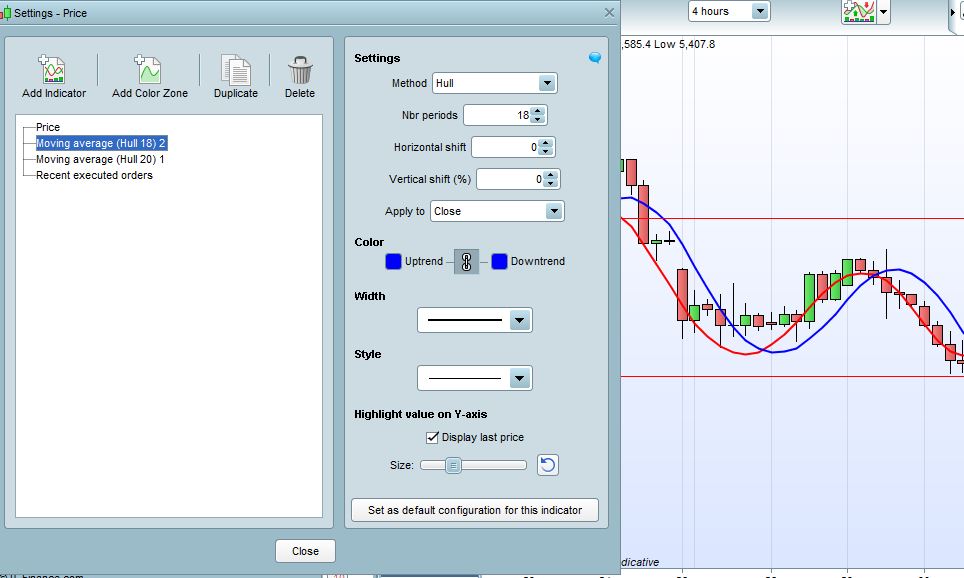
    My chart has a very basic ‘Moving Average’ indicator which I have setup two on the chart with different settings. Now when I go to the back test function, I want to setup a ‘Buy’ when MA2 crosses over MA1, and then ‘Sell’ when MA1 Crosses under MA2. And Vice Versa for the ‘Short’ positions.

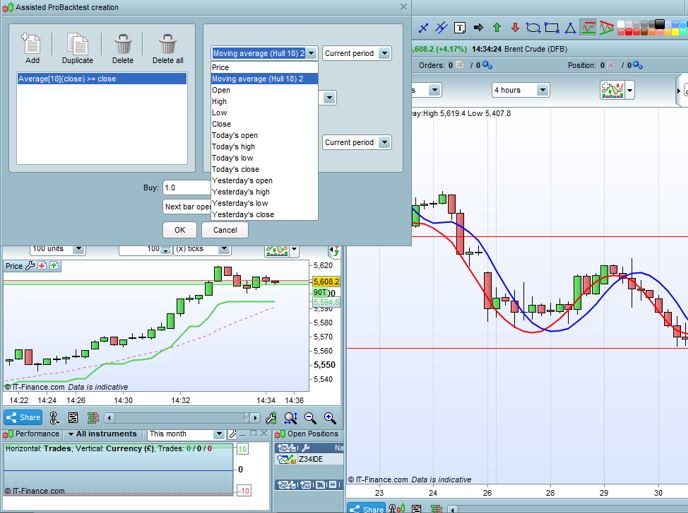
    The problem is that when I use the dropdowns I only ever see one of the MA, never both, and never the opposing one in the other dropdown in either Buy or Short tabs.

    I found a tutorial video showing exactly what I want to do but I simply don’t have the option on the dropdown menu for some reason.

    Can anyone help please? I’ve attached a couple of screen shots showing what I mean.

    Thanks, Matt

    MA-SETUP.jpg MA-SETUP.jpg MA-SETUP-2.jpg MA-SETUP-2.jpg
    #118752 quote
    Nicolas
    Keymaster
    Master

    I made the test with 2 Hull averages just like you did and I can see both in the dropdown list. Are you sure you have clicked on the chart where the 2 averages are present?

    #118753 quote
    Deltona
    Participant
    New

    Hi, Thanks for the quick reply. Yes I am positive, I’ve even shut down, restarted, tried new templates, deleted all indicators and tried to add them to the chart again…. which works as you can see. But whenever I go into the dropdown it only shows one of them.

    I have tried a workaround and gone into the code and changed the numbers of the indicators which kind of works. But this leads to me think it doesn’t work correclty as when I run the backtest it’s not entering and exiting trades at the point they actually cross it’s waiting a few bars later.

    Cheers……

    #118759 quote
    Nicolas
    Keymaster
    Master

    I see that there is a problem using Hull MA in the assisted creation tool. It always takes SMA instead into the code.

    Anyway, the below code would do the trick: 2 Hull MA crosses strategy

    // Definition of code parameters
    DEFPARAM CumulateOrders = False // Cumulating positions deactivated
    
    Periodf=18
    Periods=20
    
    inner1 = 2*weightedaverage[round( Periodf/2)](typicalprice)-weightedaverage[Periodf](typicalprice)
    inner2 = 2*weightedaverage[round( Periods/2)](typicalprice)-weightedaverage[Periods](typicalprice)
    
    hullf = weightedaverage[round(sqrt(Periodf))](inner1)
    hulls = weightedaverage[round(sqrt(Periods))](inner2)
    
    // Conditions to enter long positions
    c1 = hullf crosses over hulls
    c2 = hullf crosses under hulls
    
    IF c1 THEN
    BUY 1 CONTRACT AT MARKET
    ENDIF
    
    // Conditions to enter short positions
    
    IF c2 THEN
    SELLSHORT 1 CONTRACT AT MARKET
    ENDIF
    
    
    Deltona thanked this post
    #118767 quote
    Deltona
    Participant
    New

    That’s brilliant thanks very much. I actually shutdown my machine and rebooted it as well, then hey presto I could see both MA on the dropdown, very strange.

    I have also just tested the code you put above and it works well….

    I just need to figure out a few more settings, and why my ‘Simple MA’ setup is taking trades when they haven’t crossed over, they aren’t even close to each other which again is very odd.

    Thanks for your help!

    #118780 quote
    Deltona
    Participant
    New

    Nicolas, Is it also possible to make this even simpler by using a single MA and simply trigger when the average flips from uptrend to downtrend? I am trying to reduce the latency and also the false trades from a 4hr system I am trying.

    I can’t seem to fathom the correct settings to allow me to do this, or does it always have to be when there’s two MA’s and they physically cross?

    Thanks…..

Viewing 6 posts - 1 through 6 (of 6 total)
  • You must be logged in to reply to this topic.

PRT – Using backtest, issue with only having moving average to select


ProOrder: Automated Strategies & Backtesting

New Reply
Author
author-avatar
Deltona @deltona Participant
Summary

This topic contains 5 replies,
has 2 voices, and was last updated by Deltona

6 years ago.

Topic Details
Forum: ProOrder: Automated Strategies & Backtesting
Language: English
Started: 02/05/2020
Status: Active
Attachments: 2 files
Logo Logo
Loading...

