


PRT Screener Code Automatic Change or Not saved

Viewing 4 posts - 1 through 4 (of 4 total)

  • Author
    Posts
  • #231382 quote
    WhyAskOZ
    Participant
    New

    Hi,

    I created a customised indicator and then used that indicator to create screener which basically screen the stock once certain indicator conditions are met. My query is  not about checking or correcting my code, however it is about why PRT change the code everytime i close system and re-open it?

    So, I used the indicator on the stock screen and then use screener to create new screener which select my custom indicator and then i screen stock. Screener work perfectly while my session/desktop app is open. When I complete work then I save everything and close desktop aap. However, when i reopen the app and go back to the screener then it changes the screener code automatically.

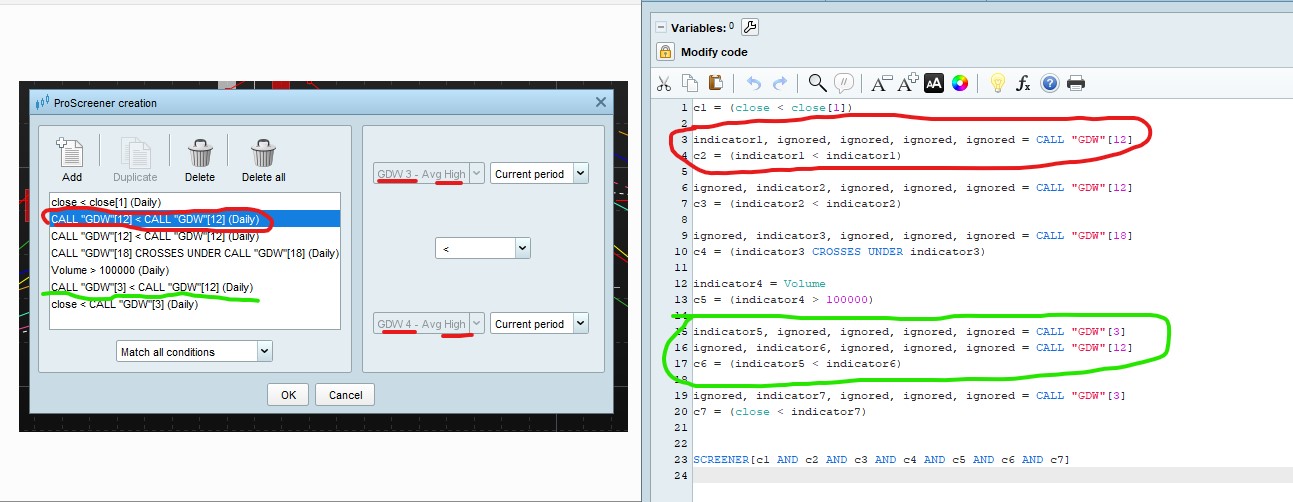
    as you can see in attached image. the red highlight item on the left side shows that the code is for GDW12 with GDW12, but if you look at the same screen it is actualy for GDW3 & GDW4. In the code modification you can see that system making condition C2 where same indicator is checked against itself which is not what i wanted when i created code.

    if you see green highlighted area on left it compares GDW3 with GDW12 and coding also comes out correct, but for some reason system changed the coding for GDW12.

    Now, this is happening again and again in custom indicators based screeners. How can i avoid this ?


    what am i doing wrong that is causing this issue?

    I don’t need code correction. it is the system even though i am saving changing some codes automatically when i reopen it. This doesn’t happen if i have created code using code modifier and it only happens if i use proscreener creation.


    thanks

    Screener-Coding-Change-PRT.jpg Screener-Coding-Change-PRT.jpg
    #231386 quote
    PeterSt
    Participant
    Master

    There is no intelligence in the PRT code whatsoever, so nothing should change your code.
    I did not look into it, but from your description I would say that you must provide ProRealTime a technical Report (under the Help menu) and link to this topic for easy explanation which readily includes the picture. In other words, this must be a bug so somewhere.

    Iván González thanked this post
    #231399 quote
    JS
    Participant
    Senior
    Hi,

    What I would try, when you are done with your (new) screener in “ProScreener creation” then “Unlock code/Modify code” and save/execute the (unlocked) screener (possibly under a different name)…

    Iván González thanked this post
    #231436 quote
    Iván González
    Moderator
    Master
    Hi! Try with JS proposal and if nothing changes create a new ticket in PRT as Peter says.
Viewing 4 posts - 1 through 4 (of 4 total)
  • You must be logged in to reply to this topic.

PRT Screener Code Automatic Change or Not saved


ProBuilder: Indicators & Custom Tools

New Reply
Author
author-avatar
WhyAskOZ @g42dav Participant
Summary

This topic contains 3 replies,
has 4 voices, and was last updated by Iván González

1 year, 11 months ago.

Topic Details
Forum: ProBuilder: Indicators & Custom Tools
Language: English
Started: 04/11/2024
Status: Active
Attachments: 1 files
Logo Logo
Loading...



