




PRT MACD CORRUPTED!?

Viewing 5 posts - 31 through 35 (of 35 total)
  • Author
    Posts
  • #73351 quote
    Pierre
    Moderator
    Average

    I think most folks want fast blue line crossing slow red line so what is the code for this via the Assisted Creation Tool please (or have I missed it in above? :))?

    Many Thanks

    GraHal


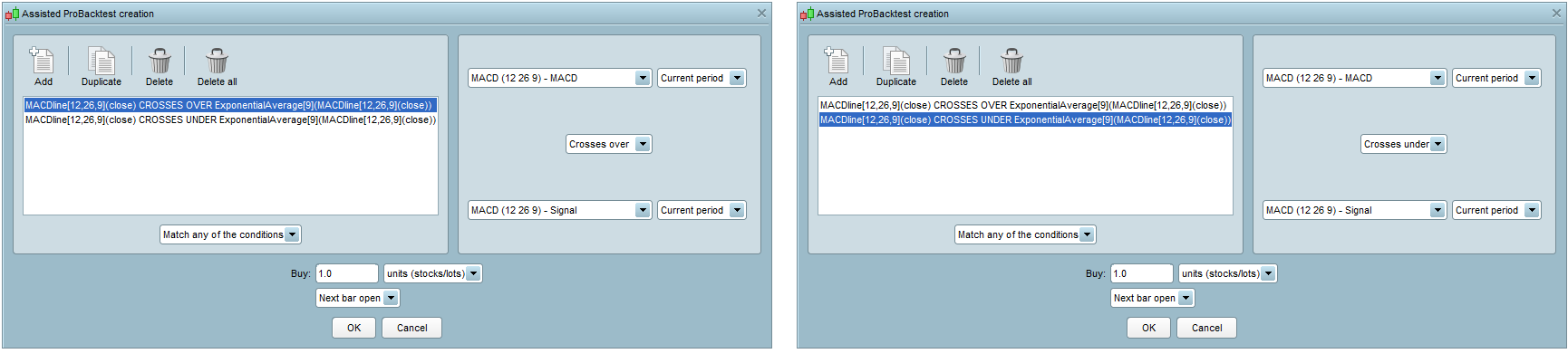
    The image below shows how to do this with assisted creation:

    [attachment file=73352]

    The first condition (left image) is for “crosses over” and the second condition (right image) is for “crosses under”.

    Here is the code generated by the assisted creation:

    // Definition of code parameters
    DEFPARAM CumulateOrders = False // Cumulating positions deactivated
    
    // Conditions to enter long positions
    indicator1 = MACDline[12,26,9](close)
    indicator2 = ExponentialAverage[9](indicator1)
    c1 = (indicator1 CROSSES OVER indicator2)
    indicator3 = MACDline[12,26,9](close)
    indicator4 = ExponentialAverage[9](indicator3)
    c2 = (indicator3 CROSSES UNDER indicator4)
    
    IF c1 OR c2 THEN
    BUY 1 SHARES AT MARKET
    ENDIF
    

    Regards,

    Pierre

    #73558 quote
    GraHal
    Participant
    Master

    the fact that the MACD line is just named MACD can create confusion because it’s not the same logic as in the rest of the Software. I’ve just asked my colleagues to correct this in a future update to display MACDLine in this dropdown menu as well.

    Thank You @Pierre.

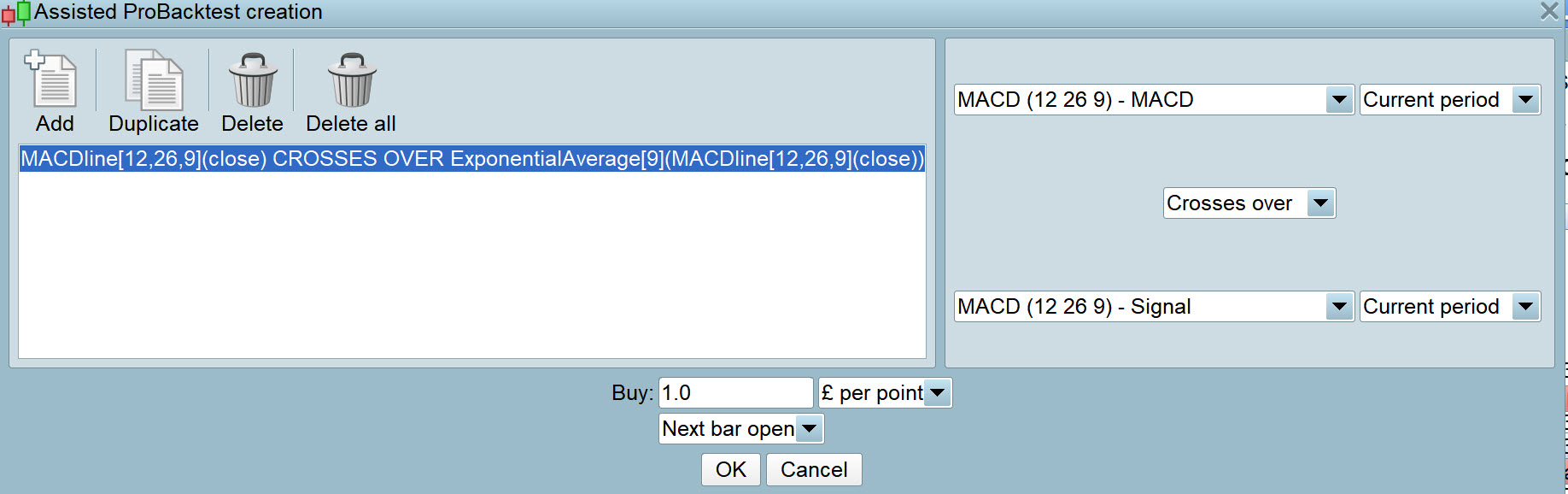
    Please ask your colleagues to correct the confusion re MACD Signal on the right side and Exponential Average  of MACD Line on the left side … see attached.

    Much easier to read, understand and remember if it can be changed to read MACD Signal  on both right and left sides

    In order to understand code, names of lines etc need to be the same everywhere we look (in code and in Creation Tool) else we feel like we are in a tumble drier! 🙂

    I know you appreciate above, but I can’t believe how this has escaped corrective action for so long?

    Regards
    GraHal

    #73564 quote
    Nicolas
    Keymaster
    Master

    most folks want fast blue line crossing slow red line so what is the code for this via the Assisted Creation Tool please

    Look at the picture Pierre has shared, blue is the MACDline and red is the signal line (an average of the MACDline). No HISTOGRAM. (I know that in some other platforms, the histogram is the MACDline, maybe your confusion come from that).

    #73569 quote
    GraHal
    Participant
    Master

    maybe your confusion come from that).

    I am now only confused / frustrated by the various names that lines are given at various points … the Assisted Creation Tool right side different from the left side and then slightly different again when used in the coding window.

    If the same name – MACD and Signal were to be used everywhere then there would be no confusion?

    At least 4 of us were / have been confused (as they stated on this Topic) by default MACD names for the lines etc … me, Despair, Nicolas and MaxT  … and I’m sure there has been many many more so the sooner the names are standardised – across all places that the names appear – the better it will be for all Users, especially  rookie coders who will not have read this Topic?

    #73600 quote
    Pierre
    Moderator
    Average

    Hi,

    FYI, I’ve modified the text last friday. The modification will be included in the next minor platform update.

    Thanks again for your feedback and sorry it took so long for someone to take it into account.

    Regards,

    Pierre

    GraHal thanked this post
Viewing 5 posts - 31 through 35 (of 35 total)
  • You must be logged in to reply to this topic.

PRT MACD CORRUPTED!?


ProBuilder: Indicators & Custom Tools

New Reply
Author
Summary

This topic contains 34 replies,
has 7 voices, and was last updated by Pierre

7 years, 7 months ago.

Topic Details
Forum: ProBuilder: Indicators & Custom Tools
Language: English
Started: 02/28/2018
Status: Active
Attachments: 9 files
Logo Logo
Loading...
