PRT clearing temporary files when backtesting

Viewing 14 posts - 1 through 14 (of 14 total)
  • Author
    Posts
  • #153567 quote
    deleted23092025
    Participant
    New

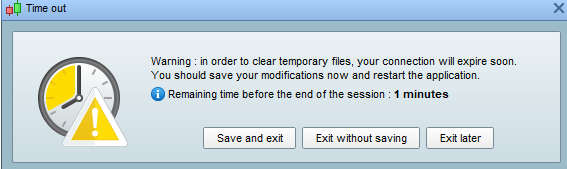
    After optimizing a system in approx 20 hours and it has gone 20% loading. I got this message “Warning: in order to clear temporary files, your connection will expire soon. You should save your modifications now and restart application. Attached a file.

    So I guess this have been happening several time while night when im trying to optimize. Everytime i wake up in the morning the program is shut off. I lost several hours of work and I did manage to catch the message this time.

    Even though i pressed exit later same message came with 0 minutes then it automatically closed. [MODERATION: DELETED BAD WORDS ; RESPECT THE POSTING RULES]

    aae85276edff6b79fab5156a8a943574.png aae85276edff6b79fab5156a8a943574.png
    #153569 quote
    deleted23092025
    Participant
    New

    I was launching my prt using java mode through ig (as that is the best (fastest) way to optimize algos?) as you can choose > 8 GB ram.

    Correct me if im wrong..

    #153582 quote
    robertogozzi
    Moderator
    Master

    PRT is shut down every 18 hours (it was 12 up to a couple years ago) to clear some temp files.

    You need to make your backtests shorter and I suggest that YOU shut it down before it does that itself.

    I shut down, and immediately launch it again, twice a day, at around 09:00 and around 20:00, to make sure it’s within 18 hours.

    #153583 quote
    deleted23092025
    Participant
    New

    Why would it be like that its 2020..


    Well its hard when you have a long code and when 6000 combinations takes 1% per hour to load… So there is no other way around it?

    #153585 quote
    GraHal
    Participant
    Master

    So there is no other way around it?

    Optimise with coarse / wide steps first then refine in to narrower steps after each optimiser run.

    20 hours to optimise … I get impatient after a few minutes so I use the above method.

    Or alternatively optimise 1 variable at a time or at most 2 at a time.

    robertogozzi thanked this post
    #153586 quote
    robertogozzi
    Moderator
    Master

    Use this box https://www.prorealtime.com/it/contatto to tell what you don’t like, what you like and what you suggest.

    thanked this post
    x-4.jpg x-4.jpg
    #153588 quote
    deleted23092025
    Participant
    New

    I use wide steps and trying to include about 6 variables.. It is a long code which takes time therefor it would be nice if the program  didnt shut off every 18 hours atleast that you can have the option to not do it.

    #153614 quote
    XORANDNOT
    Participant
    Senior

    I think one reason it shuts down every 18 hours is to get people to think more carefully about how to optimize their codes without having to use 100,000 combinations. Most of the time, there are easier and faster ways. You will end up with a curve fit either way.


    Normally, it is more important not to find “the best” of 6.000 combinations, but rather to see whether you get broad ranges of all variables where they work reasonably well. With only 100 out of 6000 combinations showing up in the end, you won’t see this.

    Nicolas thanked this post
    #153651 quote
    Nicolas
    Keymaster
    Master

    Backtests are made server side, they can take longer if you are not alone in the queue. Try to reduce your combinations like it has been suggested.

    I removed the bad words form your post, please be polite in your next posts.

    #155257 quote
    Berra
    Participant
    Veteran

    How much are the backtest time depending on the computer performance or net speed capacity?

    #155265 quote
    GraHal
    Participant
    Master

    How much are the backtest time depending on the computer performance or net speed capacity?

    Very little dependecy whatsoever

    In my opinion … 4GB RAM and above helps prevent hanging / freezing.

    PRT Servers do all the processing so user computers do not need to be latest models etc.

    #155269 quote
    Monochrome
    Participant
    Senior

    It dosent seem to process the calculation of indicators on the servers.  Each indicator takes up a cpu core.

    So if you use lots of indicators i would recommend lots of cores and ram.

    #155272 quote
    GraHal
    Participant
    Master

    Each indicator takes up a cpu core.

    You talking about Indicators displayed on charts (not Indicators used in backtests)?

    #155277 quote
    Monochrome
    Participant
    Senior

    Yes indicators displayed on charts.

    I have a slow cpu and on 200k it takes quite some time to load.

    GraHal thanked this post
Viewing 14 posts - 1 through 14 (of 14 total)
  • You must be logged in to reply to this topic.

PRT clearing temporary files when backtesting


ProOrder: Automated Strategies & Backtesting

New Reply
Author
Summary

This topic contains 13 replies,
has 7 voices, and was last updated by Monochrome

5 years, 2 months ago.

Topic Details
Forum: ProOrder: Automated Strategies & Backtesting
Language: English
Started: 12/13/2020
Status: Active
Attachments: 2 files
Logo Logo
Loading...