PRT candles appear as one line

Viewing 6 posts - 1 through 6 (of 6 total)

  • Author
    Posts
  • #217968 quote
    bearbull
    Participant
    Average

    HI,

    For some reason, my candles appear as one line when I log in and open a chart. Its frustrating having to scroll the right hand side to enlarge the candles. I save the chart expecting it to remain as my savings, but every time I open PRT, it appaers as one line and I have to enlarge the candles by way of spreading the chart out vertically

    Its obviously a setting issue…………….anyone any ideas where I should look?

    Thanks

    #217969 quote
    PeterSt
    Participant
    Master

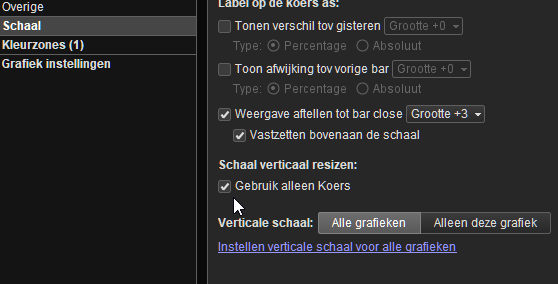
    Right-click in the right-hand margin – Configure this area – Use Price only.

    🙂

    image_2023-07-21_081259772.png image_2023-07-21_081259772.png
    #217971 quote
    Nicolas
    Keymaster
    Master

    There must be an indicator applied on your chart that change/adapt the scale.

    As PeterSt points out, you need to modify the price settings so that the scale only uses the price (and not the indicator settings applied to it).

    #217975 quote
    bearbull
    Participant
    Average

    Thanks Guys !

    PeterSt you were correct !

    Nicolas I was tinkering with an indicator but then decided not to use it, that when my problem began. Nicolas, there was a thread on AI/ chatbot that was started with re to helping program……..can you post a link please – thanks

    Again Thanks

    #217977 quote
    GraHal
    Participant
    Master

    .can you post a link please

    If you hover over your pic (top right hand coner) and enter ChatGPT in the search box, the top result is below, but there are plenty of others.

    Create strategies codes with ChatGPT for ProRealTime

    #218223 quote
    Nicolas
    Keymaster
    Master

    ChatGPT is also good at creating indicator, will certainly open a new topic about that later.

Viewing 6 posts - 1 through 6 (of 6 total)

  • You must be logged in to reply to this topic.

PRT candles appear as one line


Platform Support: Charts, Data & Broker Setup

New Reply
Author
author-avatar
bearbull @bearbull Participant
Summary

This topic contains 5 replies,
has 4 voices, and was last updated by Nicolas

2 years, 6 months ago.

Topic Details
Forum: Platform Support: Charts, Data & Broker Setup
Language: English
Started: 07/21/2023
Status: Active
Attachments: 1 files
Logo Logo
Loading...