


PROXY COT

Viewing 3 posts - 1 through 3 (of 3 total)

  • Author
    Posts
  • #37056 quote
    unkown
    Member
    New

    Hello,

    Just registered a couple of days ago and happy to have found this site.

    Is there anybody here that would know how to create the PROXY COT indicator in Prorealtime?

    The formula I found was: MovingAvg(Open-Close, bars used in average)/MovingAvg(Range,bars used in average)*50 +50

    But not sure how to integrate this in Prorealtime.

    Any help is welcome.

    Thanks,

    Ed

    #37090 quote
    Nicolas
    Keymaster
    Master

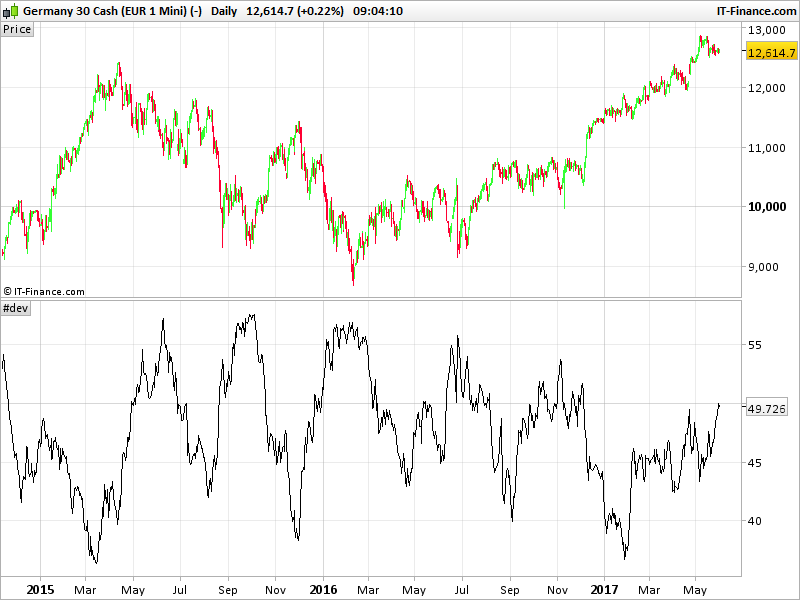
    This code snippet would do the trick, you can adjust the period of the moving in the code by yourself:

    //MovingAvg(Open-Close, bars used in average)/MovingAvg(Range,bars used in average)*50 +50
    
    period=50
    cot = average[period](open-close)/average[period](range)*50+50
    
    return cot

    I don’t know how it is useful and relevant compared to the real Commitments Of Traders, but this is what the formula returned on a chart (example attached).

    atxeel thanked this post
    #37100 quote
    unkown
    Member
    New

    Thanks a lot, Nicolas.

    This is exactly what I meant.

    I’d use it like this: above 55, be ready to buy, below 40, be ready to sell (of course if it agrees with other indicators as f.e. slow stochastics).

    Mary thanked this post
Viewing 3 posts - 1 through 3 (of 3 total)
  • You must be logged in to reply to this topic.

PROXY COT


ProBuilder: Indicators & Custom Tools

New Reply
Author
author-avatar
unkown @unkown Member
Summary

This topic contains 2 replies,
has 2 voices, and was last updated by unkown

8 years, 8 months ago.

Topic Details
Forum: ProBuilder: Indicators & Custom Tools
Language: English
Started: 05/30/2017
Status: Active
Attachments: 1 files
Logo Logo
Loading...
