ProRealCode - Trading & Coding with ProRealTime™
Il TF all’interno del codice ha un senso solo se si usano più TF contemporaneamente (MTF), ma non è questo il caso. Anche perché per ogni TF usato dovresti andare a cambiarlo.
Basta che selezioni il TF dall’apposito menu a tendina di ProScreener e puoi utilizzarlo su qualunque TF.
Ogni volta che trova un nuovo elemento lo inserisce nella lista che metterà sullo schermo, emettendo anche un beep.
Una durata vera e propria non c’è, perché è LIVE, quiandi può capitare che il nome enti nella lista ed un secondo dopo sparisca, col variare dei prezzi. Ad ogni modo scade alla chiusura della candela, quando ProScreener inizia a fare la scansione sulla nuova candela.
E’ possibile anche tenerli più candele, occorre però cambiare leggermente il codice.
Se vuoi lo faccio.
scusami se possibile sarebbe importante che sia il proscreer a scorrere e cercare tra tutti i tf proposti e non doverlo fare manualmente cambiandolo dal menu a tendina continuamente ( sui tf brevi bisognerebbe farlo ogni pochi minuti) , a proposito dei tf un amico programmatore in un vecchio e abbastanza complesso proscreeer li aveva inseriti direttamente nel codice (questo di seguito è un altro parziale esempio)
TIMEFRAME(15 minutes)
indicator1 = CALL S1
c1 = (indicator1 < 0.0)
REM Il codice seguente si rivolge all'unità di tempo:10 minutes
TIMEFRAME(15 minutes)
indicator2 = close
indicator3 = (DHigh(1) + DLow(1) + DClose(1))/3
c2 = (indicator2 <= indicator3)
....................... e lo terminava cosi ............
if c9 then
tf=120
elsif c10 then
tf=-120
elsif c7 and c8 then
tf=30
elsif c5 and c6 then
tf=-30
elsif c3 and c4 then
tf=15
elsif c1 and c2 then
tf=-15
endif
criteria=tf
SCREENER[c1 AND c2 OR c3 AND c4 OR c5 AND c6 OR c7 AND c8 OR c9 OR c10] (criteria as "Time Frame")
è un proscreener che lavora sul test della media 100, se ti può interessare ovviamente te lo invio
ti pentirai di avermi dato ok alla programmazione 😉 grazie
>> Per chiarezza dei messaggi sul forum di ProRealCode, si prega di utilizzare il pulsante “insert code PRT” per separare il testo della parte di codice! Grazie! << 🙂
questo è un esempio di proscreener con i tf di controllo inseriti nel codice, che controlla direttamente la macchina, senza necessità di cambiarli manualmente
REM Il codice seguente si rivolge all'unità di tempo:10 minutes
TIMEFRAME(15 minutes)
indicator1 = CALL S1
c1 = (indicator1 < 0.0)
REM Il codice seguente si rivolge all'unità di tempo:10 minutes
TIMEFRAME(15 minutes)
indicator2 = close
indicator3 = (DHigh(1) + DLow(1) + DClose(1))/3
c2 = (indicator2 <= indicator3)
REM Il codice seguente si rivolge all'unità di tempo:10 minutes
TIMEFRAME(15 minutes)
indicator4 = CALL S1
c3 = (indicator4 > 0.0)
REM Il codice seguente si rivolge all'unità di tempo:10 minutes
TIMEFRAME(15 minutes)
indicator5 = close
indicator6 = (DHigh(1) + DLow(1) + DClose(1))/3
c4 = (indicator5 >= indicator6)
REM Il codice seguente si rivolge all'unità di tempo:15 minutes
TIMEFRAME(30 minutes)
indicator7 = CALL S1
c5 = (indicator7 < 0.0)
REM Il codice seguente si rivolge all'unità di tempo:15 minutes
TIMEFRAME(30 minutes)
indicator8 = close
indicator9 = (DHigh(1) + DLow(1) + DClose(1))/3
c6 = (indicator8 <= indicator9)
REM Il codice seguente si rivolge all'unità di tempo:15 minutes
TIMEFRAME(30 minutes)
indicator10 = CALL S1
c7 = (indicator10 > 0.0)
REM Il codice seguente si rivolge all'unità di tempo:15 minutes
TIMEFRAME(30 minutes)
indicator11 = close
indicator12 = (DHigh(1) + DLow(1) + DClose(1))/3
c8 = (indicator11 >= indicator12)
REM Il codice seguente si rivolge all'unità di tempo:30 minutes
TIMEFRAME(2 hours)
indicator13 = CALL S1
c9 = (indicator13 > 0.0)
REM Il codice seguente si rivolge all'unità di tempo:30 minutes
TIMEFRAME(2 hours)
indicator14 = CALL S1
c10 = (indicator14 < 0.0)
REM Il codice seguente si rivolge all'unità di tempo:DEFAULT
TIMEFRAME(DEFAULT)
if c9 then
tf=120
elsif c10 then
tf=-120
elsif c7 and c8 then
tf=30
elsif c5 and c6 then
tf=-30
elsif c3 and c4 then
tf=15
elsif c1 and c2 then
tf=-15
endif
criteria=tf
SCREENER[c1 AND c2 OR c3 AND c4 OR c5 AND c6 OR c7 AND c8 OR c9 OR c10] (criteria as "Time Frame")
TIMEFRAME(2 hours)
indicator13 = CALL S1
c9 = (indicator13 > 0.0)
REM Il codice seguente si rivolge all'unità di tempo:30 minutes
indicator14 = CALL S1
c10 = (indicator14 < 0.0)
TIMEFRAME(30 minutes)
indicator7 = CALL S1
c5 = (indicator7 < 0.0)
REM Il codice seguente si rivolge all'unità di tempo:15 minutes
indicator8 = close
indicator9 = (DHigh(1) + DLow(1) + DClose(1))/3
c6 = (indicator8 <= indicator9)
REM Il codice seguente si rivolge all'unità di tempo:15 minutes
indicator10 = CALL S1
c7 = (indicator10 > 0.0)
REM Il codice seguente si rivolge all'unità di tempo:15 minutes
indicator11 = close
indicator12 = (DHigh(1) + DLow(1) + DClose(1))/3
c8 = (indicator11 >= indicator12)
REM Il codice seguente si rivolge all'unità di tempo:10 minutes
TIMEFRAME(15 minutes)
indicator1 = CALL S1
c1 = (indicator1 < 0.0)
REM Il codice seguente si rivolge all'unità di tempo:10 minutes
indicator2 = close
indicator3 = (DHigh(1) + DLow(1) + DClose(1))/3
c2 = (indicator2 <= indicator3)
REM Il codice seguente si rivolge all'unità di tempo:10 minutes
indicator4 = CALL S1
c3 = (indicator4 > 0.0)
REM Il codice seguente si rivolge all'unità di tempo:10 minutes
indicator5 = close
indicator6 = (DHigh(1) + DLow(1) + DClose(1))/3
c4 = (indicator5 >= indicator6)
REM Il codice seguente si rivolge all'unità di tempo:15 minutes
REM Il codice seguente si rivolge all'unità di tempo:30 minutes
REM Il codice seguente si rivolge all'unità di tempo:DEFAULT
TIMEFRAME(DEFAULT)
if c9 then
tf=120
elsif c10 then
tf=-120
elsif c7 and c8 then
tf=30
elsif c5 and c6 then
tf=-30
elsif c3 and c4 then
tf=15
elsif c1 and c2 then
tf=-15
endif
criteria=tf
SCREENER[c1 AND c2 OR c3 AND c4 OR c5 AND c6 OR c7 AND c8 OR c9 OR c10] (criteria as "Time Frame")
L’ho modificato, meno tempo.
Eccolo, sembra funzioni, solo che trova risultati con NumeroBarre = 1:
TIMEFRAME(default)
NumeroBarre = 1
//
TIMEFRAME(Daily)
Rialzista = close > open
Ribassista = close < open
Body = abs(close - open)
// SHORT
S1 = Rialzista[2] AND Ribassista[1] AND Ribassista
S2 = close[2] > highest[NumeroBarre](high[1])
S3 = body[1] < Body[2]
S4 = high[1] < high[2]
S5 = close[1] < close[2]
// LONG
L1 = Ribassista[2] AND Rialzista[1] AND Rialzista
L2 = close[2] < lowest[NumeroBarre](low[1])
L3 = body[1] < Body[2]
L4 = low[1] > low[2]
L5 = close[1] > close[2]
Risultato = 90000
IF L1 AND L2 AND L3 AND L4 AND L5 THEN
Risultato = 10000
ELSIF S1 AND S2 AND S3 AND S4 AND S5 THEN
Risultato = 20000
ENDIF
IF Risultato = 90000 THEN
Risultato = Risultato[1]
ENDIF
//
TIMEFRAME(4 hour)
RialzistaA = close > open
RibassistaA = close < open
BodyA = abs(close - open)
// SHORT
S1a = RialzistaA[2] AND RibassistaA[1] AND RibassistaA
S2a = close[2] > highest[NumeroBarre](high[1])
S3a = bodyA[1] < BodyA[2]
S4a = high[1] < high[2]
S5a = close[1] < close[2]
// LONG
L1a = RibassistaA[2] AND RialzistaA[1] AND RialzistaA
L2a = close[2] < lowest[NumeroBarre](low[1])
L3a = bodyA[1] < BodyA[2]
L4a = low[1] > low[2]
L5a = close[1] > close[2]
RisultatoA = 9000
IF L1a AND L2a AND L3a AND L4a AND L5a THEN
RisultatoA = 1000
ELSIF S1a AND S2a AND S3a AND S4a AND S5a THEN
RisultatoA = 2000
ENDIF
IF RisultatoA = 9000 THEN
RisultatoA = RisultatoA[1]
ENDIF
//
TIMEFRAME(1 hour)
RialzistaB = close > open
RibassistaB = close < open
BodyB = abs(close - open)
// SHORT
S1b = RialzistaB[2] AND RibassistaB[1] AND RibassistaB
S2b = close[2] > highest[NumeroBarre](high[1])
S3b = bodyB[1] < BodyB[2]
S4b = high[1] < high[2]
S5b = close[1] < close[2]
// LONG
L1b = RibassistaB[2] AND RialzistaB[1] AND RialzistaB
L2b = close[2] < lowest[NumeroBarre](low[1])
L3b = bodyB[1] < BodyB[2]
L4b = low[1] > low[2]
L5b = close[1] > close[2]
RisultatoB = 900
IF L1b AND L2b AND L3b AND L4b AND L5b THEN
RisultatoB = 100
ELSIF S1b AND S2b AND S3b AND S4b AND S5b THEN
RisultatoB = 200
ENDIF
IF RisultatoB = 900 THEN
RisultatoB = RisultatoB[1]
ENDIF
//
TIMEFRAME(15 minute)
RialzistaC = close > open
RibassistaC = close < open
BodyC = abs(close - open)
// SHORT
S1c = RialzistaC[2] AND RibassistaC[1] AND RibassistaC
S2c = close[2] > highest[NumeroBarre](high[1])
S3c = bodyC[1] < BodyC[2]
S4c = high[1] < high[2]
S5c = close[1] < close[2]
// LONG
L1c = RibassistaC[2] AND RialzistaC[1] AND RialzistaC
L2c = close[2] < lowest[NumeroBarre](low[1])
L3c = bodyC[1] < BodyC[2]
L4c = low[1] > low[2]
L5c = close[1] > close[2]
RisultatoC = 90
IF L1c AND L2c AND L3c AND L4c AND L5c THEN
RisultatoC = 10
ELSIF S1c AND S2c AND S3c AND S4c AND S5c THEN
RisultatoC = 20
ENDIF
IF RisultatoC = 90 THEN
RisultatoC = RisultatoC[1]
ENDIF
//
TIMEFRAME(5 minute)
RialzistaD = close > open
RibassistaD = close < open
BodyD = abs(close - open)
// SHORT
S1d = RialzistaD[2] AND RibassistaD[1] AND RibassistaD
S2d = close[2] > highest[NumeroBarre](high[1])
S3d = bodyD[1] < BodyD[2]
S4d = high[1] < high[2]
S5d = close[1] < close[2]
// LONG
L1d = RibassistaD[2] AND RialzistaD[1] AND RialzistaD
L2d = close[2] < lowest[NumeroBarre](low[1])
L3d = bodyD[1] < BodyD[2]
L4d = low[1] > low[2]
L5d = close[1] > close[2]
RisultatoD = 9
IF L1d AND L2d AND L3d AND L4d AND L5d THEN
RisultatoD = 1
ELSIF S1d AND S2d AND S3d AND S4d AND S5d THEN
RisultatoD = 2
ENDIF
IF RisultatoD = 9 THEN
RisultatoD = RisultatoD[1]
ENDIF
//
TIMEFRAME(default)
x = Risultato + RisultatoA + RisultatoB + RisultatoC + RisultatoD
SCREENER[x](x AS "D41XV") //D=dayly, 4=4h, 1=1h, X=15 minuti (X è la cifra di sinistra in numeri romani),V=5 in numeri romani (per ogni TF restituirà 1 (Rialzo) or 2 (Ribasso)
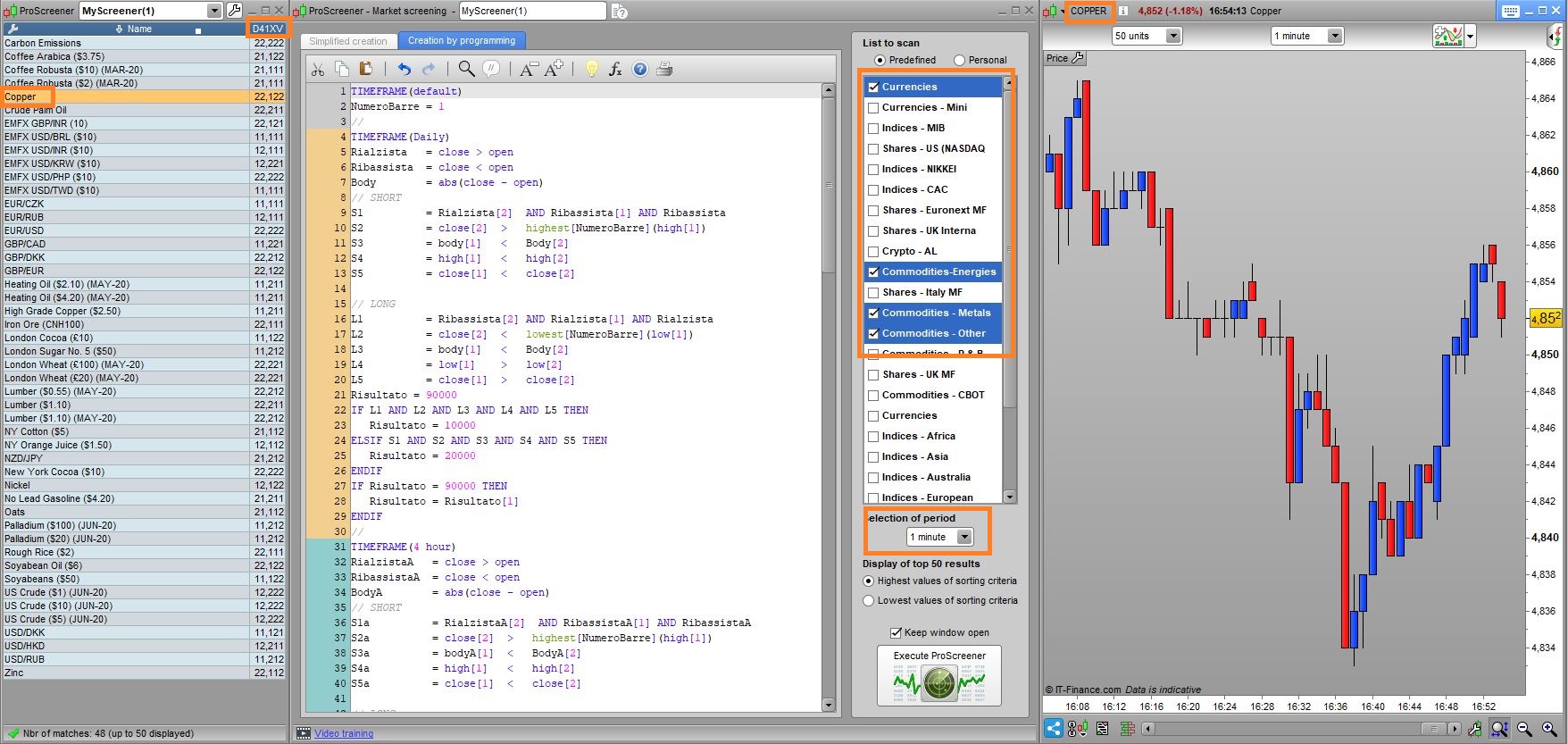
io l’ho applicato ad un TF a 1 minuto, ma questo è ininfluente ai fini della scansione, lui la fa sui TF indicati nel codice. Se vuoi vedere i risultati devi selezionare, sul grafico, il TF desiderato, nel caso del COPPER potresti visulaizzare il TF 1h dove c’è un segnale Rialzista (valore 1), mentre su tutti gli altri c’è un segnale Ribassista (valore 2).
Il segnale ha la durata di 2 barre, per cui sul TF indicato può darsi che il segnale non sia quello corrente, ma quello dalla barra precedente.
l’ho caricato, innanzitutto grazie per il grande lavoro
poi vorrei chiederti alcune cose che non mi sono chiare :
grazie
l’ho caricato, innanzitutto grazie per il grande lavoro
poi vorrei chiederti alcune cose che non mi sono chiare :
- 1)cosa significa : “solo che trova risultati con NumeroBarre = 1 ” ?
che con 10 barre NON trova niente, solo con 1 trova qualcosa- 2) hai inserito anche la condizione che sia un nuovo max /min rispetto alle ultime 10 candele ?
si, con i limiti di cui sopra- 3) a me sul proscreener non indica il tf sul quale si sta verificando, come lo riconosco ?
guarda la colonna del criterio nella lista dei risultati di ProScreener- 4)qual’è il significato dei 5 numeri nella colonna d41xv del proscreener ?
leggi (o rileggi) il commento dell’ultima riga del codice- 5) da quale barra delle 3 del setup inizia ad uscire il segnale sul proscreener ?
dalla barra corrente, cioè quella più a destra sul grafico (+ una come hai chiesto)- 6) le 2 barre di durata del segnale sono per deduzione : la terza ed ultima che lo conferma, e la successiva ?
sono quella corrente, come ho detto sopra + quella immediatamente alla sua sinistra- 7) sbaglio o è superfluo il tf selezionato nella creazione del proscreener se poi i tf da controllare sono nel codice ?
è superfluo, ma uno va indicato obbligatoriamente.grazie
rispetto al punto 1 :
1)cosa significa : “solo che trova risultati con NumeroBarre = 1 ” ?
che con 10 barre NON trova niente, solo con 1 trova qualcosa
cioè che iniza il conteggio ad ogni nuovo massimo /minimo, anche se ne ha fatto uno maggiore minore anche solo 2/3 candele precedenti ?
rispetto al precedente punto 5 :
“5) da quale barra delle 3 del setup inizia ad uscire il segnale sul proscreener ?
dalla barra corrente, cioè quella più a destra sul grafico (+ una come hai chiesto)”
non avevo posto chiaramente la domanda : tenuto conto che la configuazione è confermata dopo 3 candele con le corrette condizioni, in quale momento il proscreener mi mostra che la condizione si sta verificando : 1) durante prima candeladelle 3,direi di no, 2) durante la seconda delle 3, troppo presto, 3) durante la terza delle 3, con le prime 2 confermate, rimarrebbe aperto fino a conclusione della terza se conferma, e la candela successiva (quarta)
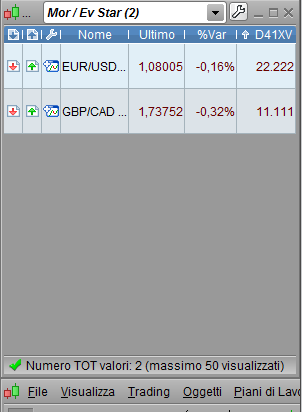
. la colonna del proscreener ora mostra su tutti i tf un segnale attivo, ma in relatà non è così. come si deve interpretare ?
grazie
Tu, com’è naturale nel trading manuale, parti da una candela e attendi che dopo quella se ne verifichino altre per formare un certo pattern (può accadere, oppure no, come tutti i pattern). Nel trading automatico, il software può solo andare indietro, quindi nel tuo caso, quando scopra un massimo inferiore al precedente capisce che è a metà strada, gli basta verificare che anche quella più a sinistra (la terza, quella che tu, sullo schermo vedi per prima) sia inferiore a quella di mezzo ed è fatta!
Quindi non si guarda a cosa succederà dopo, ma occorre andare a vedere cos’è successo prima! Infatti la prima candela è quella corrente (identificata senza barre o con [0]), che si sta formando, mentre la seconda è quella indicata con [1] e la terza ancora (quella più a sinistra sullo schermo) è qualla indicata con [2].
Il segnale viene generato quando il pattern è completo, per cui SOLO sulla candela corrente. Siccome lo screener serve per vedere risultati LIVE mentre accadono, non dopo, quando una candela chiude il segnale finisce e non c’è più perché lo screener va ad analizzare la candela nuova che si è aperta. Nel tuo caso, perché può capitare che tu non sia davanti allo schermo e rischi di perdere un segnale, mi avevi chiesto di farlo durare una barra in più, ovvero il segnale viene geneato sulla barra in corso, ma lui ti segnala ANCHE quelli passati apparsi sulla barra precedente.
Quanto al numero di barre, va bene la tua logica, solo che è raro che dia dei segnali, per cui, dovendo provare se funzionava, ho dovuto mettere 1 come numero di barra. E’ un valore assurdo, ma a me ha dato modi di verificare che il segnale viene generato. Dipende dalle condizioni che tu hai impostato capire se lo genera troppo raramente o troppo spesso, ecc… ma questo devi deciderlo tu.
Devi dirmi che numero di barre hai messo (al posto di 1) e su quali strumenti e timeframe hai fatto la ricerca.
“Devi dirmi che numero di barre hai messo (al posto di 1) e su quali strumenti e timeframe hai fatto la ricerca”.
su barre = 1 mi da i riultati allegati mercati : fx + dax + indici usa
non capsco perchè mi da segnali su tutti i tf , anche se non ci sono, non dovrebbe restituirmi un altro numero diverso da 1 – 2 che mi indica assenza di segnale se su qul tf non è in corso il segnale ?
grazie
con n. barre = 1 , se sto interpretando correttamente la colonna dei TF, da questa mattina da segnale long su tutti i tf di gbp cad, e sh su tutti i tf di eru usd.
tf lasciati quelli di default 15 m 1h 4h d
con n.barre superiori a 1 nessun segnale
Ho trovato due errori logici nelle variabili, sia long che short, corrsipondenti ai numeri S4, S5, L4 ed L5 in ciascun TF.
Ma, principalmente, ho trovato l’errore che non permetteva di utilizzare 10 barre ed era alla riga S2 ed L2, di ogni TF, dove c’è SUMMATION, l’ultimo riferimento a destra doveva essere [3] (e non [1] come avevo messo).
Adesso sembra funzionare, nella foto allegata ho evidenziato un titolo dove il segnale è sia su 1 ora che su 5 minuti.
Questo è il codice aggiornato:
TIMEFRAME(default)
NumeroBarre = 10
//
TIMEFRAME(Daily)
Rialzista = close > open
Ribassista = close < open
Body = abs(close - open)
// SHORT
S1 = Rialzista[2] AND Ribassista[1] AND Ribassista
S2 = close[2] > highest[NumeroBarre](high[3])
S3 = body[1] < Body[2]
S4 = high < high[2]
S5 = close < close[1]
// LONG
L1 = Ribassista[2] AND Rialzista[1] AND Rialzista
L2 = close[2] < lowest[NumeroBarre](low[3])
L3 = body[1] < Body[2]
L4 = low > low[2]
L5 = close > close[1]
Risultato = 90000
IF L1 AND L2 AND L3 AND L4 AND L5 THEN
Risultato = 10000
ELSIF S1 AND S2 AND S3 AND S4 AND S5 THEN
Risultato = 20000
ENDIF
IF Risultato = 90000 THEN
Ris = Risultato[1]
ELSE
Ris = Risultato
ENDIF
//
TIMEFRAME(4 hour)
RialzistaA = close > open
RibassistaA = close < open
BodyA = abs(close - open)
// SHORT
S1a = RialzistaA[2] AND RibassistaA[1] AND RibassistaA
S2a = close[2] > highest[NumeroBarre](high[3])
S3a = bodyA[1] < BodyA[2]
S4a = high < high[2]
S5a = close < close[1]
// LONG
L1a = RibassistaA[2] AND RialzistaA[1] AND RialzistaA
L2a = close[2] < lowest[NumeroBarre](low[3])
L3a = bodyA[1] < BodyA[2]
L4a = low > low[2]
L5a = close > close[1]
RisultatoA = 9000
IF L1a AND L2a AND L3a AND L4a AND L5a THEN
RisultatoA = 1000
ELSIF S1a AND S2a AND S3a AND S4a AND S5a THEN
RisultatoA = 2000
ENDIF
IF RisultatoA = 9000 THEN
RisA = RisultatoA[1]
ELSE
RisA = RisultatoA
ENDIF
//
TIMEFRAME(1 hour)
RialzistaB = close > open
RibassistaB = close < open
BodyB = abs(close - open)
// SHORT
S1b = RialzistaB[2] AND RibassistaB[1] AND RibassistaB
S2b = close[2] > highest[NumeroBarre](high[3])
S3b = bodyC[1] < BodyC[2]
S4b = high < high[2]
S5b = close < close[1]
// LONG
L1b = RibassistaB[2] AND RialzistaB[1] AND RialzistaB
L2b = close[2] < lowest[NumeroBarre](low[3])
L3b = bodyB[1] < BodyB[2]
L4b = low > low[2]
L5b = close > close[1]
RisultatoB = 900
IF L1b AND L2b AND L3b AND L4b AND L5b THEN
RisultatoB = 100
ELSIF S1b AND S2b AND S3b AND S4b AND S5b THEN
RisultatoB = 200
ENDIF
IF RisultatoB = 900 THEN
RisB = RisultatoB[1]
ELSE
RisB = RisultatoB
ENDIF
//
TIMEFRAME(15 minute)
RialzistaC = close > open
RibassistaC = close < open
BodyC = abs(close - open)
// SHORT
S1c = RialzistaC[2] AND RibassistaC[1] AND RibassistaC
S2c = close[2] > highest[NumeroBarre](high[3])
S3c = bodyC[1] < BodyC[2]
S4c = high < high[2]
S5c = close < close[1]
// LONG
L1c = RibassistaC[2] AND RialzistaC[1] AND RialzistaC
L2c = close[2] < lowest[NumeroBarre](low[3])
L3c = bodyC[1] < BodyC[2]
L4c = low > low[2]
L5c = close > close[1]
RisultatoC = 90
IF L1c AND L2c AND L3c AND L4c AND L5c THEN
RisultatoC = 10
ELSIF S1c AND S2c AND S3c AND S4c AND S5c THEN
RisultatoC = 20
ENDIF
IF RisultatoC = 90 THEN
RisC = RisultatoC[1]
ELSE
RisC = RisultatoC
ENDIF
//
TIMEFRAME(5 minute)
RialzistaD = close > open
RibassistaD = close < open
BodyD = abs(close - open)
// SHORT
S1d = RialzistaD[2] AND RibassistaD[1] AND RibassistaD
S2d = close[2] > highest[NumeroBarre](high[3])
S3d = bodyD[1] < BodyD[2]
S4d = high < high[2]
S5d = close < close[1]
// LONG
L1d = RibassistaD[2] AND RialzistaD[1] AND RialzistaD
L2d = close[2] < lowest[NumeroBarre](low[3])
L3d = bodyD[1] < BodyD[2]
L4d = low > low[2]
L5d = close > close[1]
RisultatoD = 9
IF L1d AND L2d AND L3d AND L4d AND L5d THEN
RisultatoD = 1
ELSIF S1d AND S2d AND S3d AND S4d AND S5d THEN
RisultatoD = 2
ENDIF
IF RisultatoD = 9 THEN
RisD = RisultatoD[1]
ELSE
RisD = RisultatoD
ENDIF
//
TIMEFRAME(default)
x = Ris + RisA + RisB + RisC + RisD
IF x = 99999 THEN
x = 0
ENDIF
SCREENER[x](x AS "D41XV") //D=dayly, 4=4h, 1=1h, X=15 minuti (X è la cifra di sinistra in numeri romani),V=5 in numeri romani (per ogni TF restituirà 1 (Rialzo) or 2 (Ribasso)
funziona anche la durata del segnale, di due barre (quella in corso + quella precedente), per cui può capitare che adesso sul grafico non vedi il segnale ma c’era la barra precedente. Al fine di facilitarti il compito ti ho fatto questo indicatore:
NumeroBarre = 10
Rialzista = close > open
Ribassista = close < open
Body = abs(close - open)
// SHORT
S1 = Rialzista[2] AND Ribassista[1] AND Ribassista
S2 = close[2] > highest[NumeroBarre](high[3])
S3 = body[1] < Body[2]
S4 = high < high[2]
S5 = close < close[1]
// LONG
L1 = Ribassista[2] AND Rialzista[1] AND Rialzista
L2 = close[2] < lowest[NumeroBarre](low[3])
L3 = body[1] < Body[2]
L4 = low > low[2]
L5 = close > close[1]
Risultato = 0
IF L1 AND L2 AND L3 AND L4 AND L5 THEN
Risultato = 1
ELSIF S1 AND S2 AND S3 AND S4 AND S5 THEN
Risultato = -1
ENDIF
RETURN Risultato AS "Risultato",0 AS "Zero"
ho caricato proscreener e indicatore …
per quello che stò vedendo ora … mi sembra che hai fatto un FANTASTICO lavoro, utilissimo anche l’indicatore, non avrei saputo chiedere di meglio
continuo a provarli e aggiorno nei prossimi giorni
per ora GRAZIE Roberto
Proscreener Morning e Evening Star
This topic contains 29 replies,
has 3 voices, and was last updated by Procor

5 years, 11 months ago.
| Forum: | ProScreener: Scansione Mercati & Screener |
| Language: | Italian |
| Started: | 04/02/2020 |
| Status: | Active |
| Attachments: | 3 files |

The information collected on this form is stored in a computer file by ProRealCode to create and access your ProRealCode profile. This data is kept in a secure database for the duration of the member's membership. They will be kept as long as you use our services and will be automatically deleted after 3 years of inactivity. Your personal data is used to create your private profile on ProRealCode. This data is maintained by SAS ProRealCode, 407 rue Freycinet, 59151 Arleux, France. If you subscribe to our newsletters, your email address is provided to our service provider "MailChimp" located in the United States, with whom we have signed a confidentiality agreement. This company is also compliant with the EU/Swiss Privacy Shield, and the GDPR. For any request for correction or deletion concerning your data, you can directly contact the ProRealCode team by email at privacy@prorealcode.com If you would like to lodge a complaint regarding the use of your personal data, you can contact your data protection supervisory authority.