







ProRealCode - Trading & Coding with ProRealTime™
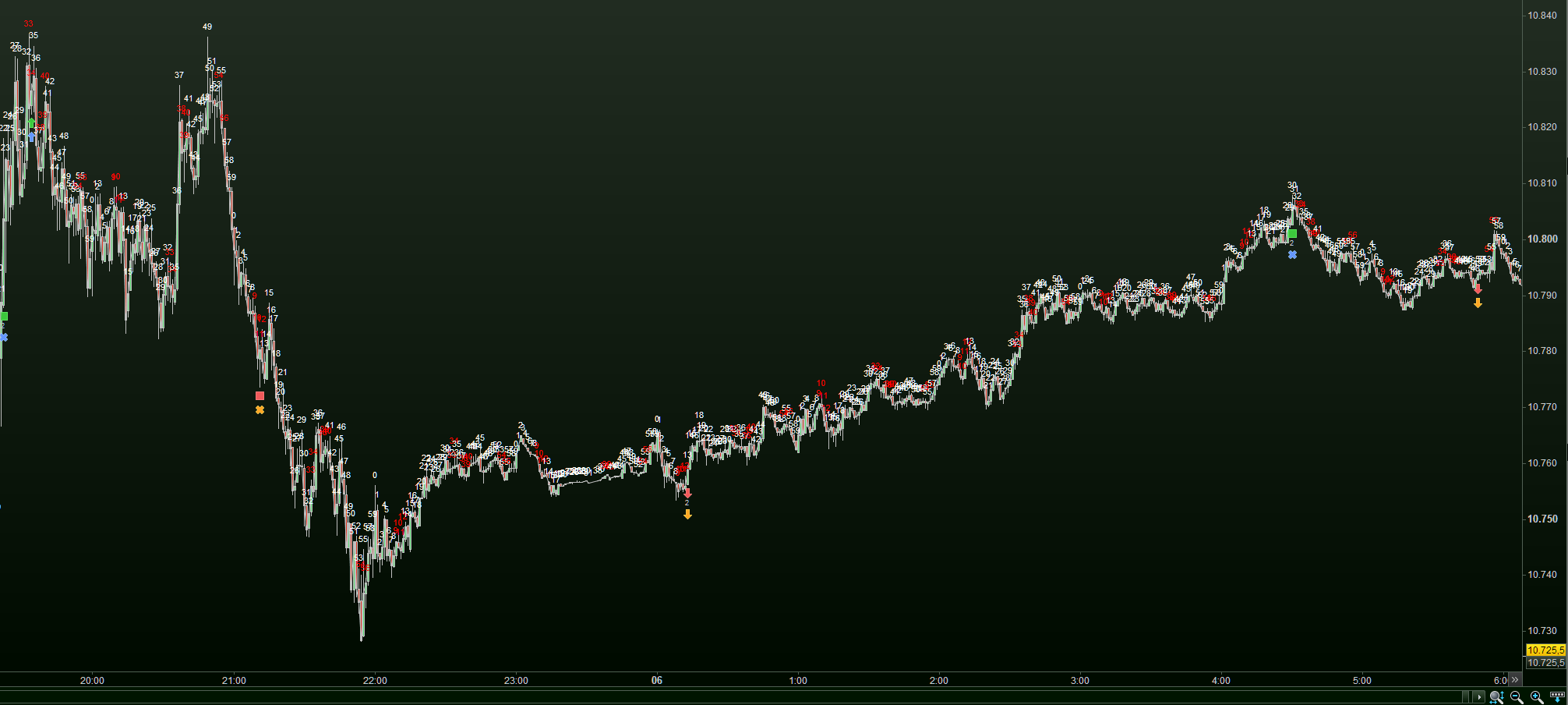
Here’s some more encouragement. This is last night / tonight (thus also with high spread). I have detailed one of them so you can see that it works quite well.
As you can see, it also works when losing. ;-(
There is something else amiss – or at least I don’t understand it; why do your Live trades not show on the Backtest screenshot ?
It is probably nothing … I just like to understand. Maybe you can switch off the live trades in a backtesting chart ?
That’s the problem I enountered. They are limit orders and in live are sometimes filled in a later bar than backtest, or not filled at all. If I get further knowledge from IG, I’ll post it.
sometimes filled in a later bar than backtest
It may be to do with spread value we enter in backtest engne not matching exactly the value of spread at the point that a trade is / should be excecuted in Live?
In FX, above is even more likely as FX spreads flash widen often.
That’s the problem I enountered. They are limit orders and […]
That is not what I meant; Look at my screenshots. I don’t need two screenshots to show the Live and the Backtest results, as both are in the same chart per backtest result. You don’t have the Live trades in the Backtest results (-chart). Why ? Is there a setting for that ?
I don’t need two screenshots to show the Live and the Backtest results, as both are in the same chart per backtest result
Maybe you have your wires crossed (hope you’re not too wired over this joke!? 😉 ) … when I refer to Live, I mostly am referring to ‘ProOrder Live‘ … maybe Tim also means the same?
You Peter, may be referring to a backtest allowed to continue into Live running ?
when I refer to Live, I mostly am referring to ‘ProOrder Live‘
This is not related. Both I (and Tim) show are from the past. Live and Demo-Live would show the same. Can you show past data *without* occurred trades, be that Live or Demo-Live ? I can’t. But let me try in real-time, just for fun.
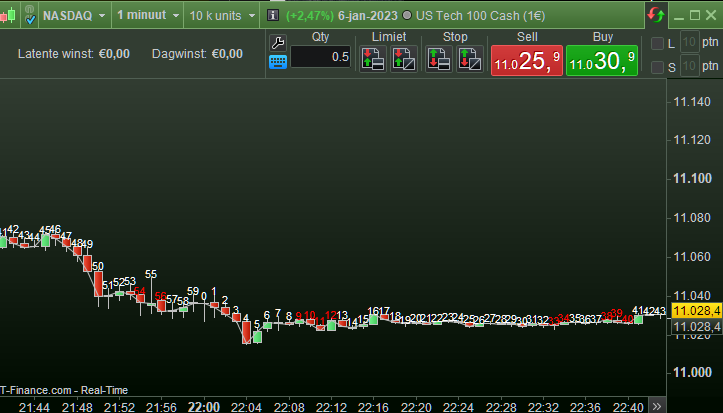
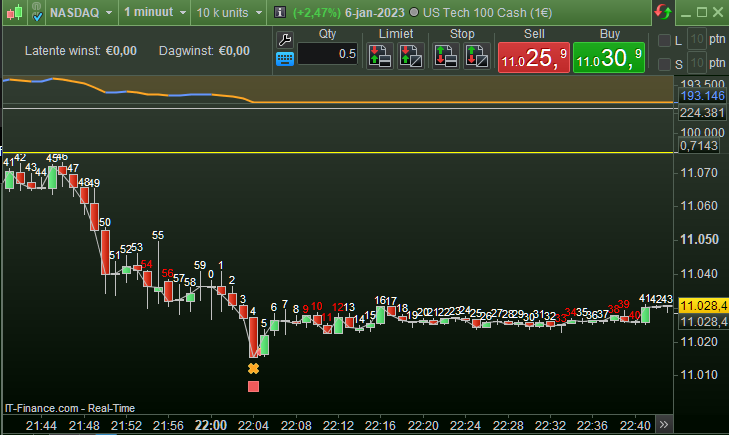
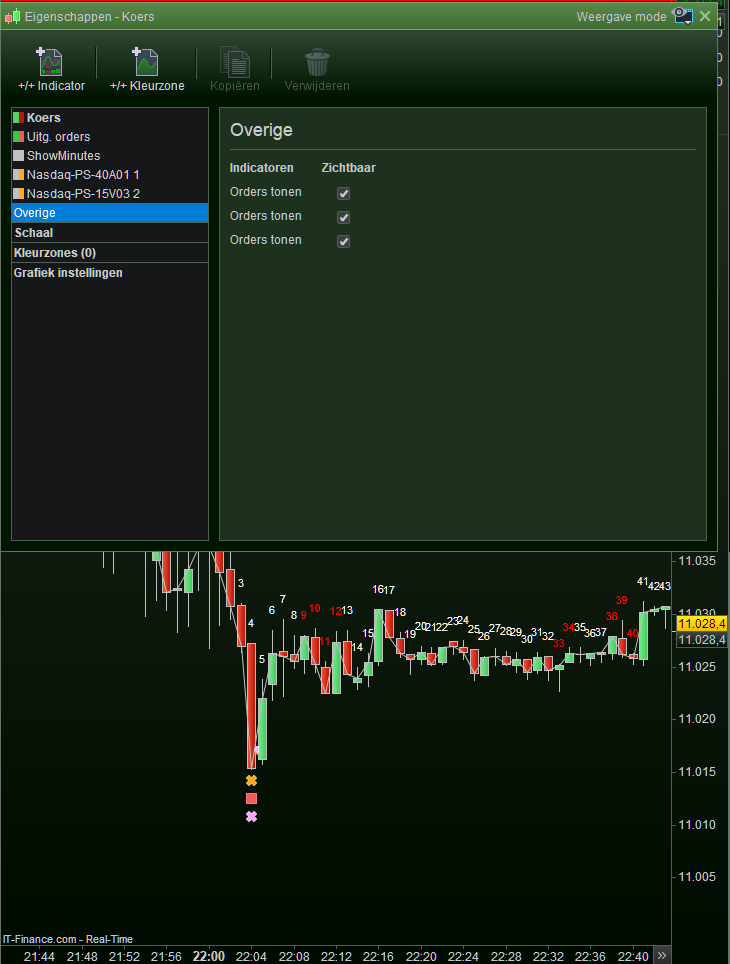
OK, first surprise is there. I fire up PRT(-IG) and no trades show anywhere. Hmm, that would be new, although … it occurred to me more often that the cart is quite “empty” at first. Thus, several trades from the past and nothing at all shows. And No, it is not the clicking on that tab we talked about the other day – that is just active. Anyway, this would incur for the same situation Tim is able to show. Not a good start (for me). But why … Anyway, see first attachment, knowing that at 22:04 a last trade occurred.
Then I’m switching on another monitor, which redundantly shows this chart as well. And what ?!? there it shows (as do numerous others).
Is it a chart setting ? … for now I am not even going to look for it. Those trades are there all the time (on the first version of the chart shown) ad I am regularly comparing Live with backtest afterwards. Like I showed yesterday …
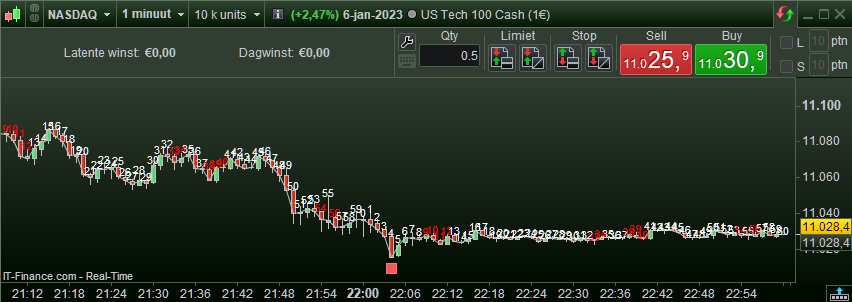
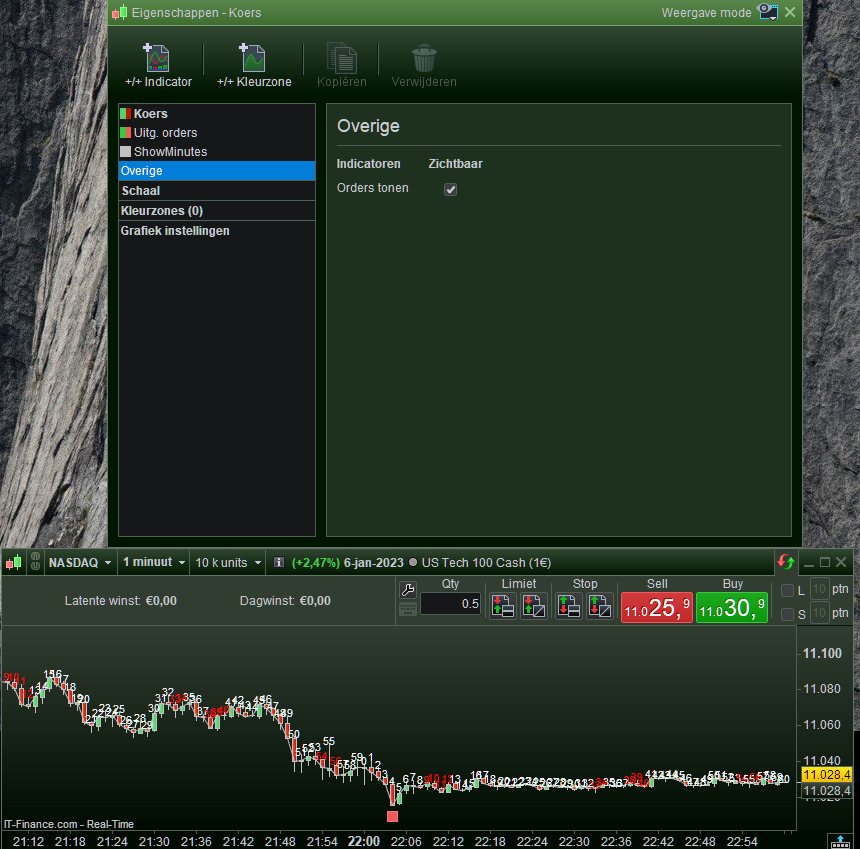
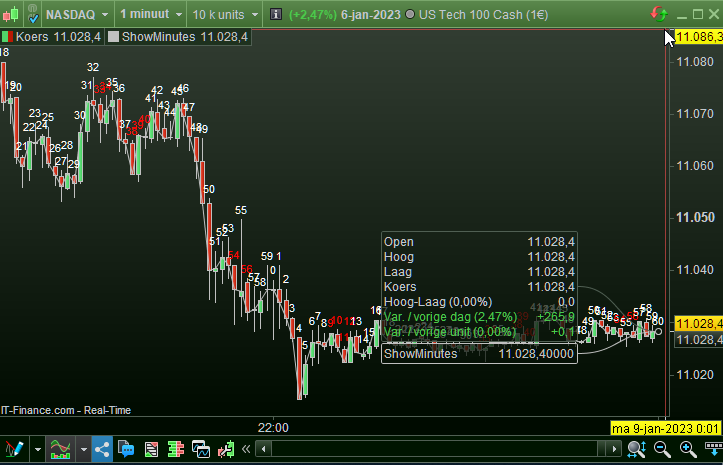
So I am running a small backtest to see whether it makes the trade occur, but No. All what occurs is the trade of the backtest (3rd attached). It seems that the devil plays with me, as I never saw this before. That is, it never occurred to me, although again, far in the back of my head I recall the screen to be “empty” some times. Like now …
So far so good for what Tim shows (also : so far so good for what my backtest shows for the same trade on the same spot, but that is not the subject now).
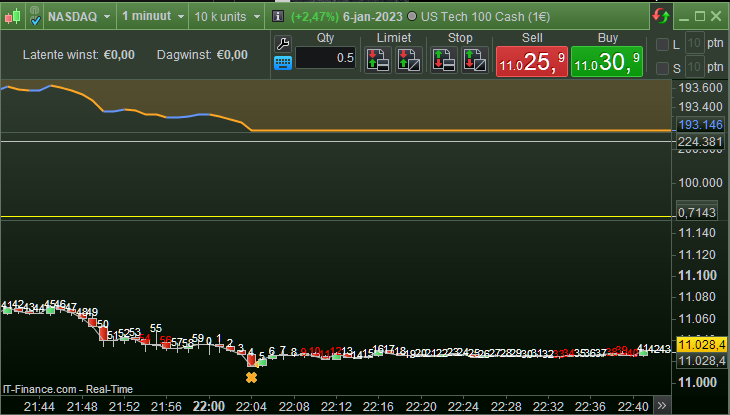
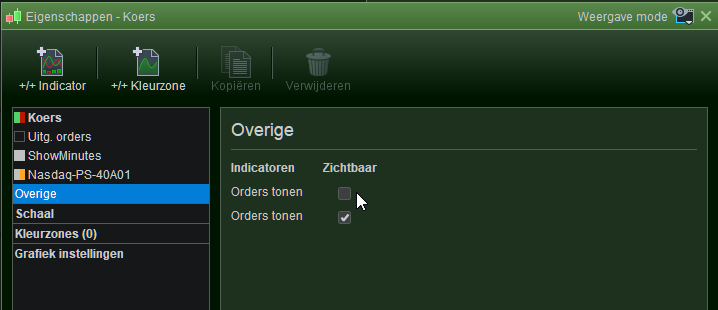
Then I do rightclick in the chart area – Configure this area – and find this setting – see 4th attachment (the selected entry in the left “Overigen” would be “Others” in English). Although I talked about similar in the other topic, this one I never saw before. But it does exactly what I saw before, but not from within a setting like this one – it does not even look finished (look at the exact same screen-field names, although this may be a translation error). It is the checkbox at the mouse pointer which makes the trades occur. It is, btw, the 2nd checkbox which make the Backtest trades disappear. Quite handy ! (once you were able to find this setting).
So, wires crossed ? always.
And next I am pretty sure that this setting has to be new, and that something else makes that checkbox checked or not. So again, look at my screenshot from yesterday, while I since really never changed any setting as I was doing quite some different things. Yesterday the Live trades showed in this very same chart, today they don’t. … I can think of a reason … right now (4:30 am Amsterdam) the markets are closed. Why that chart from the 2nd attachment shows it automatically ? Hunches :
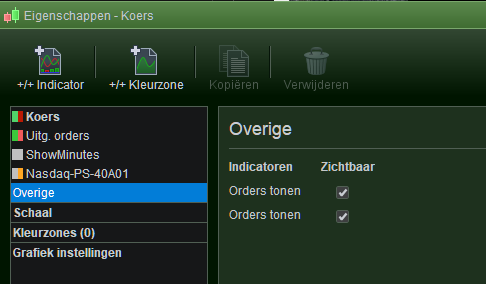
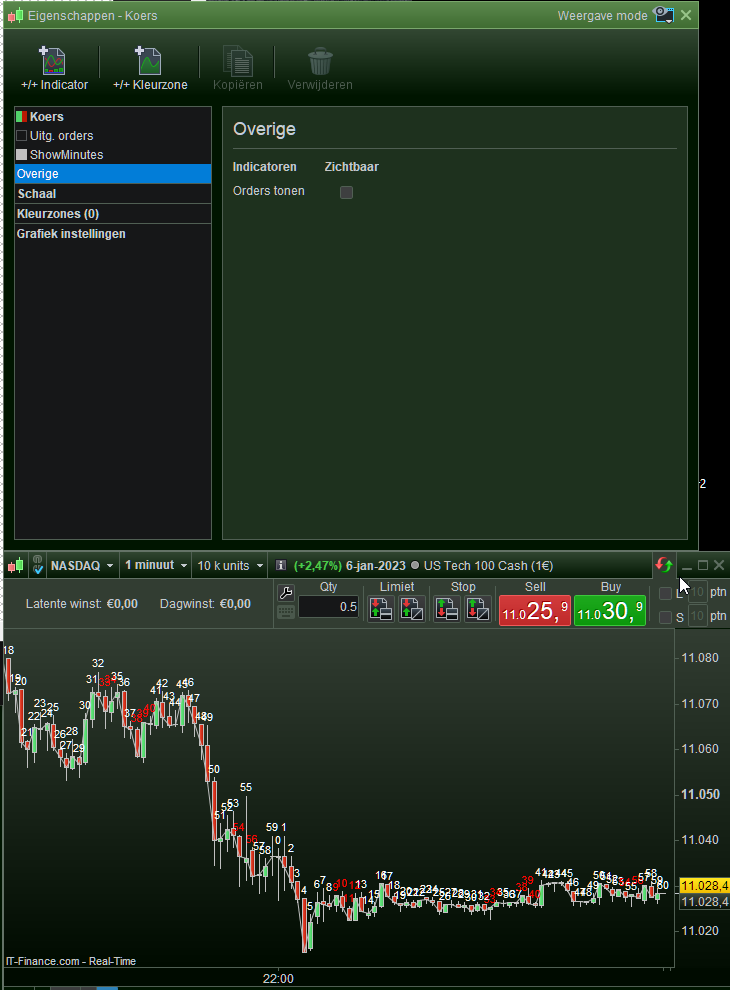
Back to the topic, Tim, what you should do is set those checkboxes as shown in the 2nd attachment. Now you will see all on one chart which is less ambiguous for the viewer, like me. I mean, I was looking for “are those two charts really the same all over ?”
Meanwhile it is still a kind of interesting to see how you, Tim, are able to show that 2nd chart with the Backtest trades, without showing the real trades (be that from Live or from Live-Demo) which seems to occur from a similar situation I just ran into : it are two charts after all, with not the same settings for what I show here in the 2nd attachment.
… But also see next post …
Then I did rightclick – Configure this area – on that other chart, and this is the result. Only one checkbox. And to my surprise it controls …
The Live trades. Hmm …
So apparently I am able to control the Backtest results when a backtest result is there in the first place (which is there on that other chart). So wait … then I would be able to incur for more options. Let’s fire up another backtest from another strategy (a previous very similar version) …
… Et voilá. The 2nd attachment unfolds.
Now let me guess … V12 is able to replay live trades (at self-set speed). I already kind of predicted that this would also allow for replay of a kind of forward testing, or maybe even backtesting with real order labels. Of course nobody believed that -at PRT support- but who are they, also in lack of (all ?) change logs. This mighty much looks like the preparation for that. I mean, it would not be much convenient to have all orders (from different backtest strategies – or even live strategies (!!!)) mixed in the chart, while analysing all, right ? So … so have several charts, each with its own backtest-strategy in it – or at least each with its own Live strategy in it and replay. Envision those charts next to each other, sit back and watch (and have a cigar while you smoke those anyway). Watching the past Live trades (Live or Demo-Live) will surely work like this (wanna bet ?). And btw, I have never seen V12 yet.
Up to more wires crossing, but hey … 🙂
PS: That “Orders tonen” in that setting, would not be unfinished really. It just shows in appearance of occurrence the “strategy” to show, (Demo-)Live on top, I’d say.
PPS: It really is convenient because it is now very easy to unfold differences in strategies – also vs Live by checking/unchecking the specific strategy of choice.
PPPS: Now tell me that this is in there for years an I never saw it. Haha.
Okay, last one on this :
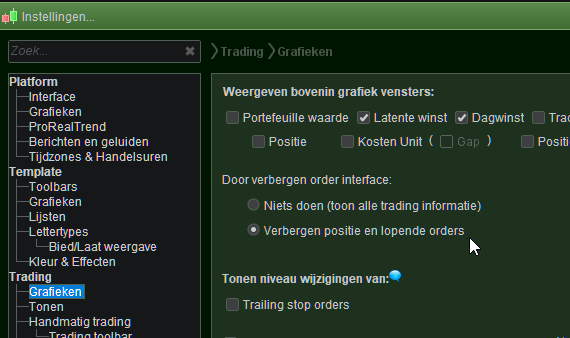
If you click on the tab to hide the orders (order labels) as per the higher level setting “Hide position and running orders” (see attachment 2) – now resulting in them being hidden and *then* save the template and restart, … then the checkbox is unchecked and you’ll be in the situation I was in when posting my first post in this topic, today.
Because – as told – I saw the more empty screen before (no trades visible) and they also appear to come back at some stage, there will also be a means to automatically check that checkbox. Well, never mind that, but this kind of stuff is obviously the most INconvenient, because they get changed behind my back and I can’t even find the setting to revert (OK, by sheer accident I did).
At checking this, I found an other oddity (probably explainable ?) which shows in the 3rd attachment. The position and orders are hidden now (I clicked that tab at the mouse pointer) but I notice that the small blue “i” for information is not there now. I can’t show what I mean (it is not there 😉 ) but during the day time it always was there as a kind of caution that I hid something which should normally show (because live trades). Maybe it is not there at this time because markets are closed ?
Anyway moral of this post : if you save your Template (which everybody will do when shutting down the platform) in this stage of the positions and orders not being visible, then you will lose them on the next start up. Not nice …
Wow. Thank you PeterSt and GraHal for your further posts on this. I have two bits of news…
Re my issue of live order execution being very different to back-test, GraHal, I think you were right in suggesting the back-test spread could be the root cause, combined with FX spread volatility. I re-did some back-tests with different spreads and found:
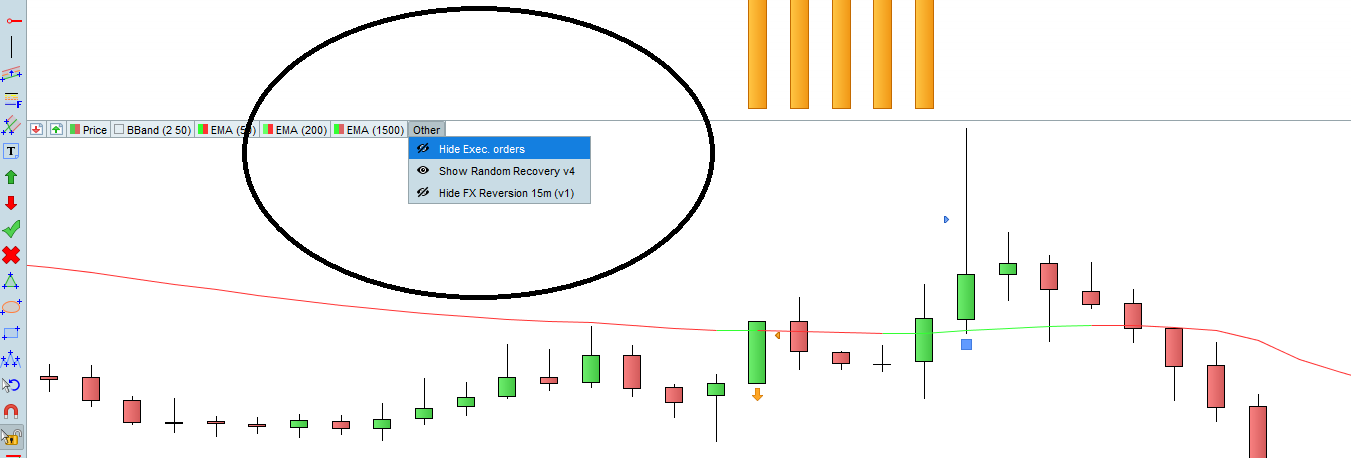
Re Peter St, and his charts that were misbehaving, I may not have followed all the diaglogue but I wanted to show how I hide/show executed orders. On my charts, I get an option called ‘Other’. It’s always the final option on the menu. See the screenshot below.
[attachment file=”206972″]
When I click this, I can show/hide orders for the systems I’m working on, and also for Executed Orders, i.e. live orders. Does this help? I’ll get back to my cigar now. 🙂
p.s. The Executed Orders option only appears if it is relevant to the instrument being charted. It won’t show if you have no executed orders.
Ah, Tim, Thank you !
Will this hide/show the running order labels as well ?
And Tim, Yes, for Fx the widening / narrowing spread may be killing for mimicking with backtesting (GraHal talked about that too). I think relatively soon now, PRT-IG will allow for Autotrading and there you’re not bothered by changing spreads (you pay commission there). But a small warning : working with Limit orders may be a bummer, at least at first. I can’t be sure about your situation (of executing them), but it may not be the same. You can test that with backtesting already (for many years already).
Elsewhere I described how IG works or can work with taking orders and how the spread is dealt with; I can imagine that once you know that it may help ?
OK, here : Spread and demo account Forex with IG
Maybe that doesn’t help really because of the varying spread. Still I don’t recall to be bugged by that really, but with the major difference that my Fx systems are always “seconds” TFs and with that no Limit orders (but Market). You’d still be pestered by spread because it takes your money, but the Entry is now predictable …
I noticed you had lots of labels on your chart. It is probably from a different indicator that is on your chart. Try clicking on the options to the left of ‘Other’. I think it will be one of those that is adding the labels.
In case you didn’t know (it’s not obvious), you get different menus depending on whether you left-click or right-click with your mouse.
Thanks Peter St. Yes, I was aware of the IG spreads page but as you say, it’s the varying spread that is the problem.
Let’s not get into it on this topic, but I find it interesting that you trade in seconds with market orders. I’ll give that some thought. I don’t have any live trading systems now but am keen to get going. Maybe catch up on a different topic.
Thanks for the input.
ProRealTime and IG Spreadbetting
This topic contains 31 replies,
has 6 voices, and was last updated by Awesomegina

2 years, 4 months ago.
| Forum: | General Trading: Market Analysis & Manual Trading |
| Language: | English |
| Started: | 12/29/2022 |
| Status: | Active |
| Attachments: | 21 files |

The information collected on this form is stored in a computer file by ProRealCode to create and access your ProRealCode profile. This data is kept in a secure database for the duration of the member's membership. They will be kept as long as you use our services and will be automatically deleted after 3 years of inactivity. Your personal data is used to create your private profile on ProRealCode. This data is maintained by SAS ProRealCode, 407 rue Freycinet, 59151 Arleux, France. If you subscribe to our newsletters, your email address is provided to our service provider "MailChimp" located in the United States, with whom we have signed a confidentiality agreement. This company is also compliant with the EU/Swiss Privacy Shield, and the GDPR. For any request for correction or deletion concerning your data, you can directly contact the ProRealCode team by email at privacy@prorealcode.com If you would like to lodge a complaint regarding the use of your personal data, you can contact your data protection supervisory authority.