Hi everyone,
Two important improvements just went live, and both come directly from real usage problems that showed up during long generation sessions.
No more out-of-memory crashes
If you’ve ever run ProRealQuant for a long continuous session, you may have experienced the browser slowing down, freezing, or even crashing entirely after generating hundreds of thousands of strategies. And with it, losing all the results you had accumulated. That’s now fixed.
The root cause was that all strategy data, equity curves, drawdown history, trade lists, was being kept in memory at the same time. After enough strategies, the browser simply ran out of RAM. The fix involved moving all that heavy data to a local database stored on your machine (IndexedDB), while keeping only the lightweight metrics like score, Sharpe, profit factor and drawdown in memory. The results table works exactly as before, and when you click “View” on a strategy, the full detail is fetched instantly from the local database.
In practice, this means you can now run continuous sessions for as long as you want, generating millions of strategies, without risking a crash or losing your results mid-session. This was honestly one of the most annoying limitations of the tool, glad it’s finally sorted!
Generation speed slider
The second addition gives you direct control over how hard ProRealQuant pushes your CPU during generation.
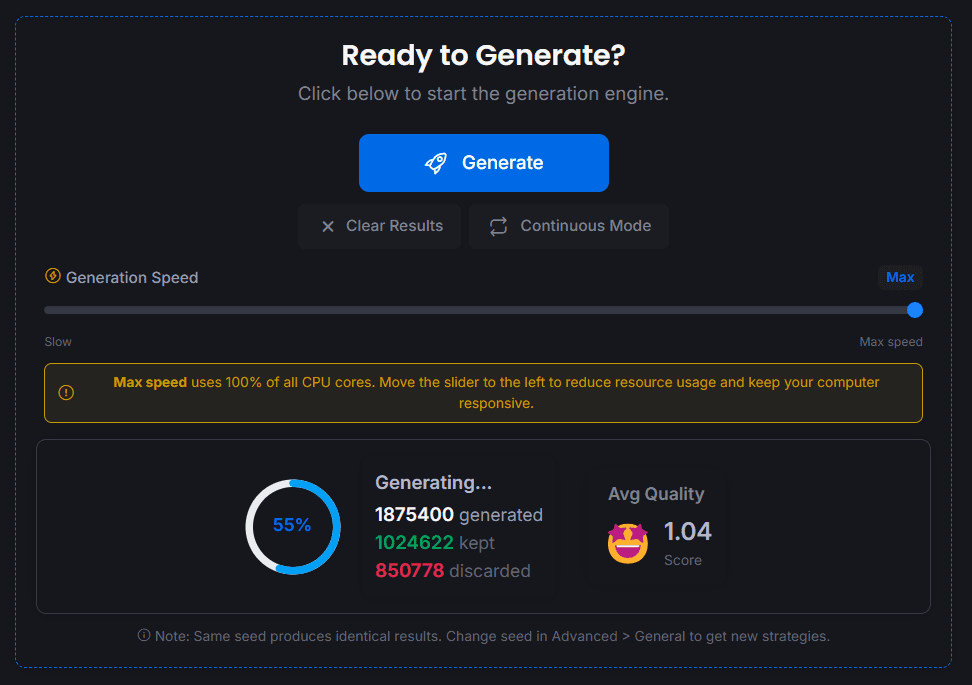
A new speed slider is now visible in the interface. Pushed all the way to the right, the generator runs at maximum speed, using all available CPU cores as before. Pulled to the left, it progressively slows down the generation rate, up to a 2 second delay between batches.
Why would you want to slow it down? Because at max speed, the generator uses a significant chunk of your CPU, which can make other applications feel sluggish if you’re working on something else at the same time. Now you can find the right balance for your setup: run at full speed when you step away from the computer, dial it back when you need the machine for other things. A small warning indicator appears when you’re running at max speed, just as a reminder.
What you need to do
Nothing, just reload the page. Both improvements are automatic.
As always, if you notice anything unexpected or have suggestions, drop a message below.
Happy backtesting!