ProRealQuant changelog and upcoming improvements, your feedback matter

Viewing 6 posts - 1 through 6 (of 6 total)

  • Author
    Posts
  • #258028 quote
    Nicolas
    Keymaster
    Master

    Hi everyone,


    Since the release of ProRealQuant, I’ve been collecting your questions, suggestions and bug reports. First of all, thank you to everyone who took the time to test the tool and share their experience (on forums, through chat or direct message in the website!), it’s incredibly valuable and it directly shapes the development priorities. So far, millions of strategies have been generated.

    I wanted to share what has been improved already, what’s coming next, and gather even more feedback from the community.


    What’s been improved recently

    Based on your early testing sessions, here are the adjustments and clarifications that came out of the first wave of feedback:

    • Monte Carlo validation is working as intended. Many of you reported that most strategies receive a “Poor” grade, and that’s actually the correct behavior. The Monte Carlo stress test is designed to be harsh, it filters out strategies that look good on historical data but are likely overfit. A strategy that passes Monte Carlo with a grade above 60 is genuinely robust.
    • Clarified the recommended workflow for finding robust strategies: use the Conservative preset or a custom setup with Min Stability > 0.7, Max Drawdown < 20%, Profit Factor > 1.2, and Min Trades > 30. Reduce Max Complexity to 1 (single indicator) to keep strategies simple and less prone to overfitting. Run Continuous mode to give the engine enough time to surface good candidates.
    • Confirmed that everything runs 100% client-side in your browser. There is no server involved during generation or backtesting, so the speed depends entirely on your own hardware. You can run Continuous mode as long as you want without affecting anyone else.


    Questions from the community, answered

    Several recurring questions came up during testing, here are the key takeaways:


    1. Monte Carlo variability: yes, each Monte Carlo run generates 100 new random synthetic price series, so results will vary slightly between runs. This is normal. If you want more confidence, run it 3 to 5 times and check the consistency of the grade. A strategy that stays above 60 across multiple runs is solid.
    2. Intraday data (H1, 15min): this is a common request. More intraday data will be added progressively.
    3. Stocks configuration: if you’re generating strategies on individual stocks and getting no results, the most likely cause is filters that are too strict for the volatility profile of that stock. Start with the Default preset to confirm strategies are being generated, then tighten progressively.
    4. Strategy refinement after generation: ProRealQuant is designed to find the raw skeleton of a strategy, a valid entry logic with basic stop/take profit exits. The next phase (adding trailing stops, time filters, session filters, additional exits) is intentionally manual. Automating that layer would dramatically increase the risk of overfitting. The recommended approach is to export the ProBuilder code, then test incremental improvements one by one in ProRealTime’s backtester.


    What’s on the roadmap

    Based on your requests, here are the features and improvements I’m prioritizing:


    1. More pre-loaded instruments: Forex pairs and commodities are the most requested additions, and for good reason, they would allow generating uncorrelated strategies compared to indices. This is high priority.
    2. More intraday data: pre-loaded H1 and possibly 15min data for major instruments.
    3. UI and usability improvements based on your feedback.
    4. Exploring ways to assist with strategy refinement without compromising the anti-overfitting philosophy of the tool. This is a delicate balance, but I’m thinking about it.
    5. Exit in profit or loss based on Points of instruments.
    6. Custom history data uploaded by users.


    Your turn

    If you have suggestions, feature requests, bugs to report, or if you’ve found strategies with Monte Carlo > 60 and want to share your settings and approach, please post below. Every piece of feedback helps make ProRealQuant better for the whole community.

    Thanks again for your support and your testing efforts!

    GraHal and robertogozzi thanked this post
    prorealquant.jpg prorealquant.jpg
    #258251 quote
    Nicolas
    Keymaster
    Master

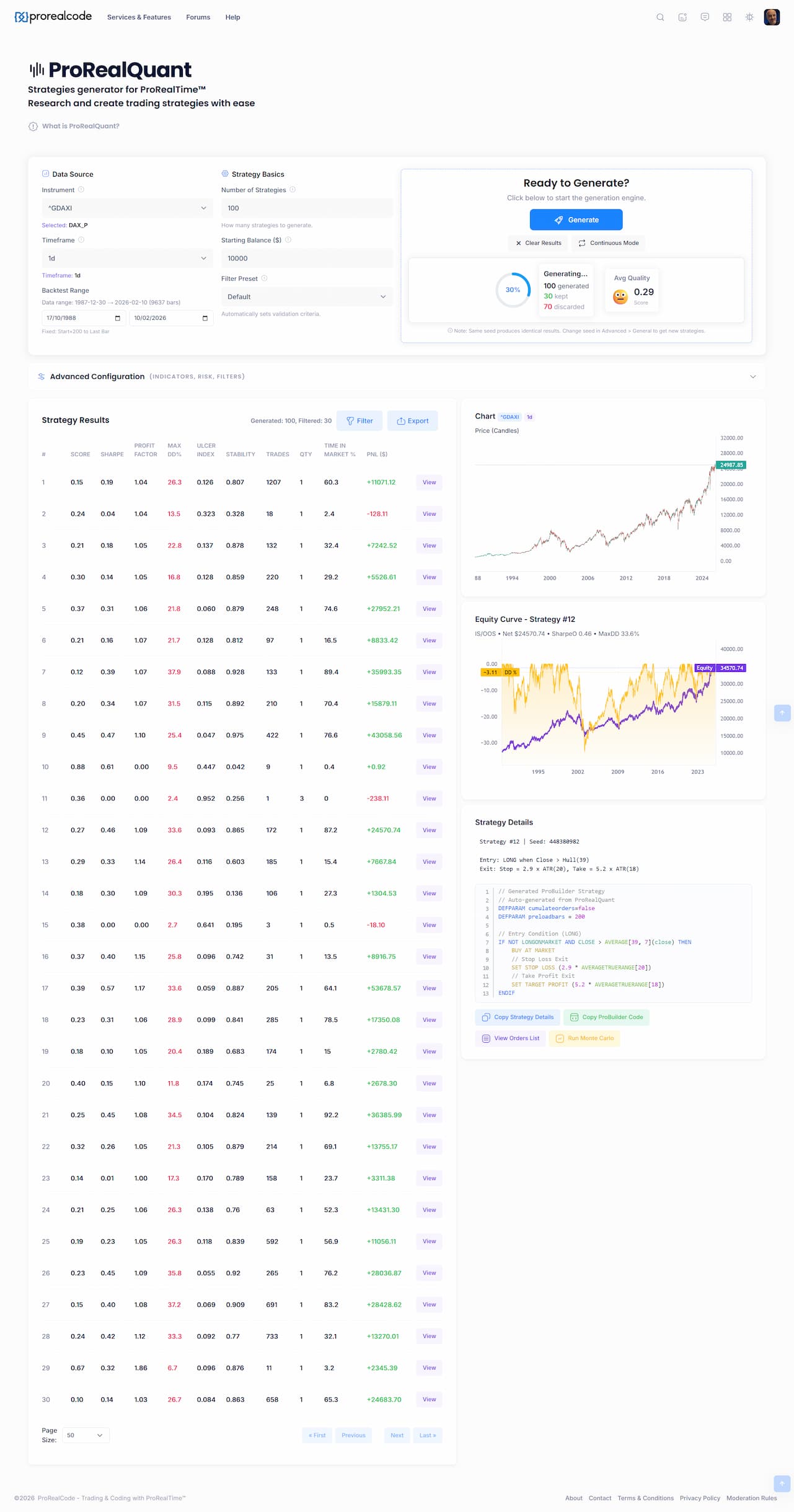
    Hi, I have been quietly working on a big performance update, and it’s now live. If you’ve used the strategy generator before, you’ll notice the difference immediately. Here’s what changed and why it matters 🙂


    Charts load instantly, no matter the data size

    Previously, loading 50,000 bars of intraday data could freeze your browser for several seconds. Now it renders immediately and stays responsive. Zooming, panning, and switching between charts is fluid.


    You can now see your full price history

    Before, charts were silently cutting off data older than roughly 5–6 years even if history went back to the 1990s. That’s now fixed. Load 30 years of daily data and the chart shows all of it.


    Strategy generation is dramatically faster

    This is the big one. The generator now runs on all your CPU cores at the same time, instead of just one.

    Before 1 core was used, now it can use up to 8! In practical terms: what used to take 60 seconds now takes around 8. And while it’s running, you can still interact with the page normally: filter results, view charts, change settings, without any lag!


    What You Need To Do

    Nothing. Just reload the page. All improvements are automatic.

    If you’re using a multi-core processor (which covers virtually every desktop and laptop made in the last decade), you’ll immediately benefit from the full speedup.


    Now I can focus on data: add more pre-loaded instruments and intraday timeframes.


    Happy backtesting!

    Test it by yourself: https://www.prorealcode.com/prorealquant/

    robertogozzi thanked this post
    prorealcode-prorealquant-2026-02-18-11_40_17.jpg prorealcode-prorealquant-2026-02-18-11_40_17.jpg
    #258265 quote
    pableitor
    Participant
    Master

    WOW ! Amazing rebuild to use these multi cores CPUs Nicolas ! Just one question: right now it seems you have to run the Monte Carlo test on the manually selected strategies one by one, which takes quite a long time. Would it be possible to run the Monte Carlo test automatically in one batch to all or a group of N of the selected strategies ?

    GraHal thanked this post
    #258266 quote
    Nicolas
    Keymaster
    Master

    Hi,

    Thanks! Glad the speedup is noticeable.


    That’s a great suggestion and you’re right, running Monte Carlo one by one on each strategy is tedious, especially when you have dozens of candidates to evaluate.


    Batch Monte Carlo is definitely something I want to add. The idea would be to let you select multiple strategies (or all filtered results) and run Monte Carlo on the whole batch automatically, then display the grade directly in the results table as an extra column. That way you could sort and filter by Monte Carlo grade just like any other metric, which would make the whole workflow much smoother.


    The good news is that with the new multi-core engine, this is now technically feasible without freezing your browser. Before this update, running even one Monte Carlo (100 simulations) was already heavy on a single core, so batching would have been painful. Now that the workload is distributed across all available cores, batch processing becomes realistic.


    I’ll add it to the priority list. It fits naturally as the next usability improvement after the performance overhaul.


    Thanks for the suggestion!

    GraHal thanked this post
    #258268 quote
    pableitor
    Participant
    Master

    Awesome! Let’s put those idle CPU cores to work!! 🔥🔥🔥


    Nicolas thanked this post
    #258446 quote
    Nicolas
    Keymaster
    Master

    Hi everyone,


    Another update just went live on ProRealQuant. This one addresses the most requested feature from the last changelog: batch Monte Carlo testing. But instead of just batching it, I went a step further.


    Auto Monte Carlo, built into the backtest

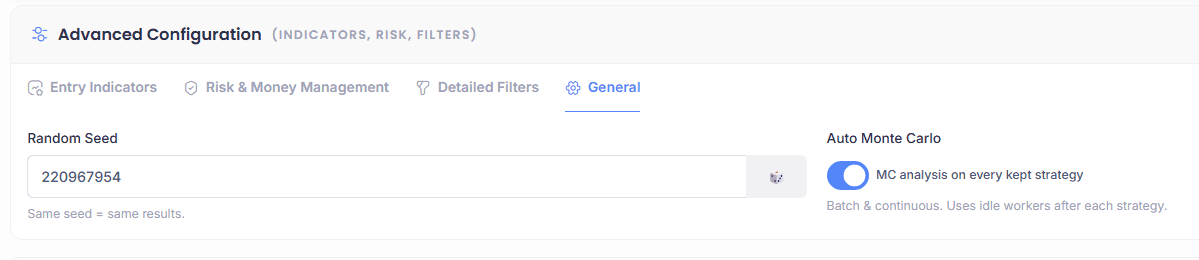
    You can now enable automatic Monte Carlo analysis directly during strategy generation. The option is in Advanced Configuration, General tab, check the “Auto Monte Carlo” box and you’re set.

    When enabled, each strategy that passes your filters will automatically go through a Monte Carlo stress test right after its backtest. The MC grade then appears directly in the results table as a new column, no need to manually select strategies one by one anymore.

    It works in both single batch mode (Generate) and in Continuous mode. So you can launch a continuous session, go grab a coffee, and come back to a table full of strategies already graded by Monte Carlo.

    One thing to keep in mind: since Monte Carlo uses bootstrap randomization (100 synthetic price series generated randomly each time), if you run a second MC analysis on the same strategy, the score might differ slightly. That’s completely normal and expected. A robust strategy will stay in the same grade range across multiple runs.


    Improved Monte Carlo scoring

    I also reworked the scoring formula. The previous version was too harsh on drawdown.

    Here’s what was wrong: the old formula penalized drawdown via two metrics (95th percentile max DD and average DD) with a combined weight of 35%. The penalty curves were set so that 50% drawdown scored zero on one metric and 33% drawdown scored zero on the other. The problem is that this was too aggressive for strategies using reasonable stop losses. For example, a strategy with a 5% stop loss that simply hits 5 consecutive losing trades would produce roughly 23% drawdown by pure math (compound: 1 minus 0.95 to the power of 5 = 22.6%). Under the old scoring, that scenario alone would already score around 50 on the drawdown component, even though there’s nothing wrong with the strategy, it’s just experiencing a normal losing streak within its risk parameters.


    The fix: the drawdown penalty is now normalized against an “expected baseline” derived from the average stop loss size observed in the simulations. In other words, the scoring now distinguishes between drawdown that’s a natural consequence of the strategy’s risk profile and drawdown that signals a genuine problem. On top of that, the total weight of drawdown in the overall score has been reduced from 35% to 25%, redistributing weight to the other components.

    In practice, this means strategies with tight risk management will no longer be unfairly penalized for normal losing streaks. Strategies that produce abnormal drawdown relative to their stop loss size will still be flagged appropriately.


    What you need to do

    Nothing, just reload the page. Enable Auto Monte Carlo in the General tab if you want it, and let the engine do the work.


    Happy backtesting!

    GraHal thanked this post
    monte-carlo-analysis.png monte-carlo-analysis.png
Viewing 6 posts - 1 through 6 (of 6 total)
  • You must be logged in to reply to this topic.

ProRealQuant: Strategy Generator

New Reply
Author
author-avatar
Nicolas @nicolas Keymaster
Summary

This topic contains 5 replies,
has 2 voices, and was last updated by Nicolas

3 days, 18 hours ago.

Topic Details
Forum: ProRealQuant: Strategy Generator Forum
Started: 02/13/2026
Status: Active
Attachments: 3 files
Logo Logo
Loading...