Proorder randomly closing for no reason

Viewing 9 posts - 1 through 9 (of 9 total)

  • Author
    Posts
  • #225542 quote
    Batty
    Participant
    Junior

    Recently I have had several incidents of the Proorder platform closing down mid way through running a back test.  These instances have not been the normal closing to clear the cache that I expect to happen. They have happened only an hour or few hours after opening the platform and there has been no warning given to save before it closes. I wonder if anyone else has experienced this?  Maybe it is related to V12 as it is only a recent thing.

    #225544 quote
    Jean FX
    Moderator
    New

    Please send a technical report to PRT by following these instructions:
    – As soon as you encounter the issue, go to the “Help” menu on the ProRealTime toolbar.
    – Click on “Technical support”
    – Select “Code”
    – In the “Concerned code” field, enter the name of the code related to your problem.
    – Give as many details as possible, explain the issue you are having in the text box and mention the name of the code you are referring to.
    – Check the box “Attach network report”
    – Click “Send report”

    #225548 quote
    PeterSt
    Participant
    Master

    – As soon as you encounter the issue, go to the “Help” menu on the ProRealTime toolbar.

    Which has vanished because the whole platform has vanished.

    #225549 quote
    Batty
    Participant
    Junior

    Thanks for your reply Jean but this doesn’t quite respond to the problem I am outlining. The whole platform is closing down for no apparent reason. So I cannot send a technical report unless I re-open it. Also this does not relate to any one particular system or code. Either it is a problem with the platform or my set-up at this end. I’m running it on a Windows 10 laptop with Intel Xeon processor and 32GB RAM – same setup I have used for years without experiencing this issue. I updated Java very recently too so it is the latest version.

    This does not happen often but it has happened several times over the past couple of weeks or so. It would be very interesting to know if anyone else has experienced the same recently. Or are there things I can check in my set-up here that might be causing it?

    #225551 quote
    PeterSt
    Participant
    Master

    Batty, what comes to mind is that something might be molested in the Optimization Parameters (variables). Try to create a new Strategy (not copy it from the original) and manually apply those parameters again. Now retry.

    Do you use Graph(OnPrice) commands ? try with having them commented out (do not surround them with If 0 Then).

    Both these can cause issues which looks like yours. But very rare, in my experience.

    If you have done the above and you can not consistently let PRT fail, blame the instability of the late versions (it is seriously poor IMHO) and wait for better times (revert to V11).
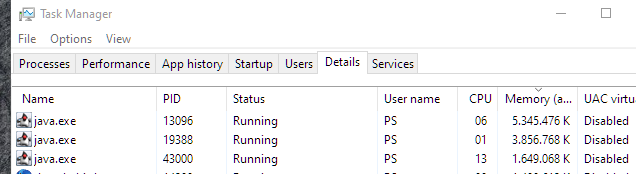
    You may keep in touch with Taskmanager and see whether strangenesses occur to memory usage or cpu usage.

    Regards,
    Peter

    Batty thanked this post
    image_2023-12-20_174042236.png image_2023-12-20_174042236.png
    #225557 quote
    Batty
    Participant
    Junior

    Thanks PeterSt.  I don’t think it is related to the code or the Optimization Parameters as each time it has happened the systems have been different. I’m not using Graph(OnPrice) commands and the CPU memory usage are fine. I’ll keep a log when it next happens and see if I can identify anything …

    #225559 quote
    PeterSt
    Participant
    Master

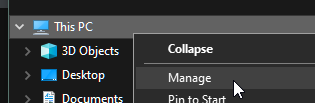
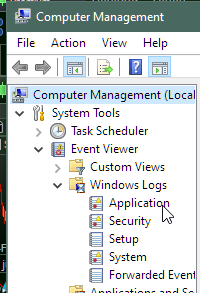
    I think you should be able to find something about this in the Windows Event Viewer. It will be about the Application tab or the System tab in there. Look for red crosses in the lists at times that resemble the happenings and maybe it brings something. I wouldn’t think so, but niet geschoten is altijd mis. 🙂

    image_2023-12-20_185401076.png image_2023-12-20_185401076.png image_2023-12-20_185511216.png image_2023-12-20_185511216.png
    #225565 quote
    Batty
    Participant
    Junior

    Thanks PeterSt, I had a look at the events viewer and couldn’t find anything that obviously relates to this but I will check again if/when it happens again.

    #225571 quote
    justisan
    Participant
    Junior

    – As soon as you encounter the issue, go to the “Help” menu on the ProRealTime toolbar.

    Which has vanished because the whole platform has vanished.

    😀

Viewing 9 posts - 1 through 9 (of 9 total)

  • You must be logged in to reply to this topic.

Proorder randomly closing for no reason


Platform Support: Charts, Data & Broker Setup

New Reply
Author
author-avatar
Batty @batty Participant
Summary

This topic contains 8 replies,
has 4 voices, and was last updated by justisan

2 years, 1 month ago.

Topic Details
Forum: Platform Support: Charts, Data & Broker Setup
Language: English
Started: 12/20/2023
Status: Active
Attachments: 3 files
Logo Logo
Loading...