Hi!
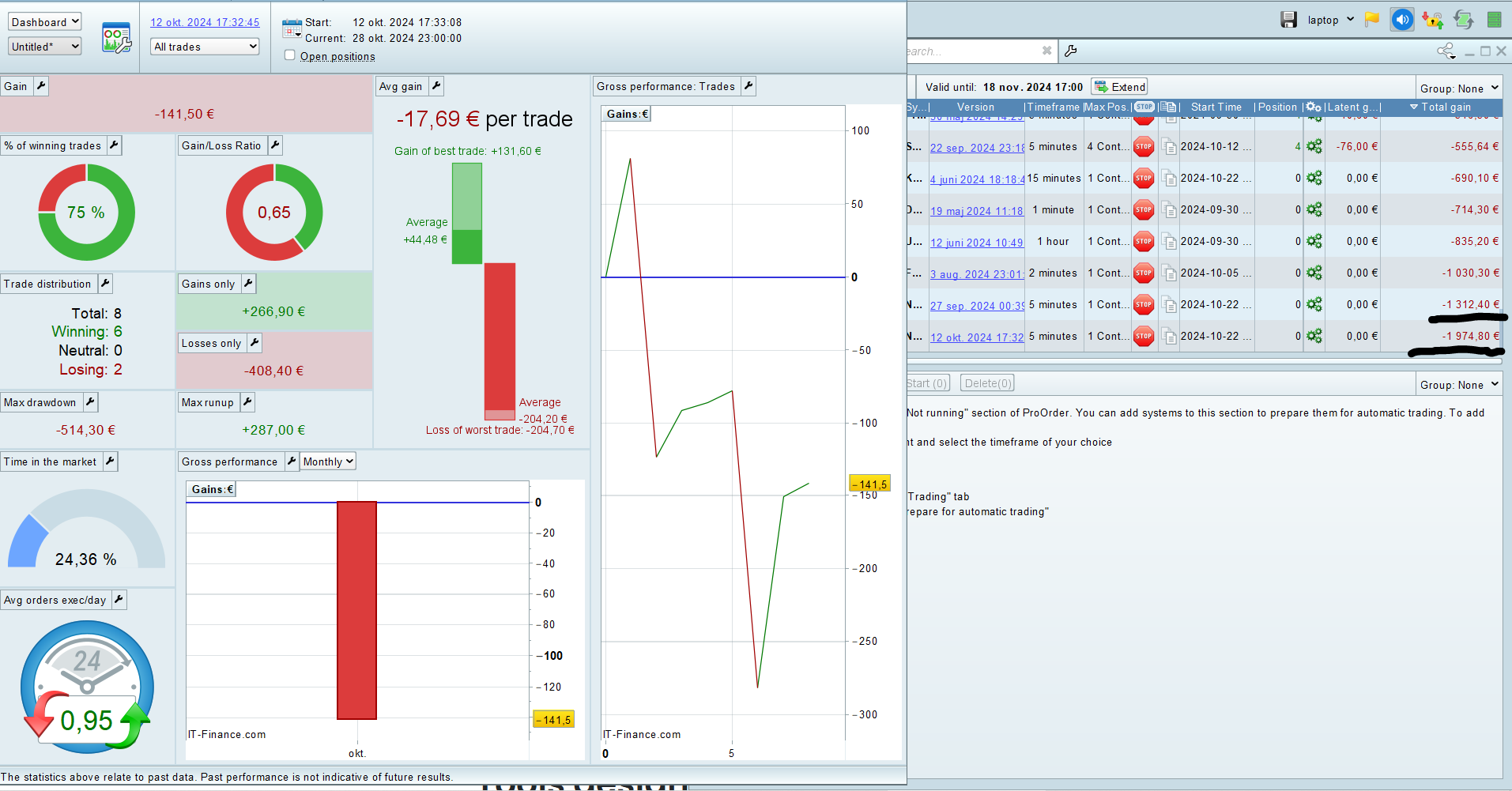
I am having a weird issue. In the ProOrder view it says the strategy have a total loss of 1974 Euro. However, if I open up the detailed report of the strategy, the loss is 141 Euro. The latter one is the one that is the same as a backtest in the same period. Anyone know why I get this issue and how to fix it? I have the same for another strategy as well, so it is probably nothing to do with the code as it two complete different strategies. I am running demo account on PRT v12.
Thanks.
Are all figures for the same period, same positions size and same spread value?
Is the Detailed Report not acounting for current open losing trade?
There is a button to enable Open trades to be included in the result shown by the Detailed Report.
I am not sure how it calculates the spread etc. But I assume it will be the same since both figures are from the live dashboard (not backtest)? Its the same dates as you can see, comparing the dates in the detailedReport and ProOrder window. There is also no open trades right now as you also see on the ProOrder window. Really weird!
Ah yes, I admit to not looking at your ss thoroughly.
I have similar from well over 12 months ago, reads £66,092.40 Gain on ProOrder Total Gains, but in the Detailed Report it reads £-28.60 Loss. I had several more, but deleted them ages ago and restarted the Systems. I retained (in ProOrder) the System mentioned as a test case if a solution / reason is found.
It seems that the Total Gain in ProOrder gets screwed-up at times and never gets back correct again.
It be worth submitting a Technical Report via Help > Technical Support with your errors as an example.
Be sure to let us know if you hear anything back?
Sure thing, will try to restart the systems and see if it works, as well as making a ticket. Thanks for your suggestions Grahal!
Please note : you / we can completely forget about tickets and solving / working out matters via that route. And thus it is mostly : try to reason out together what could be going on.
A hint :
Optimization and also Backtesting, is a separate process from asking for the Detailed Report. The difference would mainly be the more detailed work-out of the tick data, present under the hood; Optimizations tends not to do that in full, while CLICKING (!!) on the result line does. Also : not clicking because you have one result anyway and not iterations in the Optimization, does not give the proper result. Also see thee small line of help at the bottom of the Optimization Result list, which tells about this clicking and the ticks.
The moral is a bit : never let PRT auto-present the Detailed Report; always create yourself the opportunity to click a (also if there’s only one) Result Line.
The difference usually emerges from Limit and/or Stop orders, or actually all which can emerge in-bar (which also are Target Profit orders and StopLoss orders (the latter hopefully/usually less occurring thus also with less influence on the (wrong) result.
It has never really become clear to me when Limit Orders actually start to have this influence because I can work a full day on Backtesting with Limit Orders in there executing all over the place, the results always being on par with each other (what the result line shows vs what the Detailed Report shows after click on the line). This, while another day it is always off, the Detailed Report always for the better result.
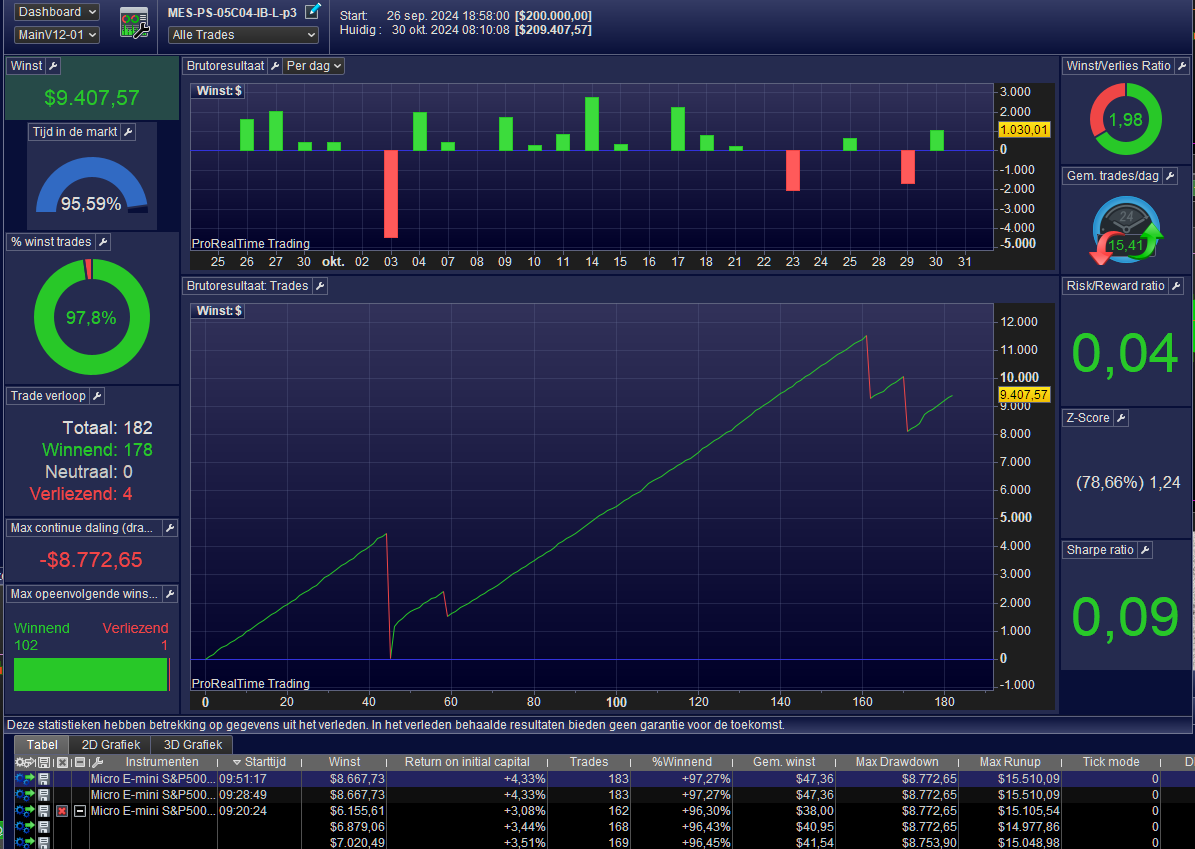
For today’s situation, see below. All differ by a mile (like the shown 8667 vs 9407) and all I know is that Limit Orders must be involved to bring this being off.
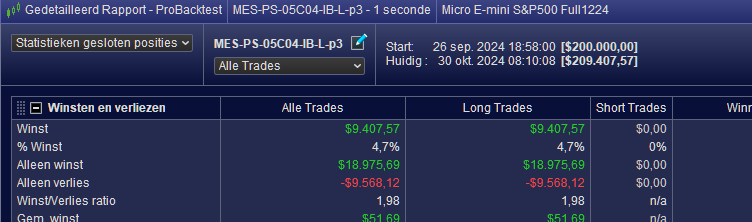
The 2nd attachment shows that the Statistics in detail are the same as what the first attachment shows. I take it that in your case these are the same too ?
Please note : This is not to be confused with that ever lasting error of open-ended reports not showing the correct data. There’s a longer thread about that elsewhere, where I clearly stated that you must give the backtest an end date and not let it be open to “last date/time”. That is a completely different issue from what I described above. And, what I see from GraHal’s example (a loss instead of a large profit) this goes more in the direction of that (issue). I recall now that that thread was about double-counted trades, which randomly happened. Maybe that is solved by now, but as usual we never get feedback from PRT about that (a dozen people made a ticket of that one).
Hope this helps …
Peter
I deleted the systems and restarted them and they seem to work as expected now.