







Although this is one of the most severe bugs in order, I saved reporting about it until it “bugged” me in real time. And there it is …
In the other topic I just described about the “memory” bug and to quit the platform quickly after saving, so you won’t lose any data. I will now describe two bugs in the same topic because I regard it the same bug, both leading to the same misery – lose data (program code).
- There is no explicit Save Button since V11. I regard this “ridiculous” because you’ll now depend on … what ?
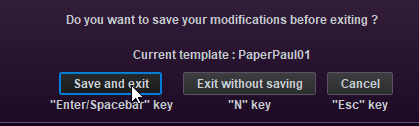
- In combination with nr#1 I just quit PRT and depended on the question Save and “Exit Y/N = Y”. See 2nd Attachment.
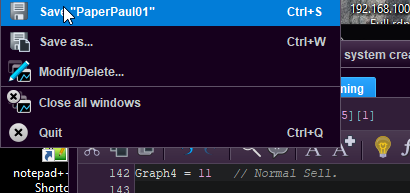
I change some small things regarding graphing, which you can see in Attachment 1. What I changed there is not important, but at line 139 and 142 I set those variables to 0. Thus, Save and Exit and … back are the variables to 1.
OK, so I changed them back to 0 again, clicked the main menu, pressed Ctrl-s and …
Now save without exit and the 1’s are back again.
So I now know that THAT is not even saving the code (after using ctrl-s like that a 1000+ of times, just in case after longer typing changes in the Editor (can be hours)).
Yes, people reported about these things. I did too (support) a possible 20 time, but nobody is picking it up. Come on …
Then now what you should do :
- Set to 0 again;
- Use the BackTest button (see 3rd Attachment);
- Exit With Save or *now* use Ctrl-s on the main menu (you can now Exit without Save because now the Ctrl-s really saved).
So using the BackTest button causes an internal save, which is not to “your cloud” yet. That requires the additional explicit Save.
Dear people at PRT. Yes, it is me how kept on sending in reports on how the automatic Exit after 18 hours of the PRT platform resulted in anomalies from all angles. Assuming that my PRT Support passed on all my emails and examples about this, you should count 20 over the course of time this dis not work out. What shall we say … 10 months ? 10 months of losing set positions, losing Lists, always needing to set them again ?
Yes, you now managed.
I just gave you the most severe example of things not saved in the programming environment of PRT. Just one. About all in there is not save properly or not saved at all. Preparing this example for you takes an initial hour. If it ends up as with the 18 hour exit, it may add 2 days for me. But …
Could you now please look into this yourself ? All of it ? All of the programming environment ?
I think I will make one additional “Bug” entry for you, because all of the other is in a different area. But it still is about things not saved. And somehow only in the programming environment. The normal Trade environment is super (for what I use of it).
Thanks !
Peter

