Every now and then we see posts from indicator (ProBuilder) and strategy (Probacktest/ProOrder) developpers wondering why on earth their programmed indicator differs from the native on-chart indicator supplied by PRT itself (VWAP, Pivot Point, MACD, …). Most of the times this has to do with time zones or at which time exactly certain values are taken. Like the Close at closure of the exchange or at 22:00 GMT or …. I have seen cases where a programmed indicator normally was in sync with the native one, except for a month that had its first day on a monday.
But this post is about the function DCLOSE that delivers a different result in ProBacktest than in ProBuilder, in the context of futures. This difference exists maybe also in the context of CFDs, but I have no means of verifying that.
According to the documentation DCLOSE returns the “offical daily close”, determined by the Exchange following a certain protocol. In case of e.g. the DAX, the EUREX supplied Daily Close is normally close to the price at 17h30, but not exact. Now, suppose you are convinced having found a profitable, manual trading strategy, based on the Daily Pivot [(DHIGH+DLOW+DCLOSE)/3]. At first you want to build an indicator with ProBuilder, that supports you with trading signals on chart. You find that using DCLOSE in that Daily Pivot calculation gives you a programmed indicator exactly in sync with the native one that you used for developing your manual trading strategy. So far so good. Great help for your manual trading. Then you decide to take it a step further and integrate your beautiful indicator code in a robot with ProBacktest. You add order and position management coherent with your manual trading style and launch the backtest. Like your manual trading it is profitable, but . . . when looking closer at the trade entries, you notice that they do not correspond with the manual entries in that period. What???
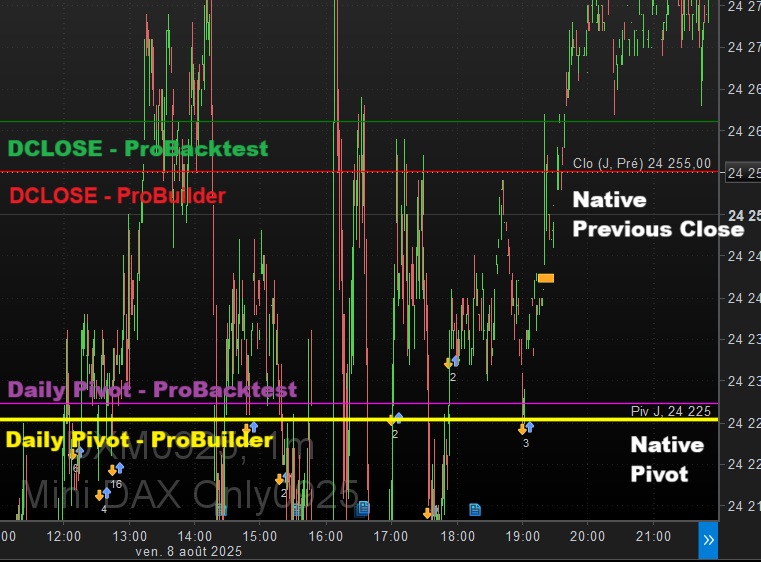
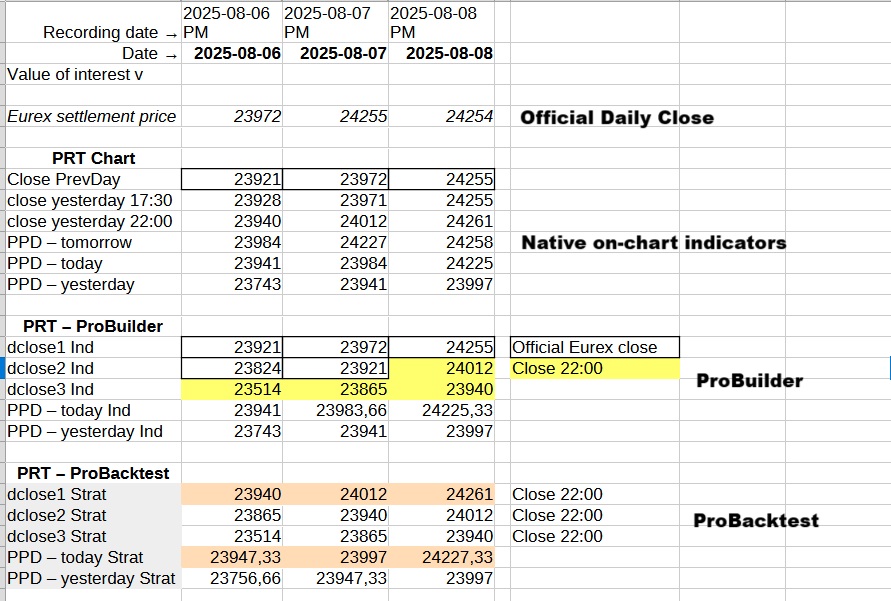
You add a bunch of GRAPHONPRICE statements, and that reveals that the ProBacktest Pivot levels are different from the ProBuilder Pivot levels. The last ones being identical to the native pivot levels. What the heck, same code, different calculation result. Zooming in a bit further, you find that the ProBacktest DCLOSE differs from the ProBuilder DCLOSE. Took me some time, but for the DAX it appeared that DCLOSE retrieves the 22h00 price when used in ProBacktest.
So, very happy with the ProBuilder development team that decided to follow the documentation with the “official daily close”. But very unhappy with the ProBacktest development team that decided to take the 22h00 close (for DAX at least) instead of the official daily close.
Huge dilemma now. Use DCLOSE for indicators to mimic exactly the native indicator. But use the 17h30 price (in case of DAX) for robots to approach as much as possible the native levels, because the 22h00 price, used by DCLOSE, is way off in general. OR … always use the 17h30 price, you will always be close to the native indicator but not spot on, but at least you have only one code version.
The same story is valid for the Weekly and Monthly pivots of course, given that they build on DCLOSE also.
Basically this invalidates ALL backtests done with calculations using directly DCLOSE or implying it indirectly, e.g. PRT supplied functions using DCLOSE under the hood.
To illustrate my findings on differing DCLOSE and Daily Pivot levels, some screen captures are added. The chart shows you the DCLOSE(1) and the Daily Pivot from 3 sources: -1- Native indicators (white), -2- ProBuilder code (red, yellow), -3- ProBacktest code (green, cyan). Notice that ProBuilder mimics the native indicators perfectly, but not ProBacktest. The table gives you the numbers, where you can see that ProBacktest always takes the 22h00 price.
I might produce another post on whether DCLOSE “repaints” in ProBuilder or not. My guess: it does.
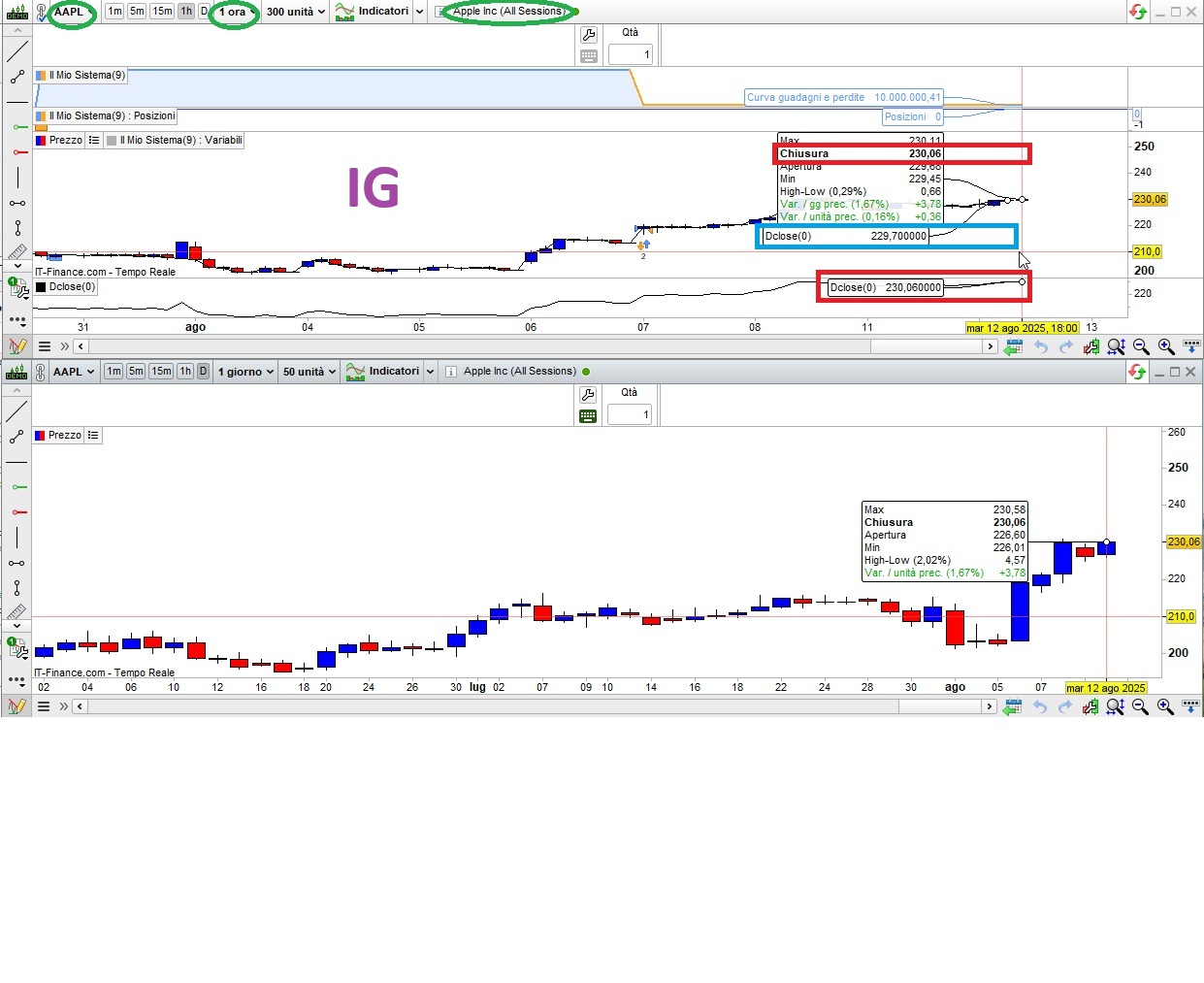
If you want to replay these tests with CFDs, find attached the ProBuilder and the ProBacktest code used for this item. Please report back your findings.