Problems with typing while editing code

Viewing 9 posts - 1 through 9 (of 9 total)

  • Author
    Posts
  • #260650 quote
    steynpjsteynpj
    Participant
    Average

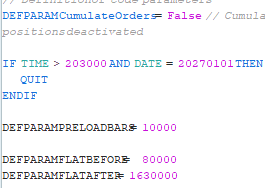
    When I open a trading system the “=” character in code is on top of character to the left of it.


    I am also not able to delete/backspace/change number characters. PRT leaves the old number, and just add new number. It deletes characters I do not want to delete.


    Thank you.

    #260652 quote
    GraHalGraHal
    Participant
    Master

    If you Exit / Quit (don’t forget to save as you Quit) and then you log back in and immediately carry out the same typing as you detail above … is PRT still doing weird stuff (like you detail above)?

    Iván González thanked this post
    #260690 quote
    steynpjsteynpj
    Participant
    Average

    YES

    #260691 quote
    GraHalGraHal
    Participant
    Master

    You say Yes, but did you try the typing immediately after you logged back in?

    I say above because I get similar weirdness like not being to delete / back delete / change numbers etc, but with me it occurs after I have been using the Platform intensely doing loads of backtesting and I have loads of Opto Results Tables open and loads of Detailed Reports open etc etc … in short I have overloaded the Platform and it is using loads of RAM and not releasing RAM.


    If I close a few things or Quit and Log back in and everything works fine.

    #260692 quote
    steynpjsteynpj
    Participant
    Average

    I HAVE NOT TRIED TO EDIT CODE FOR MONTHS. WHEN I OPENED CODE LAST WEEK, PROBLEM STARTED.


    I RELOADED MULTIPLE TIMES. SAME THING.

    #260695 quote
    steynpjsteynpj
    Participant
    Average

    ATTACHED EXAPMPLE OF = OVER LEFT CHARACTER.


    BUT THERE ARE A LOT OF OTHE PROBLEMS AS NAMED ABOVE.


    ALSO SOME LINES OF CODE WITH A NUMBER HAVE AN ERROR SIGN

    Screenshot-2026-04-28-225010.png Screenshot-2026-04-28-225010.png
    #260696 quote
    PeterStPeterSt
    Participant
    Master

    This is something else and merely looks like what GraHal and Nicolas already ancountered – but which was forum related. Still it feels the same.


    @Nicolas ?

    #260697 quote
    GraHalGraHal
    Participant
    Master


    steynpj wrote: BUT THERE ARE A LOT OF OTHE PROBLEMS AS NAMED ABOVE.

    If you post your code then I would try it on my Platform for you … least that would isolate the problems you are seeing to either 1. your code or 2. your Platform?

    #260698 quote
    NicolasNicolas
    Keymaster
    Legend

    @steynpj

    Looks like internal problems with your data.. Did you send a report through the platform already? If yes, please send me your account number through the messaging system of the website and I’ll try to fasten the support process.

Viewing 9 posts - 1 through 9 (of 9 total)

  • You must be logged in to reply to this topic.

ProRealAI ProRealAI New

Stuck on this ProBuilder code?

Describe what this topic is trying to build, in plain English, and ProRealAI writes the ProRealTime™ indicator, screener or system for you.

Available in 7 languages
Try ProRealAI

Problems with typing while editing code


Platform Support: Charts, Data & Broker Setup

New Reply
Author
author-avatar
steynpj @steynpj Participant
Summary

This topic contains 8 replies,
has 4 voices, and was last updated by NicolasNicolas

5 months, 1 week ago.

Topic Details
Forum: Platform Support: Charts, Data & Broker Setup
Language: English
Started: 04/27/2026
Status: Active
Attachments: 1 files
ProRealCode ProRealCode
Loading...